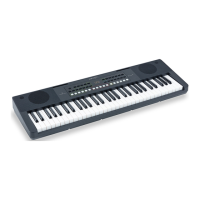
The Keylite series is designed to be a powerful resource both for studio and live
performances. The friendly user interface is one of the best features of these products and
this allow you to configure your sound device in a fast and easy way.
Keylite Keyboards are designed to work with any PC or MAC hardware and with any DAW.
You don’t need to install a specific driver because this is a Plug&Play device.
ALL
DAW
COMPATIBILITY
You have just to plug the USB cable on the keyboard and then plug the other side on your
computer. Open the software menu in which is possible to define the MIDI Device to use
and select “USB Midi Controller” from the available devices.
If you use the Midi Out port be sure that the module you are using is able to receive the
Midi messages in the same Channel in which the Keylite is working (Default Ch is 1).
You can plug 2 switch or continuous pedal on the Keylite. It’s really suggested to use
genuine SOUNDSATION pedals. Ask your dealer for a compatible SOUNDSATION pedal.
Before connecting any other pedal please read carefully the specific section of this manual
where you can find all the instruction to adjust the resistance read range of pedals.



 To Next Page