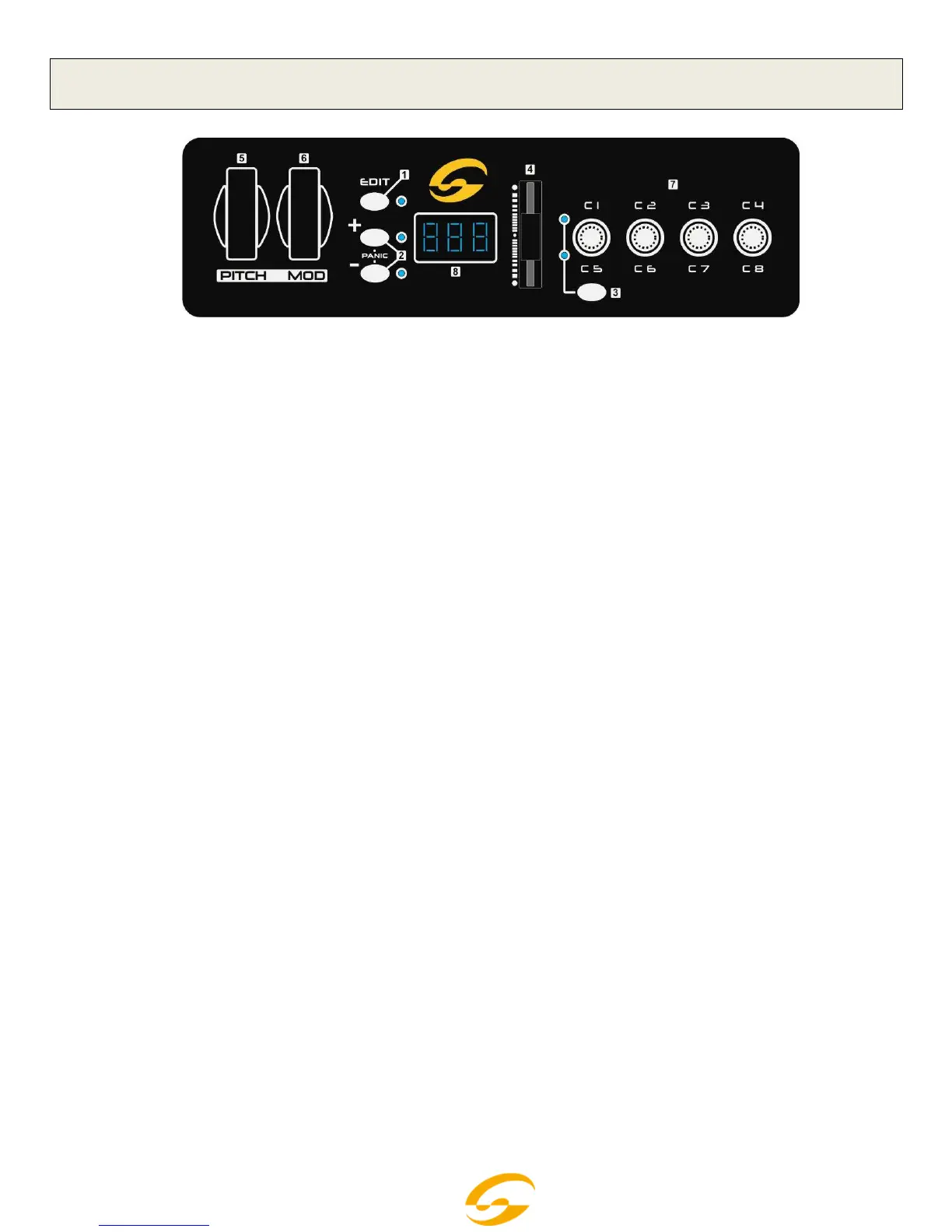
The top panel is common for Keylite 25/49/61.
1 - EDIT Button
It is to open/close keyboard multi-function. . When LED indicator is on, keyboard multi-function is on,
viceversa.
2 - DATA +/- Buttons
They are assignable buttons assignable as 160 controllers. The initial setting is 154
th
controller: octave
adjustment. When the LED indicator is on, it indicates that there’s upper/lower octave adjustment; when the
indicator flickers slowly, it indicates that there’s upper/lower transpose adjustment; when the indicator
flickers quickly, it indicates that there’s upper/lower octave and transpose adjustment at the same time;
when the indicator is off, it indicates that there’s no upper/lower octave nor transpose adjustment. If you
press the 2 buttons togheter you send the CC 120&123 (All sound off-All notes off) on Ch1 & Ch2.
3 - GROUP Button
It is to switch function groups of pots C1~C4 and C5~C8.
4 - SLIDER
It is an assignable fader that can be assigned as 148 controllers. The initial setting is 147
th
controller:
master volume.
5 - PITCH BEND Wheel
It is an assignable wheel that can be assigned as 148 controllers. The initial setting is 146
th
controller: pitch
bend wheel.
6 - MODULATION Wheel
It is an assignable wheel that can be assigned as 148 controllers. The initial setting is 1
st
controller:
modulation wheel.
7 - C1~C8 Pots
These are assignable dials with an independent channel distributed to each dial, and each dial can be
assigned as 160 controllers. The initial channel of C1~C4 is 0, initial controller numbers are 152, 153, 156,
157, which controls program, channel, tempo and keyboard velocity curve respectively. The initial channels
of C5~C8 are 0~3, initial controller number is 7, which controls the volume of channels 0~3 respectively.
The function group of C1~C4 and C5~C8 is switched by GROUP button.
8 - LCD Display
It indicates the current number/status information.



 To Next Page