10
ENGLISH
PMX-8UBT User’s manual
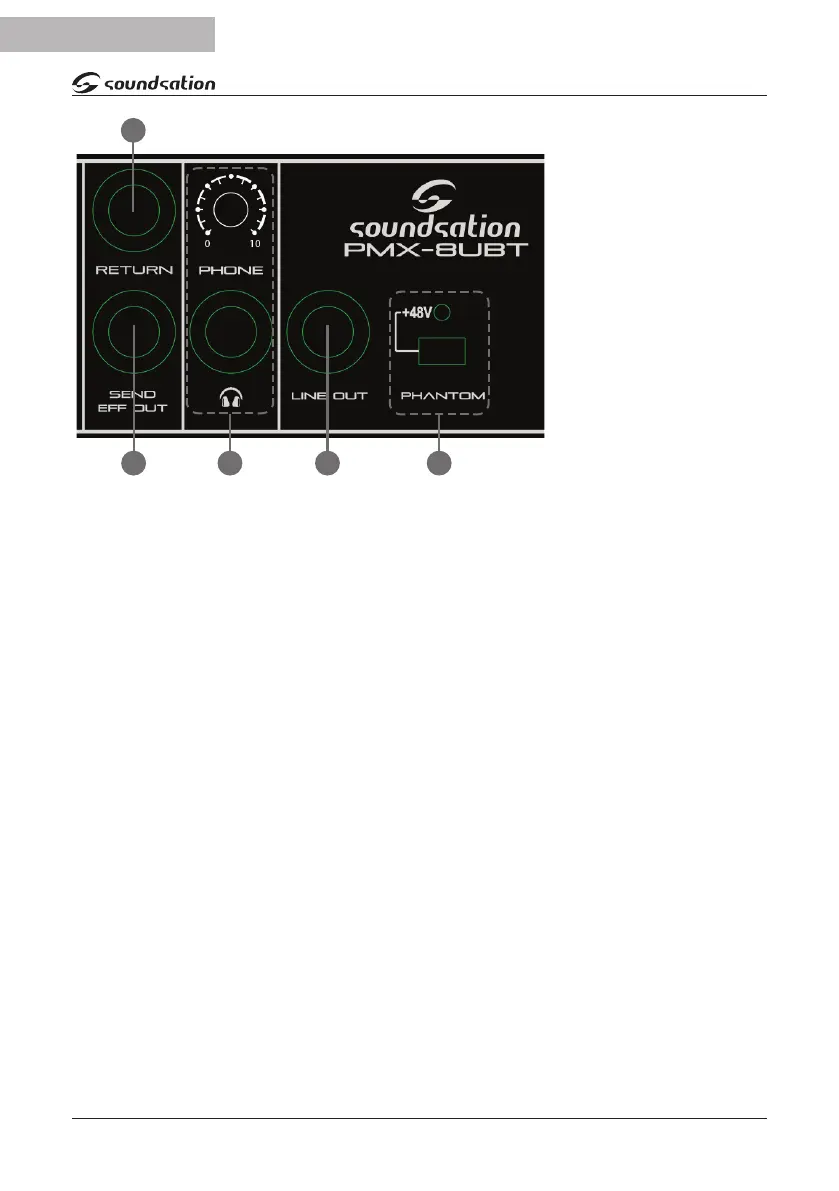
(21) RETURN
It is used to connect the
output of an external
eects processor.
(22) SEND EFF OUT
It is the output con-
taining the mix coming
from the AUX / SEND,
and can be connected
to an external eects or
a monitor.
(23) PHONE
Headphone output. It
allows you to monitor
the main mix with stereo headphones. The knob adjusts the headphone output level.
(24) LINE OUT
It is a mono line output from the main mix and can be used with other mixers or pow-
ered speakers.
(25) +48 PHANTOM
The + 48V Phantom power is used to power any condenser microphones connected to
the XLR inputs of the channels. It is acvated for all channels with the Phantom switch.
The LED above this switch, when illuminated, indicates that the phantom power is
acve.
(26) POWER LED
When the power LED is on, the mixer is operang normally.
(27) SPEAKER OUTPUTS
These outputs are connected to passive speakers. Dierent combinaons are possible:
2 Speakers - Usually one speaker is connected to one of the two A RIGHT outputs; a
second speaker is connected to one of the two B LEFT outputs. The impedance of each
speaker must be between 4 and 8 ohms.
4 Speakers - When using four speakers simultaneously (two connected to A RIGHT
outputs, two to B LEFT outputs) the impedance of each of them must be between 8
and 16 Ohm.
22 23 24 25
21


 To Next Page