.............................
~~
~
+
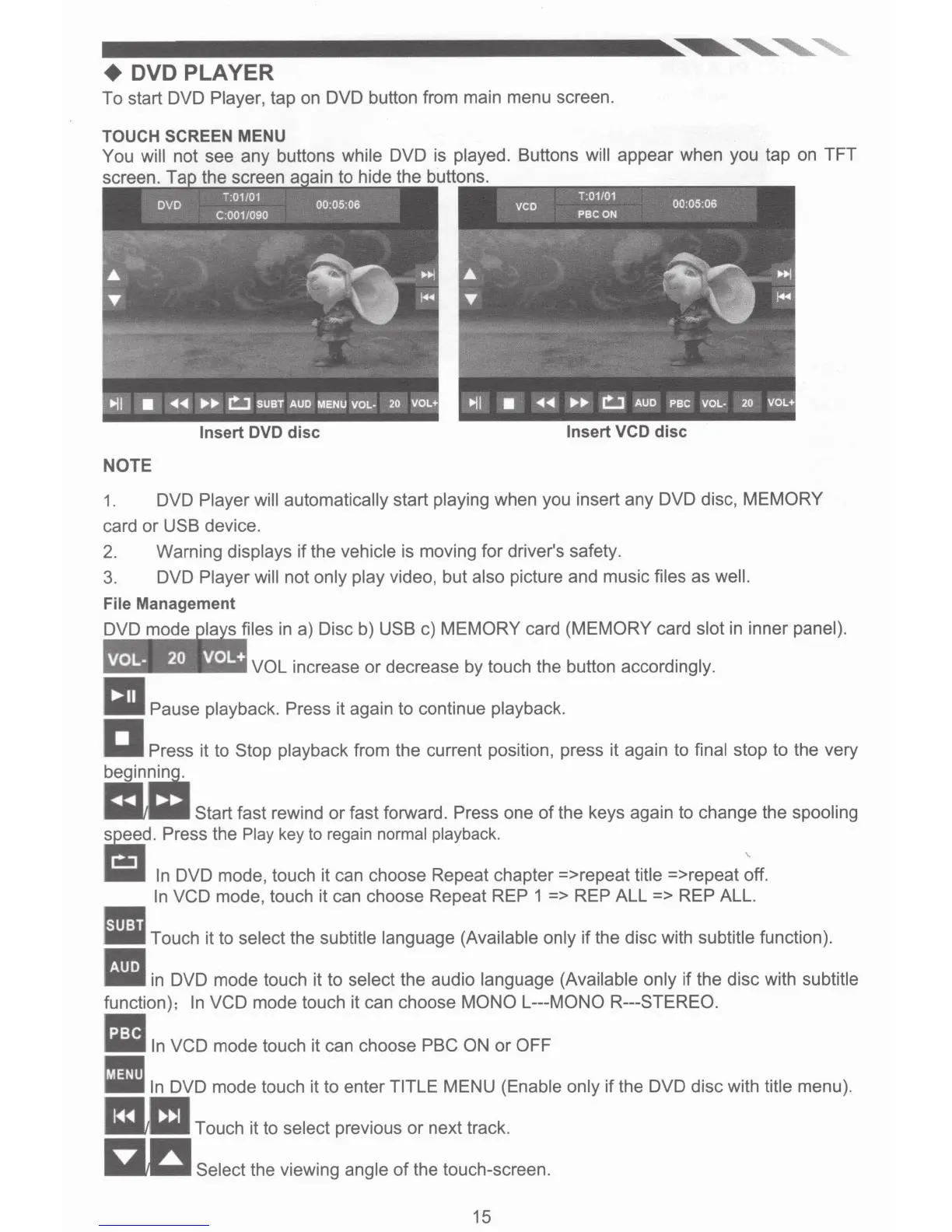
DVD PLAYER
To start DVD
Player, tap on DVD button from main menu screen.
TOUCH SCREEN MENU
You
will
not see any buttons
while
DVD is
played.
Buttons
will
appear when you tap on TFT
screen. T the screen
in
to hide the buttons.
Insert
DVD
disc
Insert
VCD
disc
NOTE
1. DVD
Player will automatically
start
playing
when you insert any DVD disc,
MEMORY
card
or
USB device.
2.
Warning
displays
if
the
vehicle
is moving for driver's safety.
3.
DVD
Player will
not
only play
video, but
also
picture and music
files
as
well.
File
Management
DVD mode files
in
a) Disc b) USB c)
MEMORY
card
(MEMORY
card
slot
in inner panel).
VOL increase
or
decrease by touch the button accordingly.
~~
Pause playback. Press
it again to continue playback.
a Press
it to Stop
playback
from the current position, press it again to
final stop to the very
=~
mliil
Start fast rewind
or
fast forward.
Press
one
of
the keys again to change the
spooling
=d.
Press
the
Play
key
to
regain
normal
playback.
-=-
In
DVD mode, touch it can choose Repeat chapter =>repeat
title
=>repeat
~ff.
In
VCD mode, touch it can choose Repeat REP
1 =>
REP
ALL =>
REP ALL.
•
Touch it to select the
subtitle language (Available only
if the disc with subtitle
function) .
•
in
DVD mode touch it to
select
the audio
language (Available only if the disc with
subtitle
function);
In
VCD mode touch it can choose
MONO L---MONO R---STEREO
.
•
In
VCD mode touch it can choose
PBC ON
or
OFF
Ill
In
DVD mode touch it to enter TITLE
MENU
(Enable only
if
the DVD disc with title
menu).
mil
Touch it to
select
previous
or
next track.
a..a
Select the viewing
angle
of
the touch-screen.
15


 To Next Page
 Loading...