EasyManua.ls Logo

Southwire 10031S - Resistance Measurements; Safety Warning; Measurement Procedure; Continuity Test

Southwire 10031S
12 pages
Print Icon
To Next Page IconTo Next Page
To Previous Page IconTo Previous Page
Loading...
Operation cont.
Resistance
Measurements
~WARNING:
Never
test
resistance
on
a
live
circuit.
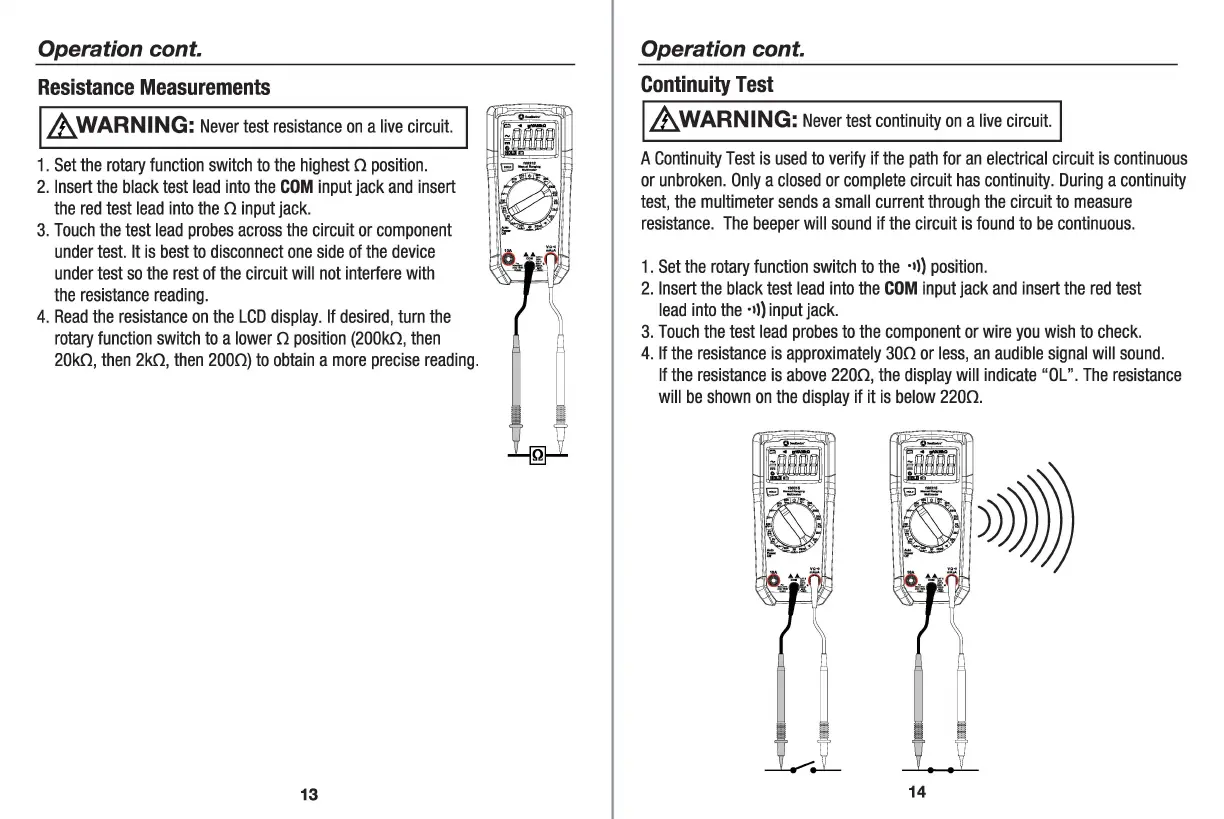
1.
Set
the
rotary
function
switch
to
the
highest
o
position
.
2.
Insert
the
black
test
lead
into
the
COM
input
jack
and
insert
the
red
test
lead
into
the
o
input
jack
.
3.
Touch
the
test
lead
probes
across
the
cir
c
uit
or
component
under
test.
It
is
best
to
disconnect
one
side
of
the
device
under
test
so
the
rest
of
the
ci
rcuit
will
not
interfere
with
the
resistance
reading.
4.
Read
the
resistance
on
the
LCD
display
.
If
desired
,
turn
the
rotary
function
switch
to
a
lower
O
position
(200k0,
then
20k0
,
then
2k0,
then
2000)
to
obtain
a
more
precise
reading
.
13
Operation cont.
Continuity
Test
~WARNING:
Never
test
continuity
on
a
live
circuit.
A
Continuity
Test
is
used
to
verify
if
the
path
for
an
electrical
circuit
is
continuous
or
unbroken
.
Only
a
closed
or
complete
ci
rcuit
has
continuity
.
During
a
continuity
test,
the
multimeter
sends
a
small
current
through
the
circuit
to
measure
res
i
stance
.
The
beeper
will
sound
if
the
ci
r
cuit
is
found
to
be
continuous
.
1.
Set
the
rotary
function
switch
to
the
·•l)
position
.
2.
Insert
the
black
test
lead
into
the
COM
input
jack
and
insert
the
red
test
lead
into
the
·
•l)
input
jack
.
3.
Touch
the
test
lead
probes
to
the
component
or
wire
you
wish
to
check.
4.
If
the
res
i
stance
is
approximately
300
or
less
,
an
audible
signal
will
sound
.
If
the
resistance
is
above
2200
,
the
display
will
i
ndicate
"OL
".
The
resistance
will
be
shown
on
the
display
if it
is
below
2200
.
14