1
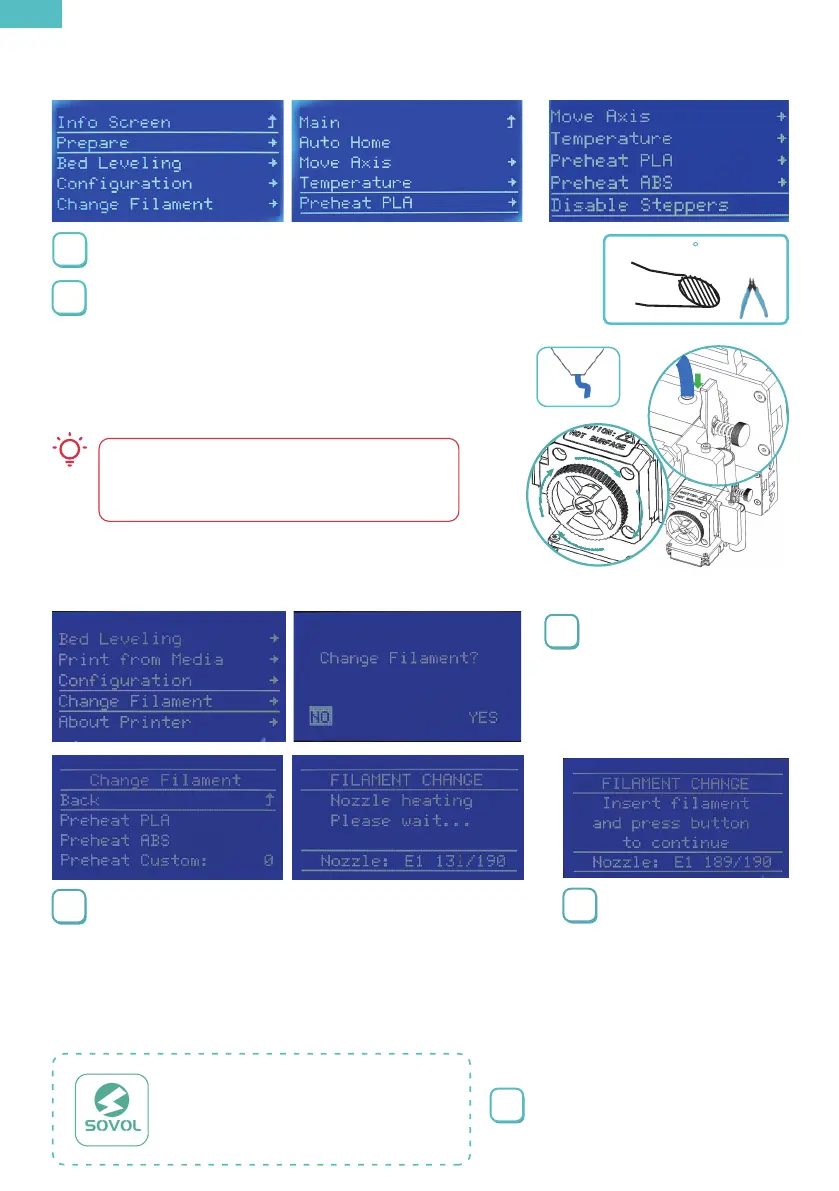
Press the knob>Main →
Change Filament → Yes
1
Double-click to install Sovol-Cura
in the TF card file.
Sovol3D_Cura-1.5.0-win64
2
Select the option according to the type of filament you
are using, you can also select Preheat Custom to set a
temperature. After selecting,please wait for the
temperature to rise.
3
Waiting for the target
temperature to rise, the
filament will withdraw
automatically,then
insert new filament to
start printing.
7 Change filament
8 Preparing to printing
45
1
Click Prepare→Preheat PLA/ABS
2
When the temperature rises to the target temperature,
cut the front end of the filament to a 45° bevel, then
insert it into the feed port for about 20mm,and turn
the wheel clockwise until you see the filament
coming out of the nozzle.
If you feel resistance when turning and it is difficult to
turn, please unlock the motorSteps to unlock the
motor: click Prepare → Disable Steppers
6 Load filament
EN


 To Next Page