Need help?
Do you have a question about the Soyea B311-522 and is the answer not in the manual?
Instructions for inserting a SIM card into the SIM card slot.
Connect the router's power adapter to a power supply for startup.
Connect your Wi-Fi device to the router's network or via LAN.
Access the web-based management page to manage router settings.
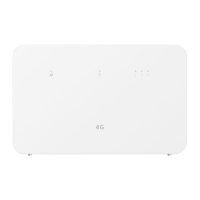
Shows the network connection status: steady white for connected, steady red for not connected.
Indicates Wi-Fi status: steady on for enabled, flashing for pairing detection.
Displays signal strength with more bars indicating a stronger signal.
Press and hold to power the router on or off.
Press to enable WPS or HiLink connection when Wi-Fi is enabled.
Press and hold to restore the router to factory settings.
Connects a LAN device to the router for Internet access.
Optional port for connecting to a telephone.
Used to install an external antenna for improved signal reception.
Information regarding software copyrights and usage restrictions.
Lists trademarks like LTE and Wi-Fi Alliance.
Information on feature activation and potential limitations by local networks.
States the manual is provided 'AS IS' with no warranties.
Guidelines for using the device safely and avoiding interference.
Precautions regarding pacemakers and hearing aids.
Warnings against using the device in hazardous environments.
Recommendations for optimal usage conditions and avoiding damage.
Precautions for child safety and device handling by children.
Information on using approved accessories and potential hazards.
Guidelines for safe use and handling of the power adapter.
Instructions for cleaning and maintaining the device and accessories.
Information on proper disposal of electronic waste and batteries.
Compliance with regulations on hazardous substances.
Declaration of conformity with EU directives.
Details on Energy-related Products Directive (ErP) compliance.
Information on radio frequency bands and maximum transmitted power.
Details on recommended accessories and software versions.
 General
| Brand | Soyea |
|---|---|
| Model | B311-522 |
| Category | Network Router |
| Language | English |

 To Next Page