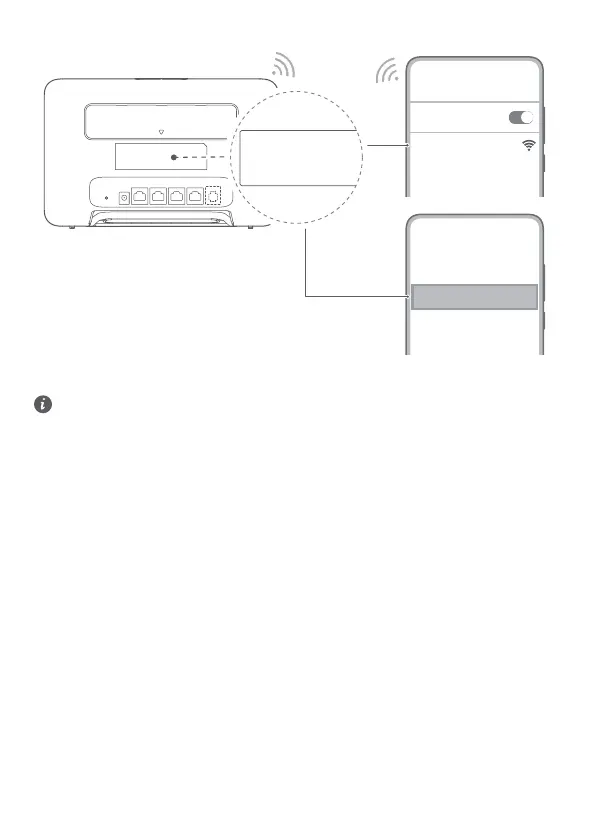
Connecting to your router's Wi-Fi network
XXXXXX
Wi-Fi
Wi-Fi
Wi-Fi Password:
YYYYYY
Wi-Fi Name: XXXXXX
Wi-Fi Password: YYYYYY
Wi-Fi Name(5G): XXXXXX
Once the router has connected to a mobile data network, you can connect your computer or mobile phone to the router's Wi-
Fi network to access the Internet. Please refer to the label on the back of the router for the default Wi-Fi network name (Wi-Fi
Name) and password (Wi-Fi Password).
• When the Wi-Fi indicator is steady on, Wi-Fi is enabled. To enable or disable Wi-Fi, refer to the router's web-based
management page.
• Ensure that you promptly change the Wi-Fi network name and password on the web-based management page to
prevent unauthorized access to your Wi-Fi network. Once you have changed the password, you will need to
reconnect to the router's Wi-Fi network.
4


 To Next Page