– 10 –
Inverter Air-to-Water Heat Pump
Main Display Window
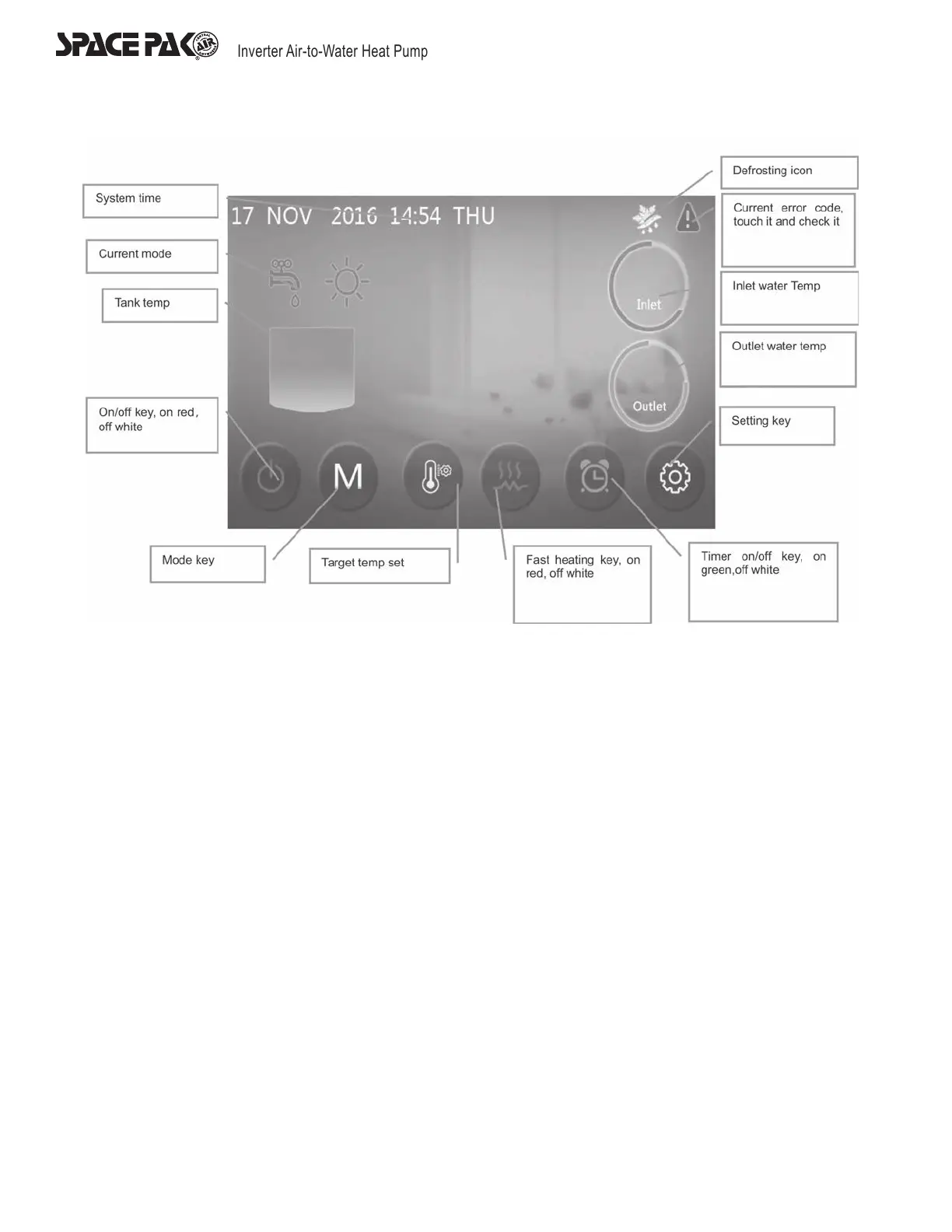
Contents and Buttons on Main Display Window
On the startup interface, contents and buttons on main display are illustrated above.
Animation on Main Display Window
1. When the unit is in defrosting mode, the defrosting icon will show until the defrosting is completed.
2. When the unit is shutdown, the main display will turn grey as illustrated below.
3. When the unit is shutdown, if the fast heating function is activated, the color of the button for ‘fast heating key’ is red, if not, the
button will be white. When R12 has not activated fast heating function, the color of the icon will be grey.
4. When the unit is shutdown, if the timing switch function is activated, the color of the button for ‘timer on/off key’ will be green, if
not, the button will be white.
131°F
Heating
95°F
110°F


 To Next Page