– 23 –
Inverter Air-to-Water Heat Pump
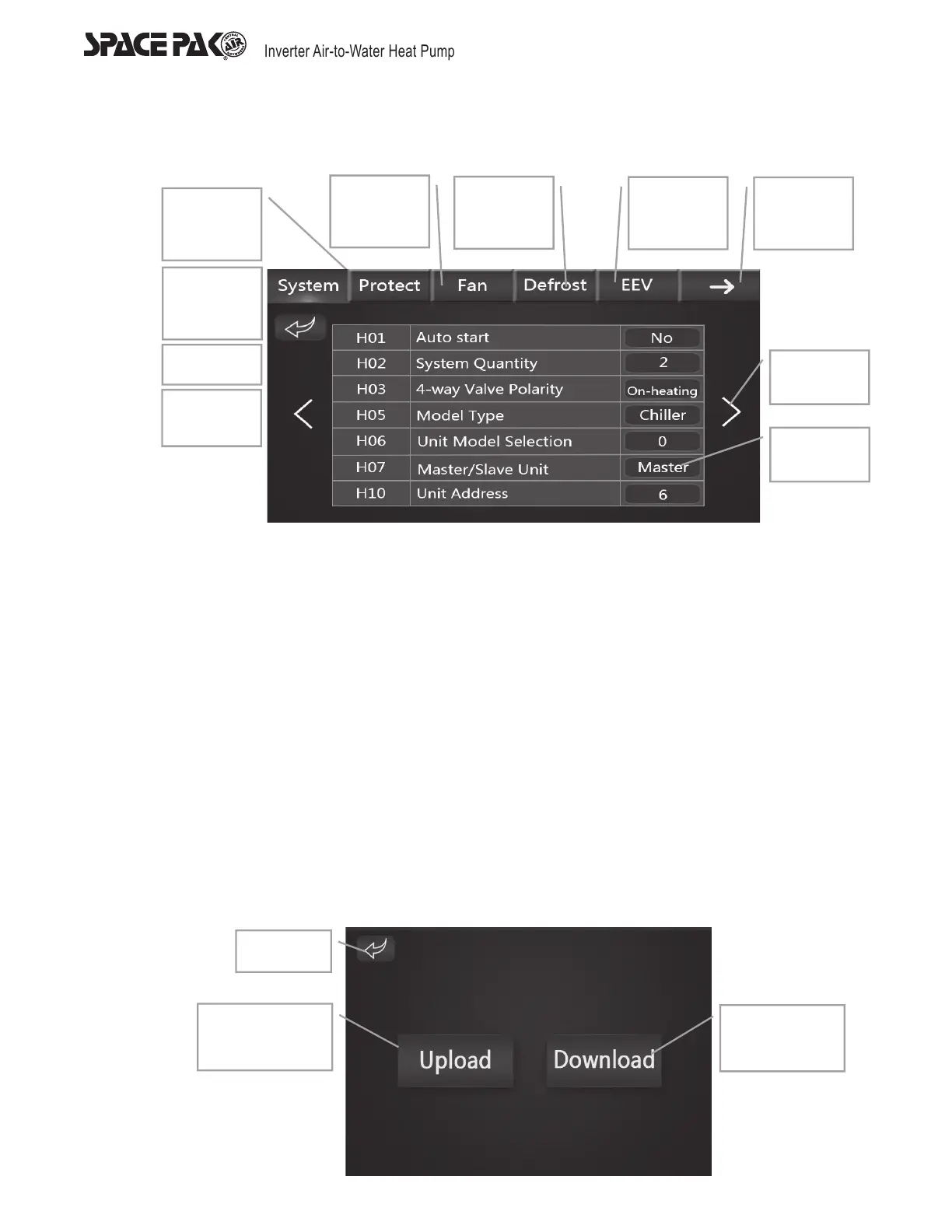
System Parameter Display
1. Press ‘Factory’ on the setting interface, input password ‘066’ or ‘66’ on the keyboard then press ‘enter’ to access the system
parameter interface.
2. Press ‘System’ to enter the parameter setting keyboard ‘interface’, after setting parameters, press ‘Enter’ to save and return,
press ‘return’ to delete the settings and return to system parameter display.
3. Degrees Fahrenheit and Degrees Celsius selection: Press the button on the right side of the ‘Temperature unit’, then the
temperature unit displayed on the control will be switched between '°F' and '°C' and the temperature will be converted
automatically according to the conversion formula (No conversion will be conducted when the main board is not successfully
connected). Power-off memory function is provided to the temperature selection. The conversion formula is as below.
a. For parameters without return difference values: °C=(°F-32)*5/9 (No special remark on the parameter page)
b. For parameters with return difference values: °C=°F*5/9 (With special remark on the parameter page)
4. Editing the Slave Unit Address: Press the value on the right side of the ‘Slave Unit Address’ to edit the modbus slave unit address
of the control. The slave unit address can be set as 1~2 and provided with power-off memory function.
5. When the two color display are connected to the controller, one slave unit address should be set as 1 and the other should be
set as 2 so that they can communicate successfully.
Upload and Download Function
Press ‘855’ to turn to the Upload and Download display.
Upload and Download Display
Return
Statecode
State
Page up
Page down
Checkthe
current load
status
Check the
current
switch
status
Checkthe
current
temp
status
Return
Checkthe
System
parameters
Checkthe
protection
parameters
Up key
Checkthe
fan
parameters
Checkthe
defrosting
parameters
Check the
EEV
parameters
Checkthe
next page
parameters
Down key
Parameter
ssetting
Return
Parameter
upload
Parameter
download



 To Next Page