11
P10452R6CO#2648
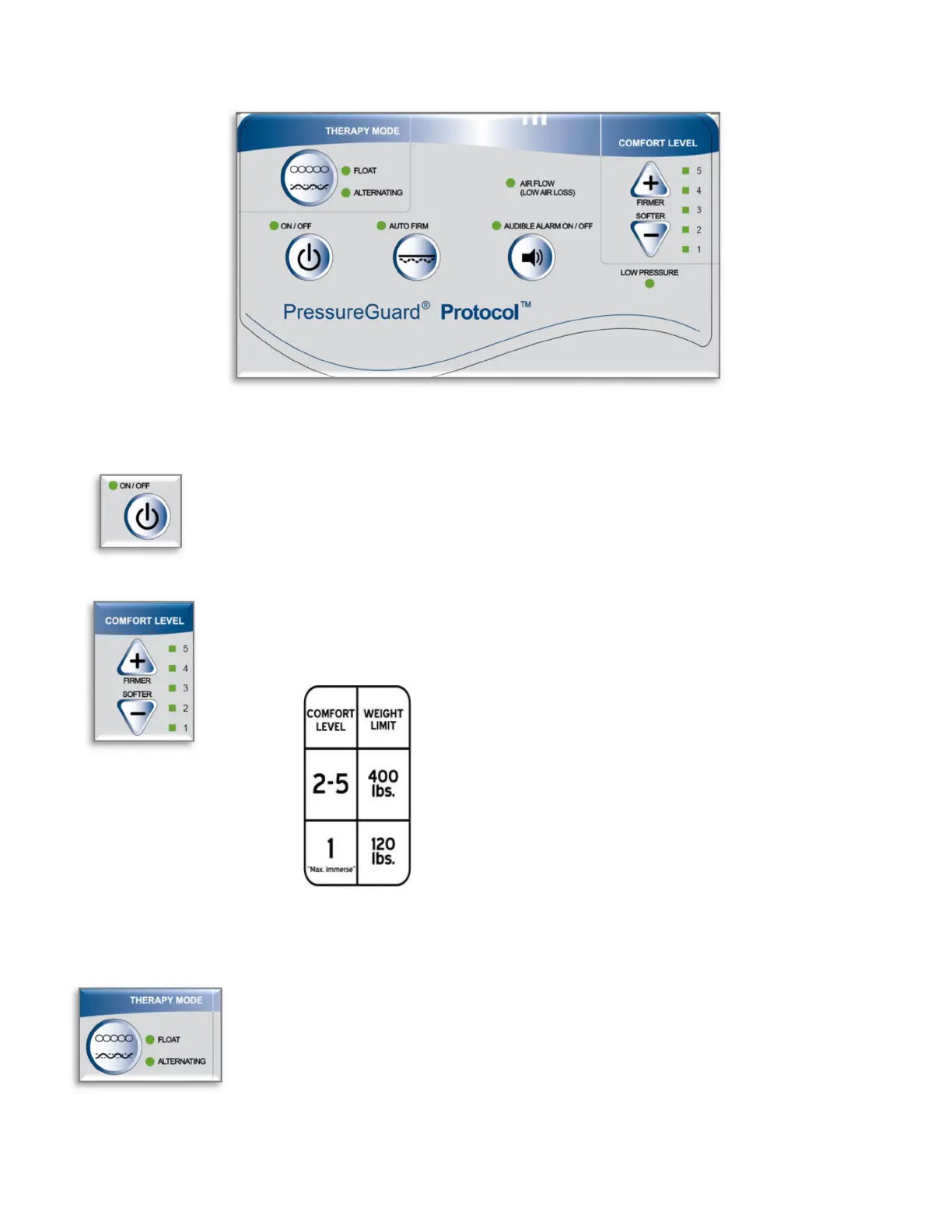
CONTROLUNITFUNCTIONS
ON/OFF: Plug power cord into wall outlet. Press ON/OFF switch to “ON”. Indicator light
will change to green, along with additional lights on control panel, indicating that the unit
is powered up. Unit will resume the settings it was in when last powered down.
COMFORTLEVEL: For best possible pressure management, maximize immersion and
envelopment by initially setting the “COMFORT LEVEL” on the control panel to the softest
selection appropriate for the patient, in accordance with the stated weight limits:
Forpatientsupto120lbs,begin with Level 1 (“Max.
Immerse”).
Forpatientsweighingmorethan120lbs(upto400
lbs.)begin with Level 2.
Adjust for user comfort as desired, using “SOFTER” and
“FIRMER” buttons.
NOTE: Elevating the head of bed may require adjusting COMFORT LEVEL to ensure
appropriate support, especially if elevated beyond 30 degrees (see “Head of Bed
Elevation”, below).
THERAPYMODE: Toggle between “ALTERNATING” and “FLOAT” mode as desired.


 To Next Page