USER’S MANUAL
EN
12
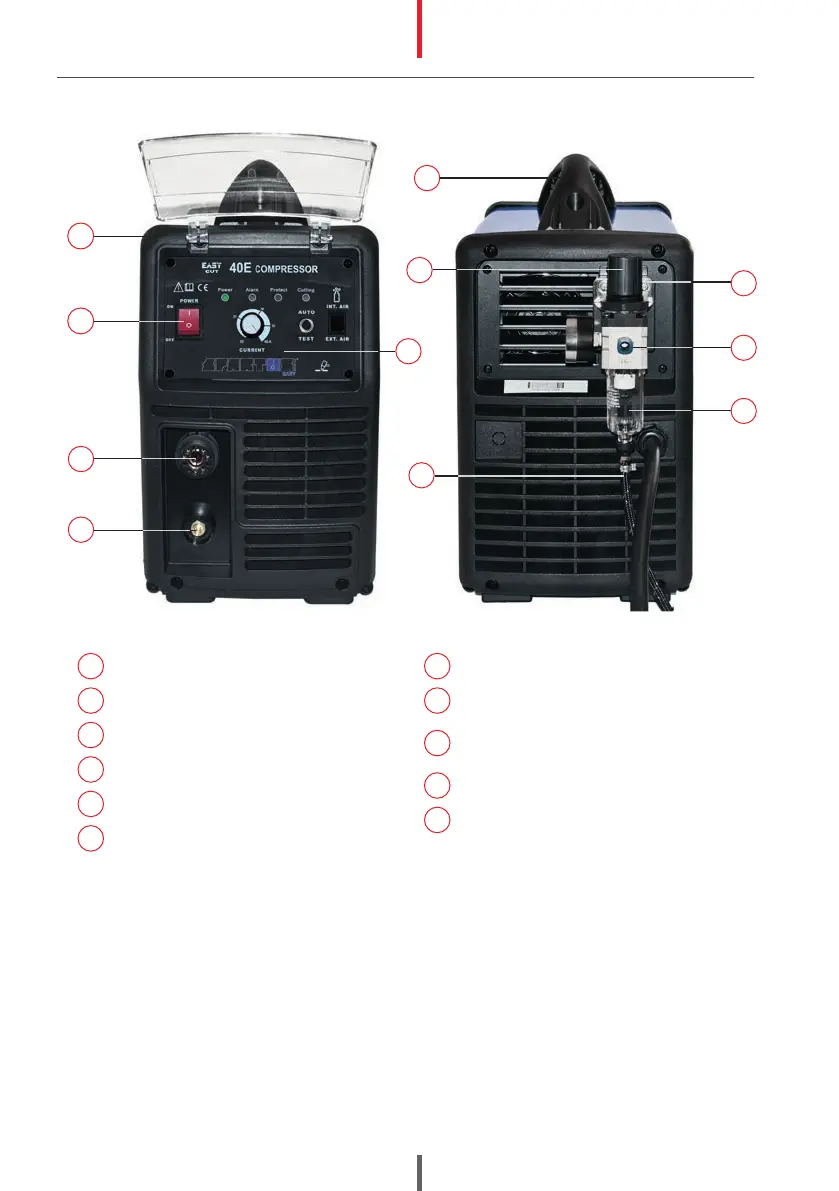
1
Transport handle
2
Control panel with cover
3
Socket SK „+”
4
Plasma torch socket „-”
5
Unit cover
6
Toggle switch ON/OFF
7
Air preparation block holder
8
Compressed air inlet
9
Air preparation block with pressure
reducer
10
Pressure regulator knob
11
The condensate drain tube
2
5
6
4
3
11
EasyCUT 40E Compressor
10
7
8
9
1
7.4 CONNECTING TO POWER SUPPLY
Requirements for power network parameters (voltage, permissible range of mains voltage
fluctuations etc.) are given in the table with technical parameters of device and on the rating
plate of cutter.
Before connecting the unit to the power source:
• Check whether the parameters comply with the requirements for unit.
•
Check: mechanical condition of the power cord and plug. The connection status of the power
cord with plug and unit (loose not allowed). If the power cord or plug is damaged or loose
connection is between them, it is forbidden to connect the cutter until fault has been rectified.
• The cutter machine can be connected to the network only when the power socket is properly
grounded.


 To Next Page