INTRODUCTION8
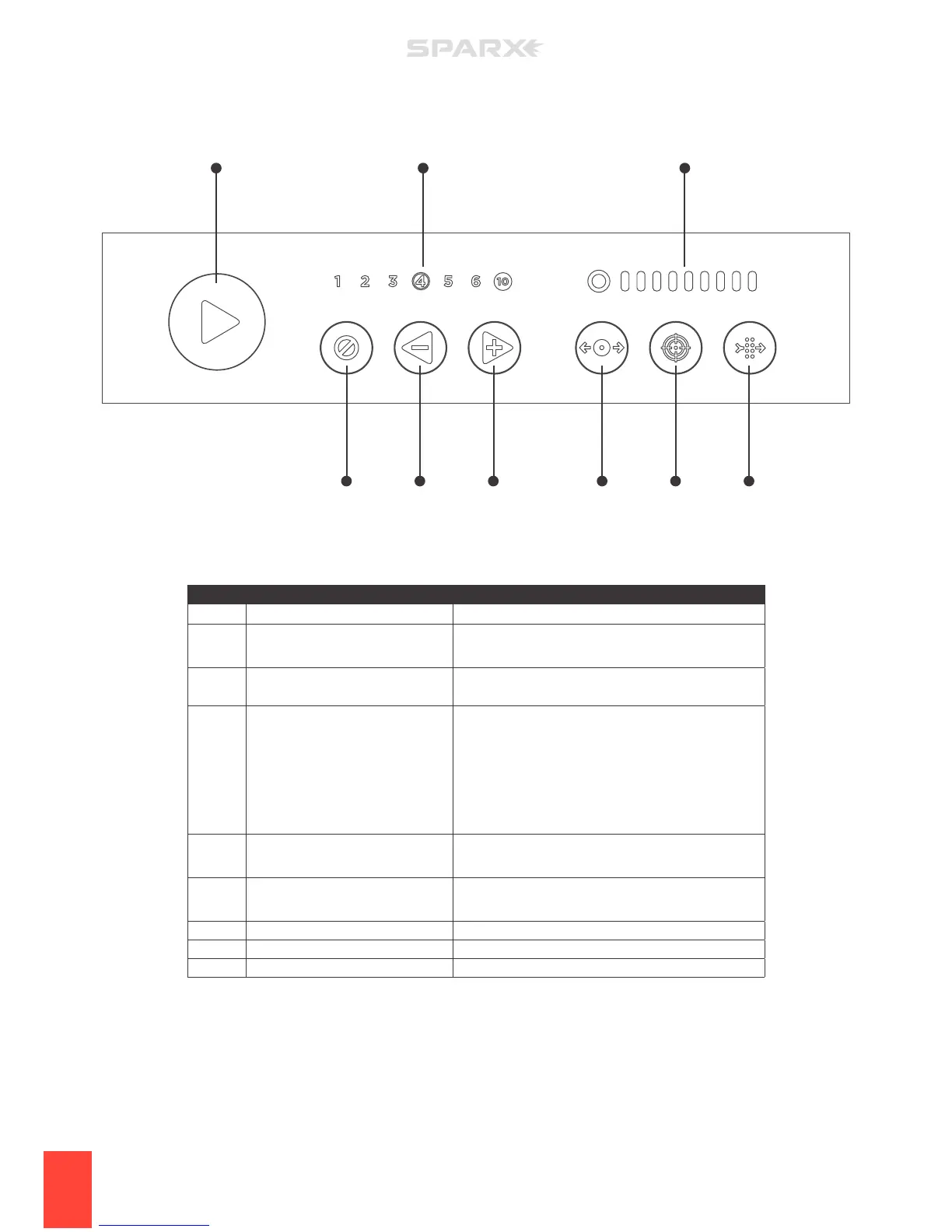
PART BUTTON DESCRIPTION
A Play
Initiates the sharpening.
B Cycle Counter
• Shows the current number of cycles selected.
• Shows error codes.
C Grinding Ring Life Indicator
Indicates Grinding Ring life status. See Grinding Ring
Life Indicator Behavior table on page 13.
D Cancel / Error
• Push 1 time to stop the Carriage at the conclusion of
the current pass.
• Push 2 times for emergency stop, motor stops
immediately.
• When illuminated red, the sharpener is in an error
state, see Troubleshooting section of manual.
E Minus Cycles / Move Left
• Subtracts cycles from the Cycle Counter.
• If in Move Mode, moves Carriage to the left.
F Add Cycles / Move Right
• Adds cycles from the Cycle Counter.
• If in Move Mode, moves Carriage to the right.
G Move
Initiates Move Mode.
H Alignment
Initiates Alignment Mode.
J Air Filter
Indicates replacement needed.
A
JF HE GD
B C


 To Next Page