7
INSTALLING CABLE HOUSING
The following steps apply to most frames with internal routing (fig.10 is specific to Specialized frames with the SWAT door). Certain frame manufacturers have specific internal cable routing
steps to follow, and may have to route from the head tube to the seat tube. Please refer to your frame manufacturer for additional information.
<
1700mm
9
10
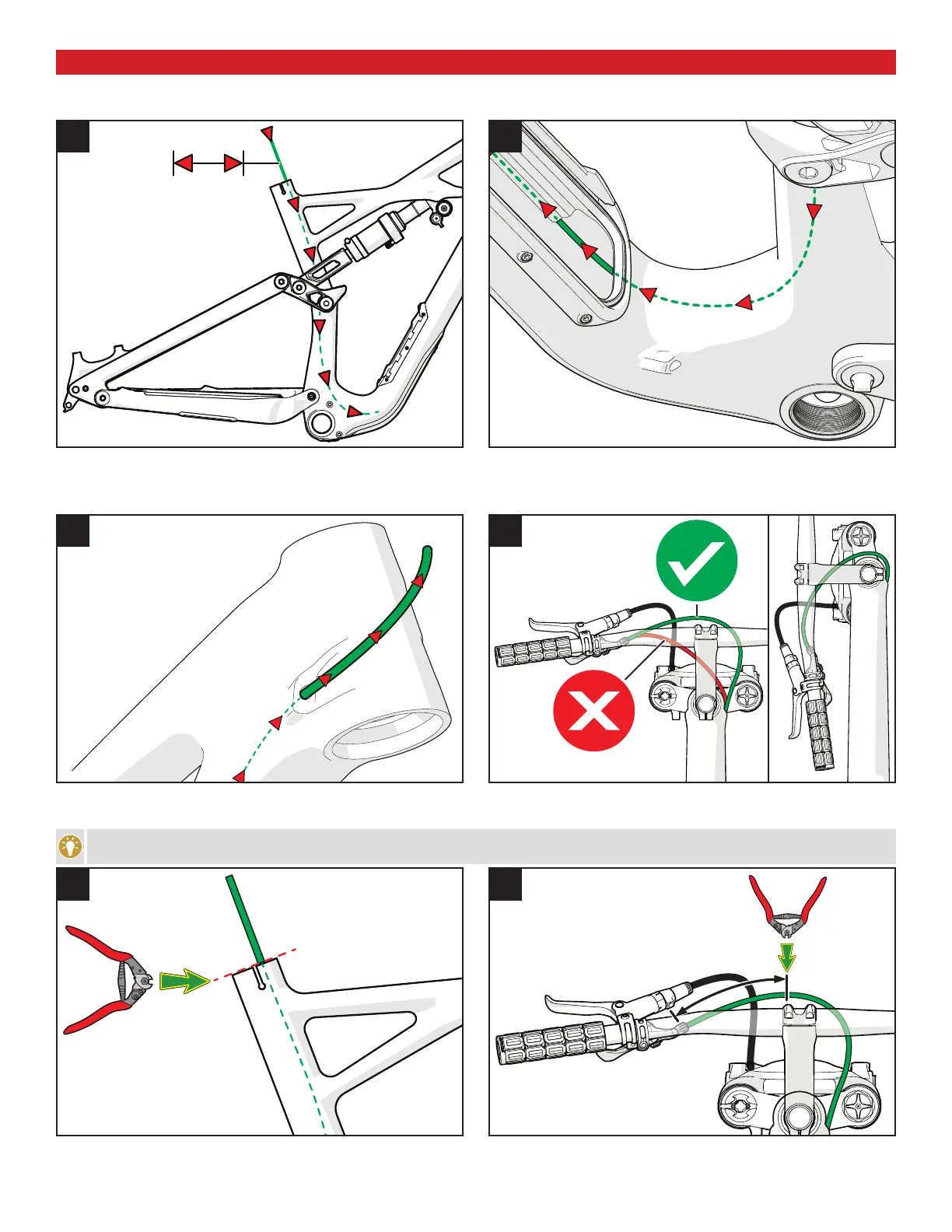
Fig.9: Run a 1700mm length section of shift cable housing down the seat tube until it exits in front of the bottom bracket shell.
Fig.10: Reach in through the SWAT down tube door to pull the housing up into the down tube.
Fig.10: Guide the housing into the lower of the two drive-side molded housing tubes until it exits the down tube at the head tube.
11
12
Fig.11 & 12: Continue guiding the housing out the head tube until enough housing is exposed to be able to reach the SRL lever, then adjust the length of the housing as shown in fig.12, so the
handlebar can rotate 90 degrees without binding the housing.
Make sure the curve above the bottom bracket shell has a bit of extra length to allow for a small amount of seat post height adjustment.
13
14
Fig.13: Trim the remaining housing exiting the seat tube so it is flush with the top of the seat tube.
Fig.14: Remove the housing from the SRL lever, then trim Xmm (as described in fig. 8) off the housing.







 To Next Page