
 Need help?
Do you have a question about the Spectra Precision RC601 and is the answer not in the manual?
Details the power source and procedure for replacing the remote control battery.
Controls the rotation speed of the laser for the HV101 model, offering various RPM settings.
Sets the beam angle and pattern for the HV101 model, including stop dot and line modes.
Disables self-levelling to allow manual control of the laser's tilt for grading.
Uses arrow buttons to adjust the laser's tilt for setting gradients on X or Y axes.
Enables dual-grade setting for driveways and car-parks using X and Y axes.
Procedure for setting a grade in a single axis (X or Y) using the remote.
Procedure for setting grades in both X and Y axes simultaneously.
Details the necessary equipment and a practical example for setting slopes.
Step-by-step guide to setting a specific gradient using the remote.
Key considerations for retaining gradient settings and using them for depth.
Using the laser for cut and fill operations with slopes over 10%.
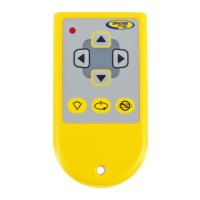
The Spectra RC601 Remote Control is an infrared device designed to enhance the functionality of compatible Spectra laser levels, specifically the LL100N, HV101, and LL300N models. This remote allows users to adjust various settings of their laser level from a distance of up to 30 meters, offering greater convenience and efficiency in various construction and surveying tasks.
The primary function of the RC601 is to provide remote control over key operational parameters of the connected laser level. It enables adjustments to rotational speed, scan angle, scan position, and manual override for single or dual-axis grade/slope control. It's important to note that the remote cannot be used to turn the laser ON or OFF, as this feature is not available on any Spectra laser level system. While compatible with the LL100N, HV101, and LL300N, not all remote functions are available on every model.
Rotational Speed Control (HV101 specific): For the Spectra HV101, the remote allows cycling through four rotational speeds: Zero (Stop Dot), 50, 200, and 600 rpm. This feature is crucial for optimizing visibility and working range. For indoor applications, slower speeds are recommended as the laser beam is easier to see by eye. For outdoor groundworks, the maximum speed of 600 rpm is advised to achieve the best working range when used with a laser detector. The default rotational mode for the HV101 is 600 rpm once the laser self-levels after being turned on.
Scan Mode (HV101 specific): The RC601 also provides control over the HV101's scan mode, allowing users to cycle through six different scan angles: Stop Dot, 3°, 8°, 45°, 90°, and 180° Line. This mode is primarily for indoor use, enabling better visibility of the beam in a specific position. It's important to remember that a laser detector cannot pick up the laser beam when the device is in scan mode. Pressing the Rotational Speed Control button once will deactivate scan mode and return the laser to rotating at 600 rpm.
Manual Override (LL100N, HV101, LL300N): This feature is applicable to the LL100N, HV101, and LL300N models. Pressing the Manual Override button on the remote once will disable the self-leveling system. The laser will continue to rotate, but it will no longer output a level datum. This mode is typically engaged when setting gradients and slopes. Pressing the Manual Override button again will reactivate the self-leveling system; the laser head will stop, adjust to a level datum, and then resume rotating at 600 rpm, returning to self-leveling mode.
Up / Down / Left & Right Arrows (LL100N, HV101, LL300N): When the LL100N, HV101, or LL300N is in manual mode (with self-leveling turned off), these arrow buttons are used to tilt the laser prism along either the X or Y axis. This allows for setting a progressive fall or gradient, essential for grading and sloping applications.
Grading (LL100N, HV101, LL300N): The LL100N, HV101, and LL300N are all equipped with dual-grade capabilities when used with the RC601. By switching to "Manual" mode, users can override the self-leveling system and set a grade (incline/slope) along the X-axis only, Y-axis only, or both simultaneously. The maximum settable slope is approximately a 1m fall over 10m. For X and Y alignment, users should refer to the case markings on the top of the laser head, which indicate the direction of the axis being set.
Setting Single Axis Slope: To set a single-axis slope (e.g., in the X-axis), first power on the laser and allow it to self-level. Then, press the Manual Override button on the remote. The red HI / MAN LED will illuminate and flash, indicating that self-leveling is off. Use the black Left & Right Arrow buttons on the remote to set the desired percentage slope (fall) as measured on a staff. Once complete, press the Manual Override button again to re-enable self-leveling. The laser head will adjust to a level datum and resume rotating at 600 rpm. The same procedure applies to setting a Y-axis slope, using the yellow Up & Down Arrow buttons.
Setting Both X & Y Axis Slopes (Dual Grade): For dual-grade applications, the process is similar to setting a single-axis slope, but all four arrow buttons on the remote are utilized as needed to adjust both the X and Y axes.
Working Example for Setting Slopes: The manual provides a detailed example of setting a 1:40 gradient for drainage. This involves placing the laser level horizontally on a surveying tripod, switching it on, and allowing it to auto-level. The measuring staff is positioned 10m away, and the laser detector is used to find the set level position. By calculating the required fall (e.g., 250mm for a 1m fall at 40m over 10m), the detector is moved down the staff. The Manual Override button is pressed, and the "down arrow" button on the remote is held until the laser beam slopes down to the new set level on the detector, thus setting the 1:40 fall.
Power Supply & Battery Replacement: The RC601UK is powered by a single 9V PP3 alkaline battery, which comes pre-installed. When battery replacement is necessary, users simply unscrew the rear battery compartment and insert a new 9V PP3 alkaline battery, ensuring correct polarity.
Important Note on Gradients: All "grade facility" rotary lasers revert to the auto (self) level condition if switched off without retaining the gradient set. Therefore, it is recommended to complete all groundworks before turning the laser off to avoid losing the set gradient.
The remote control significantly enhances the versatility and ease of use of compatible Spectra laser levels, particularly for tasks requiring precise slope and grade adjustments over various distances.
 General
| Compatibility | Spectra Precision Laser Levels |
|---|---|
| Frequency | 2.4 GHz |
| Power Supply | 2 x AA batteries |
| Type | Remote Control |
| Operating Range | 100 m (330 ft) |
| Weight | 0.2 kg |
| Water Resistance | IP54 |
| Display | LCD |

 To Next Page