
EasyManua.ls Logo

Spectra JENSEN JSBW-210 - User Manual

Spectra JENSEN JSBW-210
17 pages
Print Icon
To Next Page IconTo Next Page
Loading...
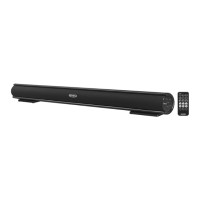
WALL MOUNTABLE 2.0-CHANNEL BLUETOOTH SOUNDBAR
Model: JSBW-210
USER MANUAL
PLEASE READ THIS USER MANUAL COMPLETELY BEFORE OPERATING THIS UNIT AND
RETAIN THIS BOOKLET FOR FUTURE REFERENCE.

Questions and Answers

  • E
    Elizabeth HaleJul 28, 2025
    Why is the sound distorted on my Spectra Speaker System?
    • J
      John CopelandJul 28, 2025
      Sound distortion in your Spectra Speaker System can occur for several reasons. The volume level might be too high, so try decreasing it. The sound source itself could be distorted; if you're using an external device with poor audio quality, distortion is more noticeable with high-power speakers, so try a different audio source. If you are using an external sound source like older generation of iPod, try reducing the output volume on the device itself. Also try turning bass boost OFF or change the EQ setting.
  • J
    John ReyesAug 4, 2025
    How to fix low volume on my Spectra JENSEN JSBW-210?
    • O
      owellsAug 4, 2025
      If your Spectra Speaker System is on but the volume is low or non-existent, the volume control might be turned all the way down. Try turning the volume control to a higher output.
  • A
    alicia79Aug 12, 2025
    How to troubleshoot a Spectra JENSEN JSBW-210 Speaker System that won't turn on?
    • C
      Cynthia JohnsonAug 12, 2025
      If your Spectra Speaker System isn't responding or powering on, there are a couple of things to check. First, ensure the unit is properly connected to the AC outlet; if it's disconnected, reconnect it. Second, the AC outlet itself might not have power; try plugging the unit into another outlet to test.
  • M
    Michael BurnsAug 19, 2025
    Why does my Spectra JENSEN JSBW-210 Speaker System get warm?
    • G
      Gregory LongAug 19, 2025
      It's normal for your Spectra Speaker System to get warm after playing at high volume for an extended period. To address this, turn the unit off for a while or lower the volume.

Summary

IMPORTANT SAFETY INSTRUCTIONS

Important Note

Key advice on avoiding unsuitable locations and handling electrostatic discharge.

FCC Compliance

Information regarding compliance with FCC regulations for digital devices.

Furniture Protection

Advice on using felt pads to protect furniture from rubber feet marks.

INSTALLATIONS

Placing on a Table

Guidelines for proper ventilation when placing the soundbar on a table or shelf.

Mounting on a Wooden Wall

Instructions for mounting the soundbar securely onto a wooden wall.

Mounting on Drywall

Step-by-step guide for mounting the soundbar onto drywall using anchors.

LOCATION OF CONTROLS

Main Unit Controls

Identifies and describes buttons, jacks, and indicators on the main unit.

REMOTE CONTROL

Remote Control Buttons

Explains the function of each button on the provided remote control.

GETTING STARTED

Connecting External Audio Devices

Guide on connecting the soundbar to TVs, DVD players, and other audio sources.

Connecting the AC Power

Instructions for powering the soundbar using the AC adaptor.

Remote Control Battery Installation

Steps for installing or replacing the battery in the remote control.

REMOTE CONTROL BATTERY CARE

Replacing the Battery

Detailed instructions for replacing the remote control's battery with correct type and polarity.

Battery Precautions

Important warnings and safety advice regarding battery handling and disposal.

BLUETOOTH OPERATION

Pairing a Bluetooth Device

How to wirelessly connect a Bluetooth-enabled phone or device to the soundbar.

Re-linking a Bluetooth Device

Procedure to re-establish a lost Bluetooth connection with a previously paired device.

Preset Sound Enhancements

Using remote buttons to select sound modes like Music, Movie, or Voice for enhanced audio.

LISTENING MODES AND INPUTS

Mute Function

How to temporarily silence the audio output using the mute button.

AUX 2 Input (TV;DVD;VCR;DVR)

Connect external audio devices using the AUX 2 RCA input connectors.

Digital Optical Input

Instructions for connecting audio sources via the digital optical input.

Auxiliary Input (AUX 1)

Connect external audio devices using the 3.5mm AUX 1 input jack.

CARE AND MAINTENANCE

Cleaning the Unit

Guidelines for safely cleaning the soundbar's exterior and front panel.

TROUBLESHOOTING AND SPECIFICATIONS

Troubleshooting Guide

Common issues and their solutions for the soundbar.

Product Specifications

Technical details like power requirements for the main unit and remote.

WARRANTY INFORMATION

Limited Warranty and Service

Details of the 90-day limited warranty and how to obtain service.

Spectra JENSEN JSBW-210 Specifications

General IconGeneral
BrandSpectra
ModelJENSEN JSBW-210
CategorySpeaker System
LanguageEnglish