Spectralink 7502 Handset User Guide
Spectralink 7502 Handset User Guide.docx
April 2023 86
Appendix A – Acoustic Echo Canceller
In the following you will find illustrations and descriptions of scenarios where the echo
canceller is used.
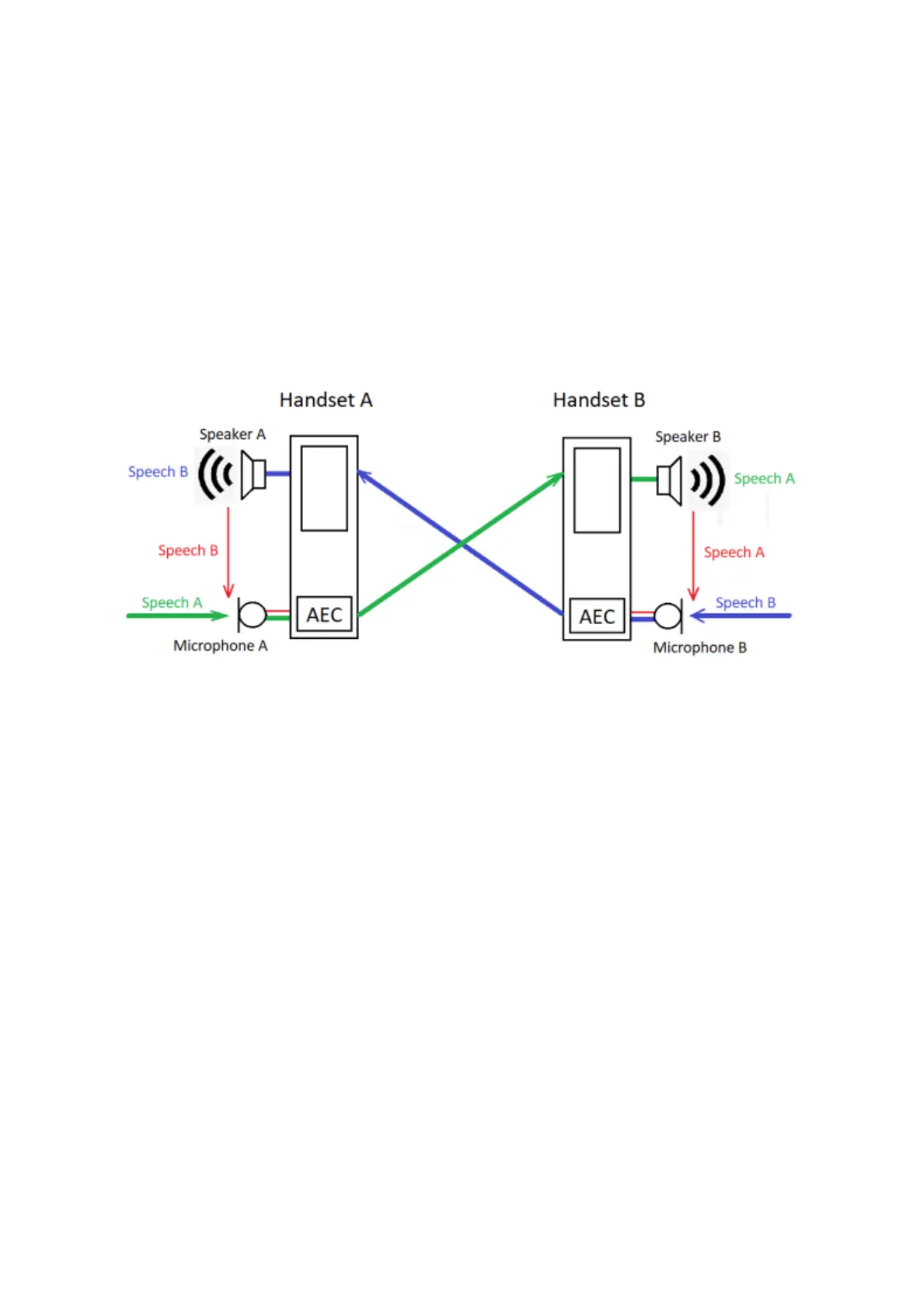
Handset A and B: AEC Enabled
The figure above shows a conversation between user A and user B. When the Acoustic
Echo Canceller (AEC) is enabled in handsets A and B, the users will not hear echoes of their
own speech.
The following describes how the AEC works:
1. User A and user B are in a telephone conversation. The AEC is enabled on both
handsets.
2. User A speaks, and user B says nothing.
3. Microphone A picks up the speech from A, and sends it to speaker B.
4. User B hears A’s speech in speaker B.
5. Speaker B also sends A’s speech out in the environment and inside the handset.
6. Microphone B picks up a part of speech A (undesired signal).
7. The AEC in handset B removes the undesired signal to avoid user A will hear an
echo of speech A.



 To Next Page