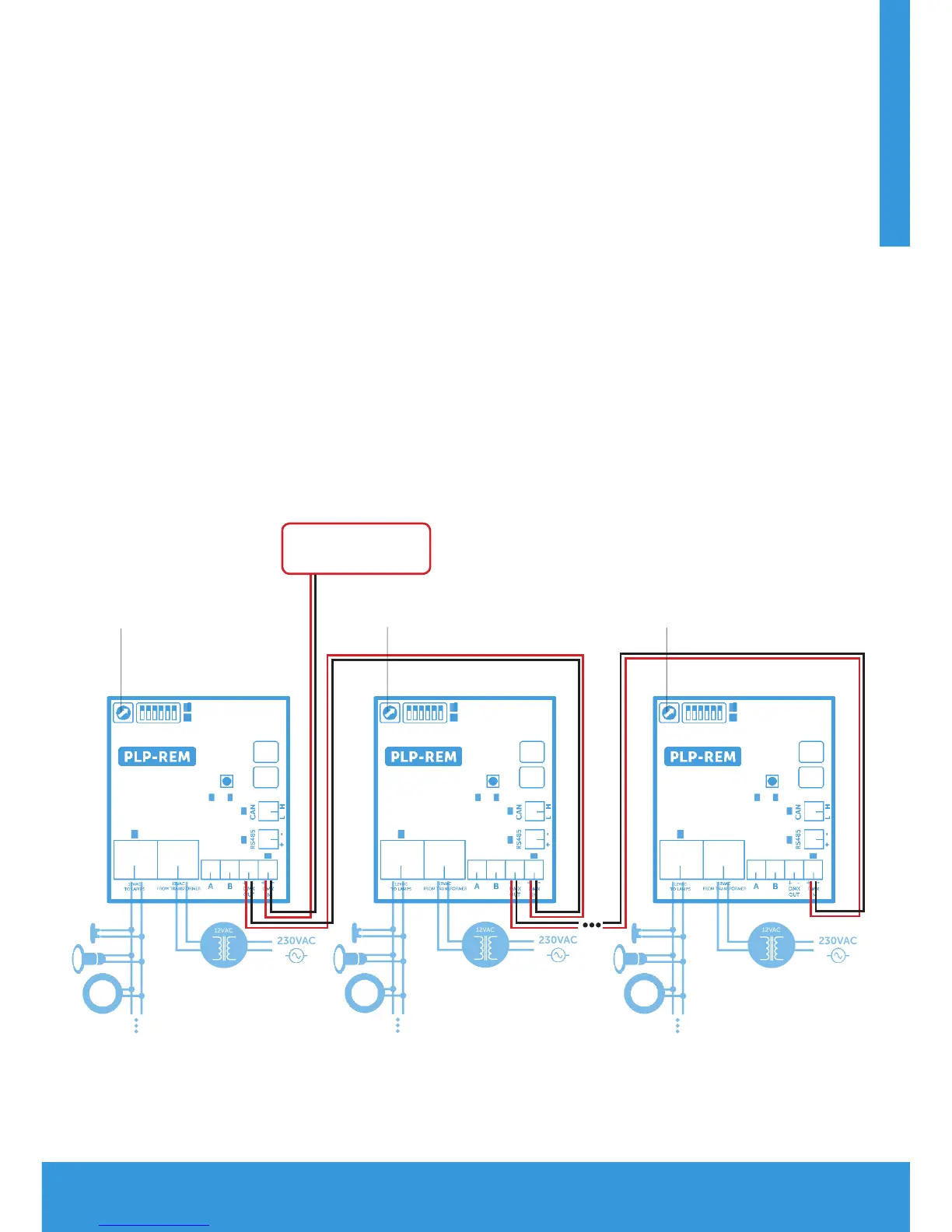
Multiple PLP-REM installation
1) Connect the DMX panel to the “DMX IN” port of the first PLP-REM
2) Connect the PLP-REM’s with each other (open loop):
DMX OUT --> DMX IN (polarized terminals + -)
3) Set the DMX address for each PLP-REM via the address dial.
- Option 1: All PLP-REM’s can be set to the same address:
This implies that all lamps will receive the same DMX data,
And will all operate identically
- Option 2: PLP-REM’s can be set to dierent addresses:
Each PLP-REM will have it’s own group of connected lamps
that will operate identically.
However, since each PLP-REM has it’s own unique address,
the dierent lamp groups can be controlled separately
DMX PANEL
Address dial
Address dial
Address dial


 To Next Page