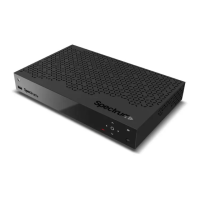
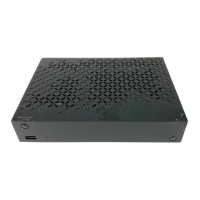
This document is a Quick Start Guide for the Spectrum110-H and Spectrum210-H HD Cable Digital Video Receivers. It provides essential information for safe installation, usage, and maintenance of the product.
Function Description:
The Spectrum110-H and Spectrum210-H are HD Cable Digital Video Receivers designed to receive and process digital video signals from a cable service provider. They serve as a central hub for connecting to a television, audio system, and network for media content and internet connectivity.
Important Safety Instructions and Warnings:
The guide emphasizes several safety precautions to ensure proper operation and prevent damage or injury. These include:
- Power Supply: Operate the product only from the specified power supply type. Disconnect power before maintenance or installation. Ensure wall outlets, extension cords, and adapters have sufficient power ratings to prevent electrical fire shock.
- Liquid Exposure: Do not expose the product to liquids or place liquid-filled objects on it.
- Cleaning: Disconnect from the wall outlet before cleaning. Use a moist cloth and avoid solvents.
- Ventilation: Ensure top slots are not blocked for adequate airflow. Do not place other electronic equipment or objects on the product to avoid blocking ventilation or causing surface damage.
- Attachments: Use only manufacturer-specified attachments to prevent hazards or damage.
- Lightning/Storms: Unplug the product and disconnect the antenna during thunderstorms or when unused for long periods to prevent damage from lightning and power surges.
- Extraneous Objects: Do not insert anything through openings that could touch dangerous voltage points or damage parts.
- Replacement Parts: If parts need replacement, ensure service technicians use manufacturer-specified parts or those with identical characteristics to the original. Unauthorized substitutions may cause further damage.
- Cable Connections: Disconnect the power supply before connecting or disconnecting cables from the satellite dish LNB/cable TV signal/aerial or the TV to prevent damage.
- Earthing (Satellite Only): Earth the LNB cable to the system earth for the satellite dish.
- Location: Place the product indoors away from lightning, rain, or sun. Avoid placing it near radiators or heat registers. Maintain at least 10 cm clearance from other appliances susceptible to electromagnetic influences (e.g., TV, VCR). If placed on a rack or bookcase, ensure adequate ventilation and follow manufacturer's mounting instructions. Do not place on unstable surfaces to prevent falls, which could cause injury or damage.
- Environment: Be mindful of battery disposal and use the apparatus in tropical and/or moderate climates.
- Power Cord/Plug Damage: Do not modify, bend, or twist the power cord or plug. Disconnect by holding the plug. Keep heating appliances away from the power cord. The mains plug must remain readily accessible as a disconnection device.
- Electrical Shock: Do not open the main body. Do not insert metal or inflammable objects. Do not touch the power plug with wet hands. Disconnect the power cord in case of lightning. Unplug the power cable before installing the antenna cable.
- Product Damage: Do not use the product if it is out of order; contact customer service. Do not insert metal or alien substances into module or Smartcard slots.
- Hard Disk Drive Damage (PVR only): Do not move the product or turn off power suddenly while the hard disk drive is running. The company is not liable for data corruption due to user carelessness or misuse.
- FCC Compliance: The device complies with Part 15 of FCC Rules, ensuring it does not cause harmful interference and accepts any received interference.
- RF Radiation Exposure: Complies with FCC RF exposure limits for an uncontrolled environment.
- Modifications: Any unauthorized changes or modifications could void the user's authority to operate the equipment.
- Antenna Installation: Antennas must be installed to provide at least 20 cm separation from all persons and not be co-located or operating with any other antenna or transmitter.
- Interference: The equipment is tested to comply with CLASS B digital device limits. If interference occurs, consult a dealer or experienced technician.
Usage Features:
Front Panel Controls:
- Power: Switches between operation and standby modes.
- Navigation: Moves the cursor (up, down, left, right), selects menus, or confirms selections.
- Menu: Displays navigation keys on the front panel.
- USB: Connects a USB storage device (5V 500mA).
- Reset: Restarts the product.
Note: The product information label is on the bottom of the product.
Rear Panel Connections:
- Cable In: Connects to a coaxial cable from the service provider.
- Network: Connects an Ethernet cable for Internet connection.
- USB: Connects a USB storage device for media content.
- HDMI: Uses an HDMI cable to connect a high-definition TV for the best picture quality.
- Digital: Uses an S/PDIF cable to connect to an audio system for digital audio.
- Analog: Uses an RCA cable to connect to an audio system.
- Power: Uses the AC adapter to connect to the power supply.
Connecting the Antenna:
- Connect a coaxial cable to the "Cable In" port.
Connecting the TV:
- Using an HDMI cable: Recommended for the best picture quality with a high-definition TV.
- Using an RCA cable: Provides lower resolution as HD signals cannot be transmitted via RCA.
Connecting the Network:
- Connecting to the LAN: Use an Ethernet cable to connect the product to a router.
Technical Specifications (Implied from connections and features):
- Video Output: HDMI (High-Definition Multimedia Interface), Analog (RCA).
- Audio Output: HDMI, Digital (S/PDIF), Analog (RCA).
- Data Ports: USB (5V 500mA), Ethernet (Network).
- Input: Coaxial cable (Cable In).
- Power: AC adapter (Power).
- Copy Protection: Incorporates copy protection technology protected by U.S. patents and Rovi Corporation intellectual property rights. Reverse engineering and disassembly are prohibited.
- Audio Technology: Manufactured under license from Dolby Laboratories; supports Dolby Audio.
Maintenance Features:
- Cleaning: Use a moist cloth; avoid solvents.
- Servicing: Refer all servicing to qualified service personnel, especially if the apparatus is damaged (e.g., power-supply cord, plug, liquid spills, objects fallen into, exposure to rain/moisture, abnormal operation, or drops).
Trademarks:
- Dolby, Dolby Audio, and the double-D symbol: Trademarks of Dolby Laboratories.
- HDMI Logo, and High-Definition Multimedia Interface: Trademarks and registered trademarks of HDMI Licensing LLC.

 Need help?

 To Next Page
 General