English-13
3.4.2 Apple AirPlay Audio Out
Click " " on the home screen to enter the Audio Out.
The sound is played from the speaker of the device.
1. Built-in Speaker
Screen Mirroring
NaviCam
4
When using AirPlay, please do not turn off
the screen of your phone to avoid discon-
nection.
If you want to switch to CarPlay or Android
Auto, please turn off Wi-Fi and disconnect
Apple AirPlay on your phone.
Note
Cancel Join
Enter Password
Password 12345678
Screen
Mirroring
2 3
Sign in to your iPhone
Airplane Mode
Spedal-*** >
On >
Settings
Wi-Fi
Bluetooth
1
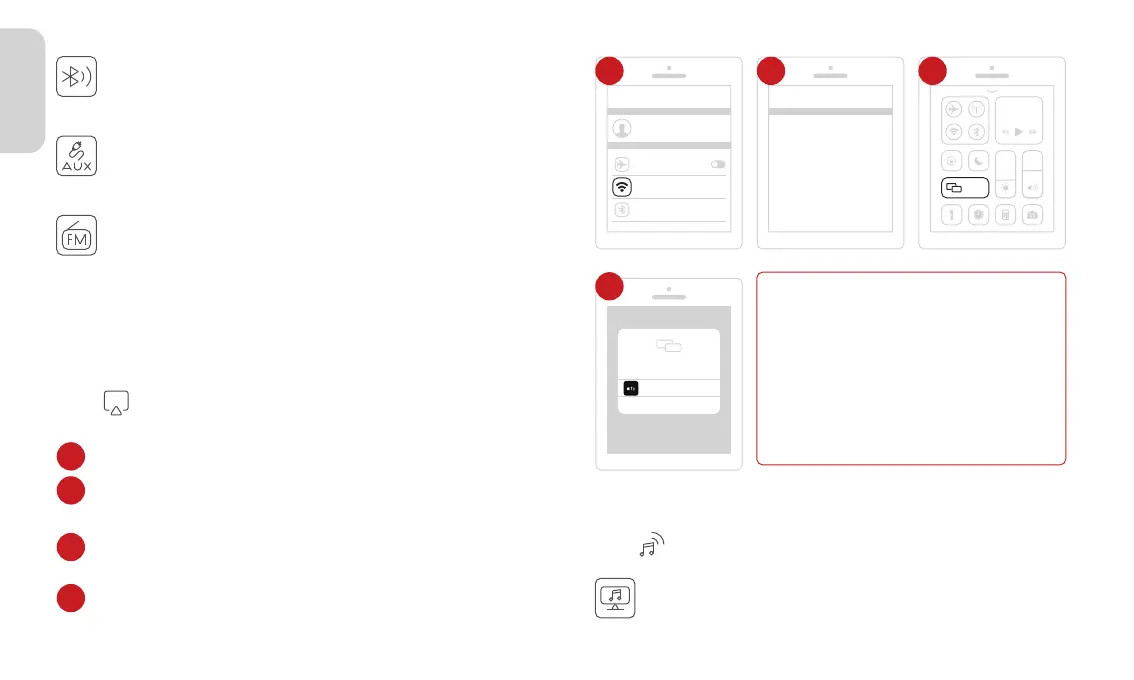
Click on NaviCam to complete Screen Mirroring.
4
Go to Settings on your iPhone > Wi-Fi.
Select the WiFi network with the name starting with
"Spedal-*****" and connect to it. Enter the password, the
default password is 12345678.
Swipe down from the top of the iPhone screen to access the
Control Center menu, then tap "Screen Mirroring".
1
2
3
Click " " on the home screen to enter the AirPlay.
3.4 Apple AirPlay
3.4.1 Apple AirPlay Wileless Connect
The same as the page 10--3.2.2--4.FM Transmitter.
4. FM Transmitter
The same as the page 09--3.2.2--3.Aux Connection.
3. AUX Connection
2. Bluetooth
The same as the page 09--3.2.2--2.Bluetooth.



 To Next Page