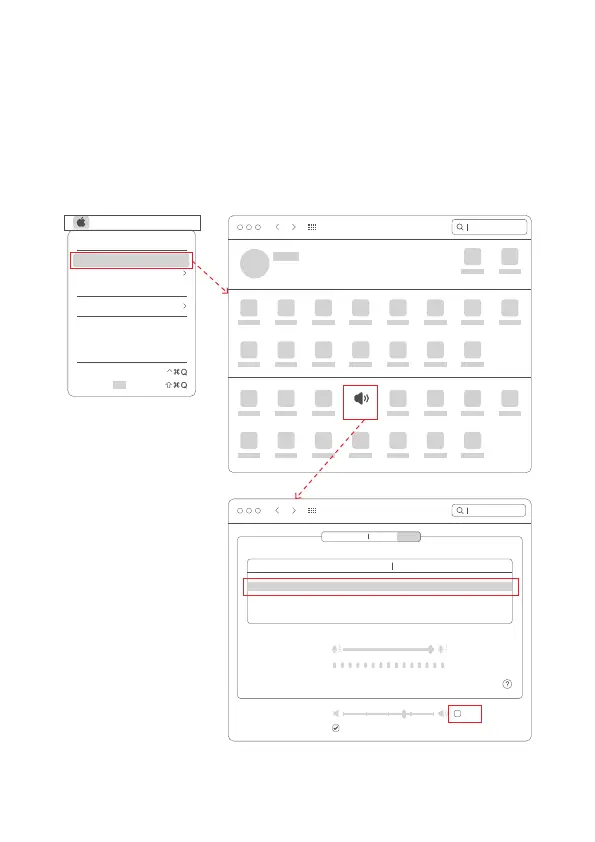
1. On the "System Preferences" page, click the "(Sound)" icon to enter the
"Sound" setting page;
2. In "Select a sound input device" under "Input", select "Spedal 4K
Camera" and adjust the input volume to a suitable level;
3. Select the appropriate output device under "Output", adjust the output
volume to a suitable level, and make sure that "Mute" is not checked.
3.2.3 Audio input (microphone), output (loudspeaker) settings
Search
Apple ID, iCloud, Media & App Store
Sound
System Preferences
SearchSound
Sound Effects
Select a device for sound input:
Name Type
Settings for the selected device:
Output Input
Built-in
USB
MacBook Pro Microphone
Spedal 4K Camera
Input volume:
Input level:
Output volume:
Mute
Show Sound in menu bar
File Edit
About This Mac
System Preferences...
Location
App Store...
Recent ltems
Sleep
Restart...
Shut Down...
Lock Screen
Log Out“ ”...
01 02 03 04
05 06 07 08 09
10 11 12 13
14
15 16 17 18 19



 To Next Page