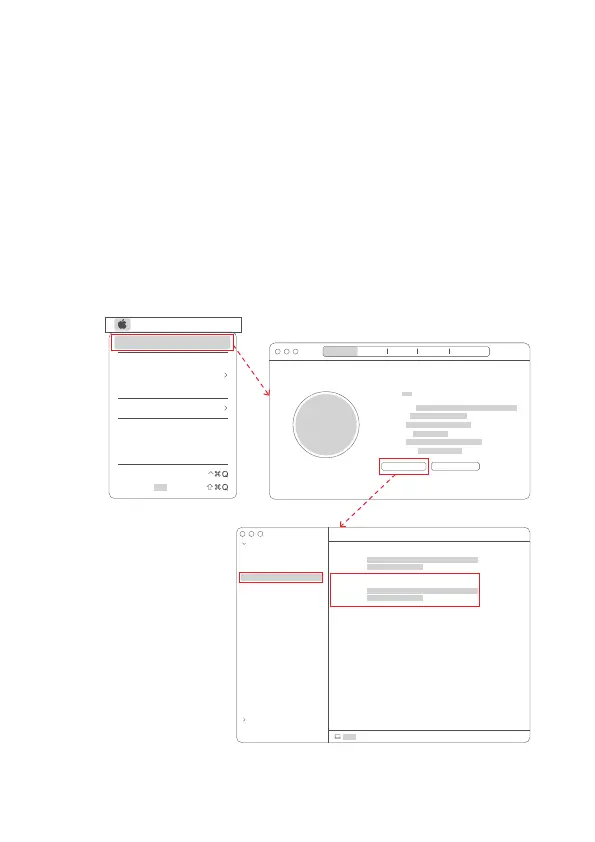
3.2 Mac OS X System Settings
When you connect the camera to the computer, the camera will be installed
automatically. No need to download and install any drivers in advance.
3.2.1 Installation
1.Mouse click the apple "menu", click "About this machine", the "System
Report" pops up;
2. Pull down "Hardware-Camera", if it shows "Spedal 4K Camera", the
installation is successful.
3.2.2 Check
File Edit
About This Mac
System Preferences...
Location
App Store...
Recent ltems
Sleep
Restart...
Shut Down...
Lock Screen
Log Out“ ”...
Overview Displays
Version
Storage Support Resources
MacBook Pro
Processor
Memory
Startup Disk
Graphics
Serial Number
macOS Monterey
System Report... Software Update...
Model ID:
Unique ID:
Hardware
Network
FaceTime HD Camera(Built-in):
Spedal 4K Camera:
MacBook Pro
Model ID:
Unique ID:
MacBook Pro > Hardware > Camera
ATA
Apple Pay
Audio
Bluetooth
Camera
Card Reader
Controller
Diagnostics
Disc Burning
Ethernet
Fibre Channel
FireWire
Graphics/Displays
Memory
NVMExpress
PCl
Parallel scsI
Power
Printers
SAS
SATA
SPl
Storage
Thunderbolt/USB4
USB
01 02 03 04
05 06 07 08 09
10 11 12
13 14
15 16 17 18 19



 To Next Page