Need help?
Do you have a question about the SpeedFun Ribelle and is the answer not in the manual?
Remove plastic casings and disconnect original display and speed sensor connectors.
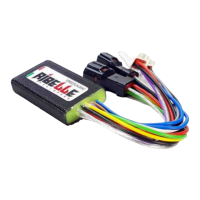
Connect Ribelle connectors 3, 5, 4, and 6 to designated ports and removed original connectors.
Position Ribelle device facing wires down, protected from water, and close plastic casings carefully.
Toggle speed release ON/OFF using WALK button or +/- sequence, confirmed by display codes.
Adjust maximum assisted speed limit via sequence, WALK button, or rear wheel rotation.
Due to increased speeds, wearing a protective helmet is essential for rider safety.
Device may classify bike as moped; non-compliance incurs penalties. Manufacturer disclaims liability and voids warranty.
 General
| Brand | SpeedFun |
|---|---|
| Model | Ribelle |
| Category | Bicycle Accessories |
| Language | English |

 To Next Page