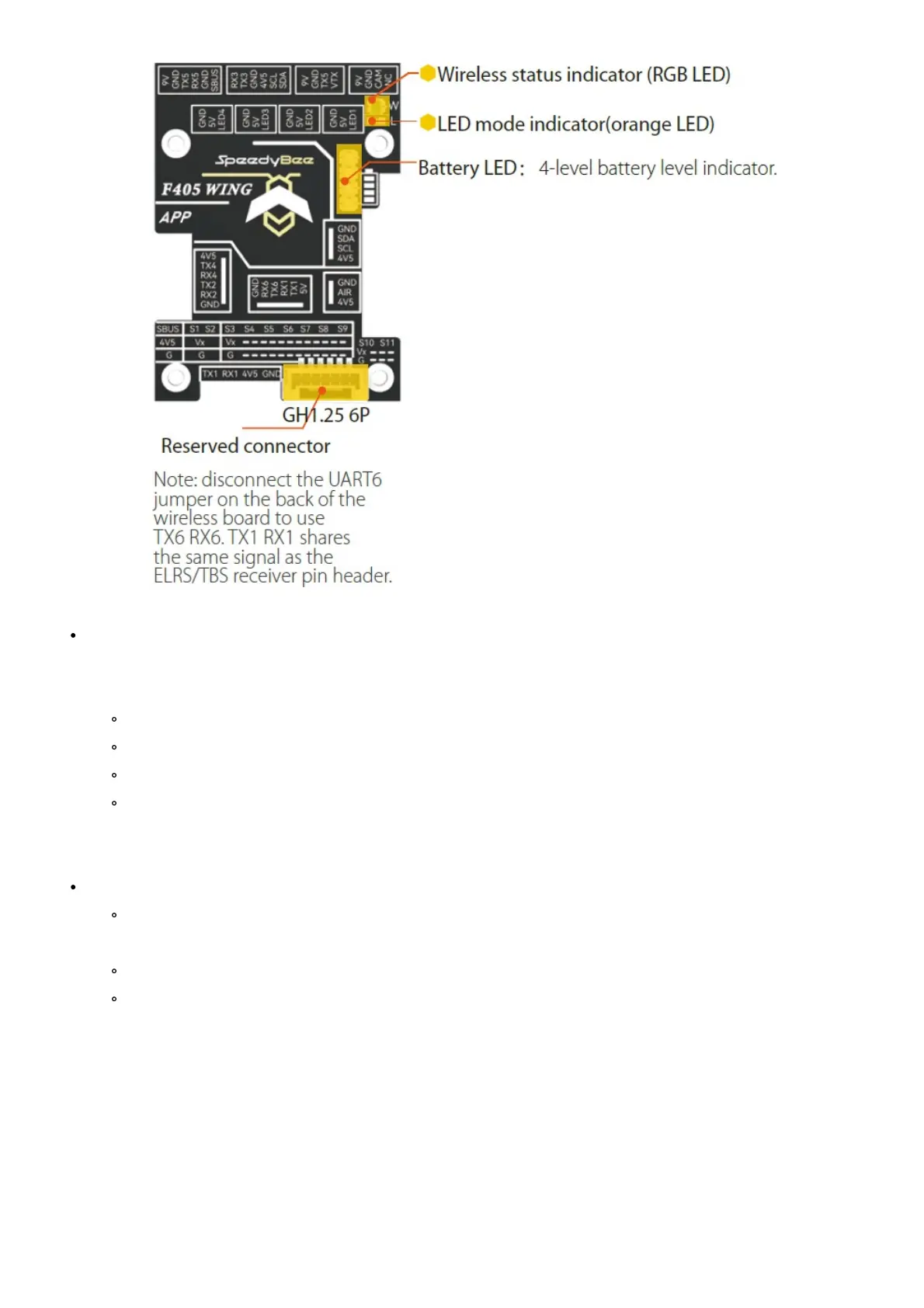
Wireless status indicator (RGB LED)
The wireless board has built-in telemetry function , which includes 4 RF modes: Bluetooth BLE, Wi-Fi, classic
Bluetooth SPP, and wireless off mode.w
Green: low power Bluetooth BLE mode.
White: Wi-Fi mode.
Blue: classic Bluetooth mode.
The RGB LED is off: wireless off mode
Press and hold the BOOT button for 3seconds to switch between the 4 wireless modes. A quick flashing
yellow LED indicates a successful mode switch.
LED mode indicator(orange LED):
Orange light always on: Solid orange LED means the 4 sets of LED strips are in SB_LED mode,
controlled by the wireless chip. A short press of the
BOOT button cycles through different display effects when the FC is operating normally.
Orange light is off – Off orange LED indicates FC_LED mode, where the FC controls the 4 sets of LED
strips directly. Press and hold the BOOT button for 2 seconds to switch between FC_LED mode and
SB_LED mode



 To Next Page