RX
TX
5V
G
SBUS
5V
GND
TX
5V
G
RX
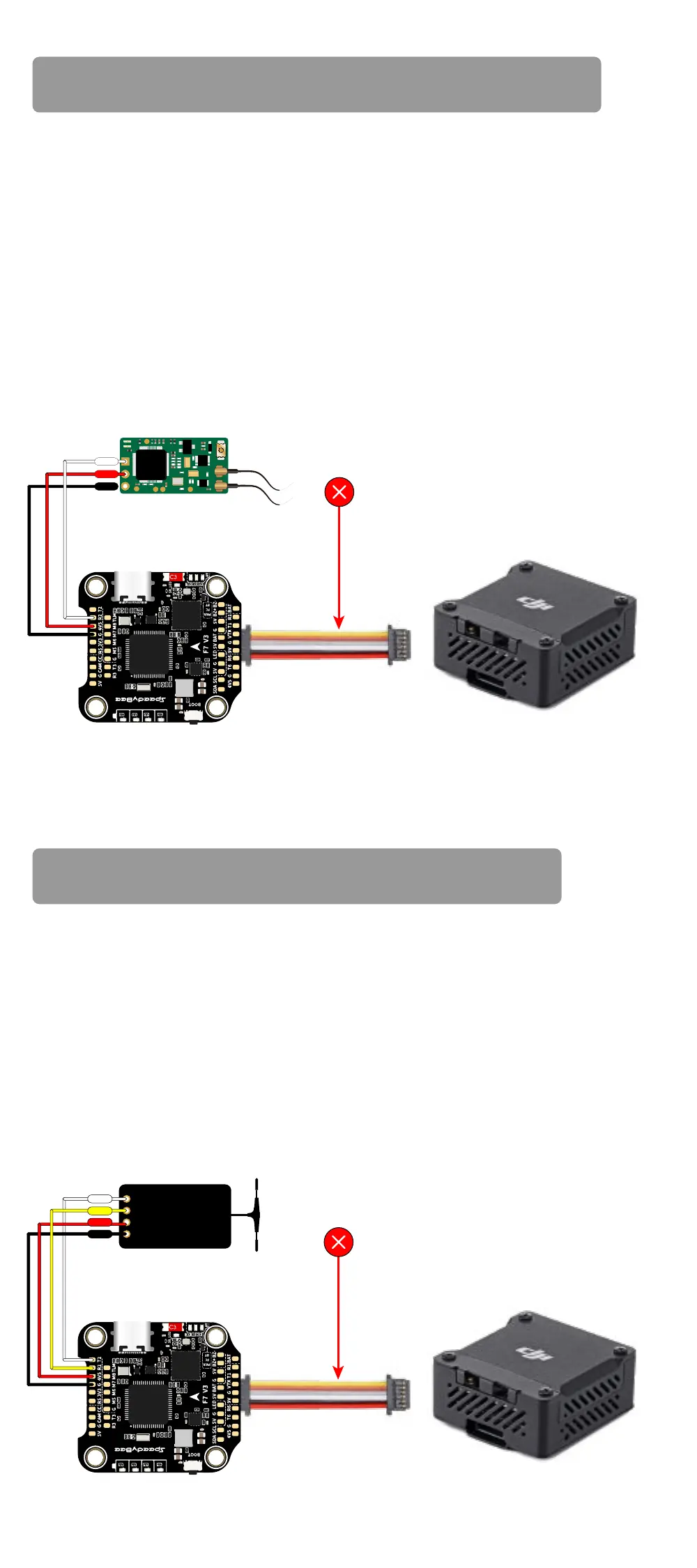
Impoance notice for SBUS receiver
Impoance notice for ELRS receiver
SBUS Receiver
When using an SBUS receiver,
the SBUS signal wire of the receiver
must be connected to the SBUS pad on the front side of the
ight controller
(this pad internally uses UART2).
If you are also using the DJI Air Unit(O3/Link/Vista/Air Unit V1),
you will need to disconnect the SBUS signal wire from the
Air Unit harness. Failure to do so will prevent the SBUS receiver
from being properly recognized by the ight controller. You can
use tweezers to pick out the SBUS wire from the 6-pin harness
connector (or directly cut this wire) and insulate the exposed
pa of the wire carefully.
We recommend connecting the ELRS receiver's TX and RX to the
T2 and R2 pads on the ight controller. However, when using the
DJI Air Unit simultaneously, some ELRS receivers may not be
recognized properly by the ight controller.
If you encounter
this issue, you need to disconnect the SBUS signal wire from
the Air Unit harness.
You can use tweezers to pick out the
SBUS wire from the 6-pin harness connector
(or directly cut this wire) and insulate the exposed
pa of the wire carefully.
Do NOT connect this wire to assure
the external SBUS receiver work properly!
DJI O3/Vista/Link/Air Unit V1F405 V4 Flight Controller
SBUS Receiver
For some ELRS receivers, it is
necessa to disconnect this wire
in order to function properly!
DJI O3/Vista/Link/Air Unit V1F405 V4 Flight Controller


 To Next Page