EN
11
Nose-wheel -Continued-
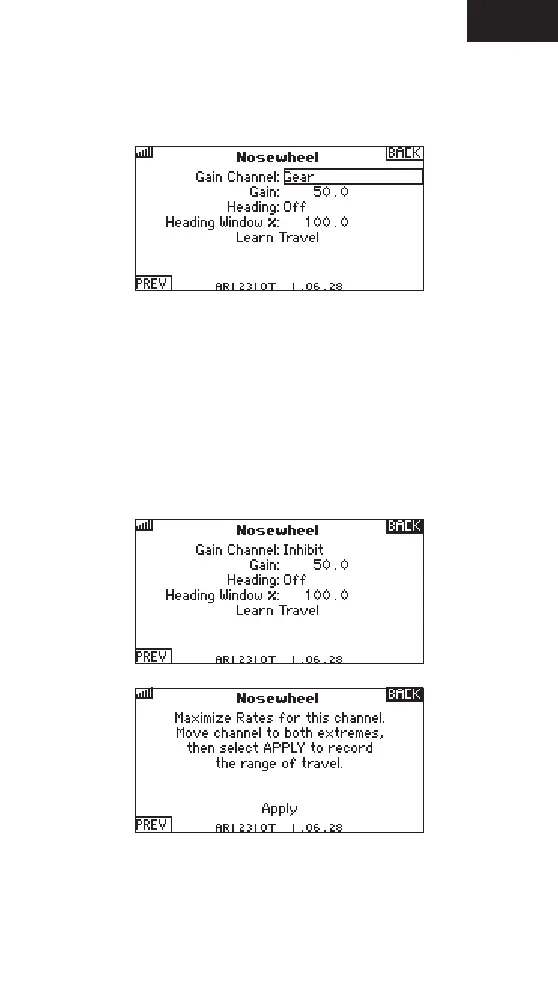
1. Gain channel can be used to select a channel to independently control the
gain for the nose-wheel. This can be he same channel used for the primary
ight control gains, or an independent channel.
2. Heading can be turned On or Off.
3. Heading Window % is used to change the range of heading travel on the
nose-wheel. This is used to reduce the heading travel only using heading
hold. It does not affect overall travel, but the travel the heading hold will
drive the nose-gear.
4. Gain - The maximum gain for the nose-wheel is independent of the systems
yaw gain. This gain is to set the gain for the nose-wheel only.
5. Learn Travel is used to teach the receiver and AS3000 the transmitters
travel settings on the nose-wheel channel. Press apply after maximizing the
rates and moving the channel to the extremes.



 To Next Page
 Loading...