User Manual, Spintso Referee Watch S1 PRO, vers 3.0
5 (32)
5. Connect to app
5.1. SMARTPhone installation
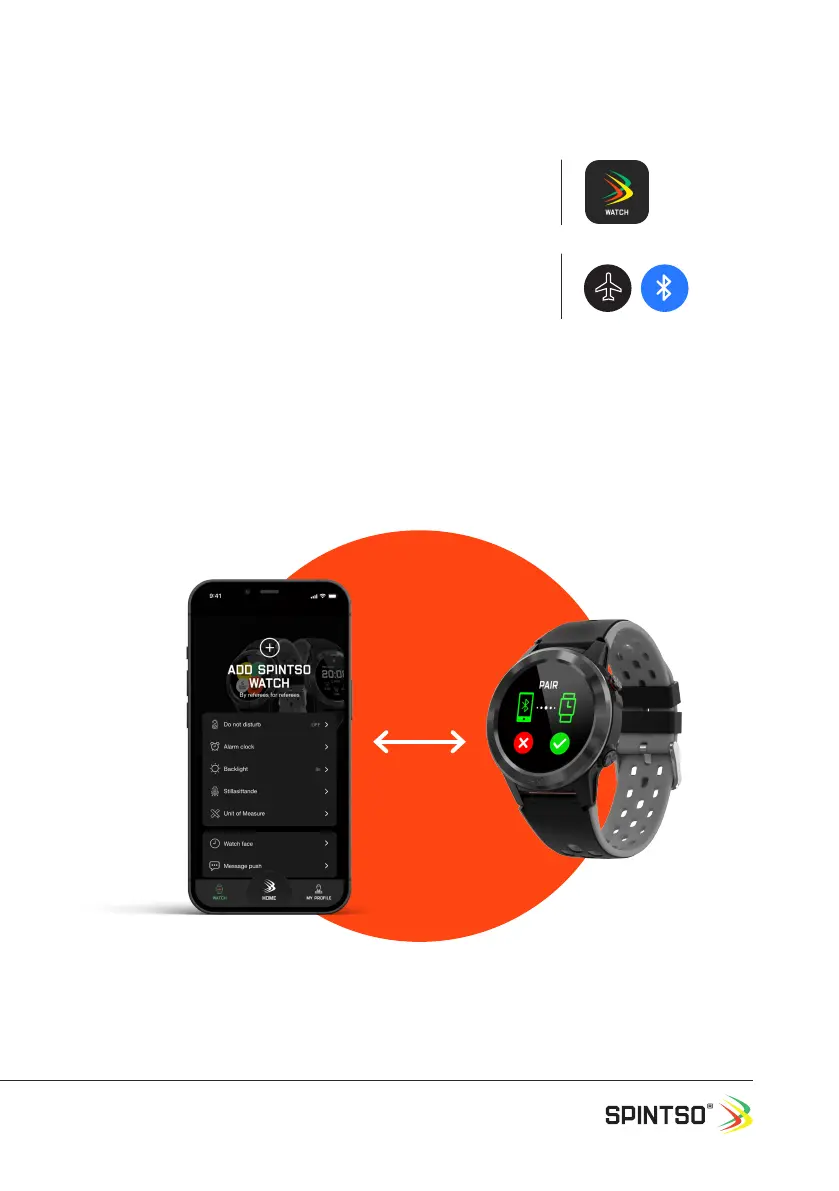
Search for “Spintso watch” on the App Store for iPhone, or on
Google Play for Android. Install Spintso App on your phone.
5.2. Connect watch
Check that Bluetooth is enabled on your phone and on your watch.
Phone: Normally a Blue Bluetooth symbol.
Watch: White ight mode symbol. (Default)
Open the Spintso watch app on your phone and select the “WATCH” tab. Then select “ADD SPINTSO
WATCH”. Wait until your Spintso watch appear in the list below and then select S1 PRO. Finally con-
rm the new pairing by selection on your watch.
The Spintso App may ask you to update the watch software. If battery status is greater than 50% you
can select yes to update.


 To Next Page