User Manual, Spintso Referee Watch S1 PRO, vers 3.0
8 (32)
7. Referee functions
Available referee functions are Referee watch, Interval training watch, Stop-watch, and Activity record.
A function is selected by tapping on the applicable bubble.
7.1. Referee watch
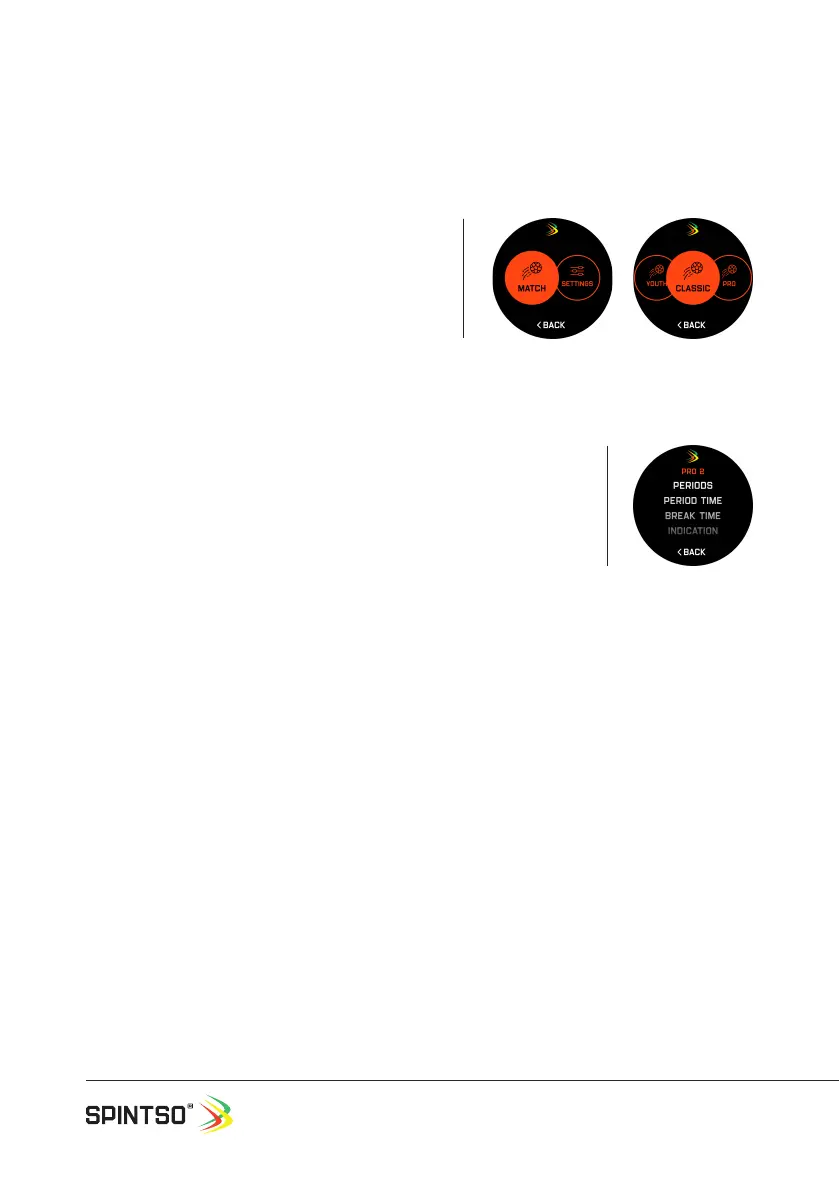
The watch offers three different match clocks. Classic,
Youth and Pro. Classic is the traditional match clock
and works similar to our previous watches. Youth
is a match clock where goals and penalties can be
registered. PRO is a new advanced match clock where
Goals, cards and substitutions can be assigned to
players and registered. All matches are set individually
to prepare for three different kind of matches.
7.1.1. Match settings
Match settings can be set-up in two ways. On the watch, or from the
Spintso App.
On the watch: Touch the screen to select Match settings. Then select
CLASSIC, YOUTH or PRO.
From the app: Choose HOME tab and select “Set up match”.
All settings and how they are congured from the watch is described below..
PERIODS: Set between 1 and 9 periods. Conrm by pressing button A or cancel by swiping to the
right.
PERIOD TIME: Set individual period time between 00:00 and 99:59. (mm:ss). Conrm all period time
settings by pressing button A. Press button B, or swipe to the left to view the time of the next period.
Exit by swiping to the right.
BREAK TIME: Set individual break time between 00:00 and 99:59. (mm:ss). Conrm all break time
settings by pressing button A. Press button B, or swipe to the left to view the time of the next period.
Exit by swiping to the right.
INDICATION: Set vibration strength between 1 and 5, or off. Conrm by pressing button A or cancel by
swiping to the right.
START/STOP: This option denes how to start, pause, and restart the match with button A. Select
SHORT PRESS, LONG PRESS or DOUBLE PRESS by touching the screen. Conrm the selection by
pressing button A, or cancel by swiping to the right.
SHORT PRESS: Button A activates immediately.
LONG PRESS: Button A activates after being pressed down for 1,5 sec. (Prevents from accidental
button press).
DOUBLE PRESS: Button A activates immediately at the second press. (Prevents from accidental
button press, but the time is controlled faster compared to LONG PRESS).


 To Next Page