User Manual, Spintso Referee Watch S1 PRO, vers 2.0
6 (30)
User Manual, Spintso Referee Watch S1 PRO, vers 2.0
7 (30)
6.3.2 Short-cuts
.
6.3.2 Functions
6.4. Deactivation
Select Power-Off in Settings or press and hold button A for 16 seconds to turn off the watch.
6. General handling
6.1. Screen wake-up
Screen is activated by either pressing button A, or by turning the wrist. The screen fades and deac-
tivates automatically after a congurable time. During fading, the screen can be tapped to keep the
screen active.
6.2. Change clock-face
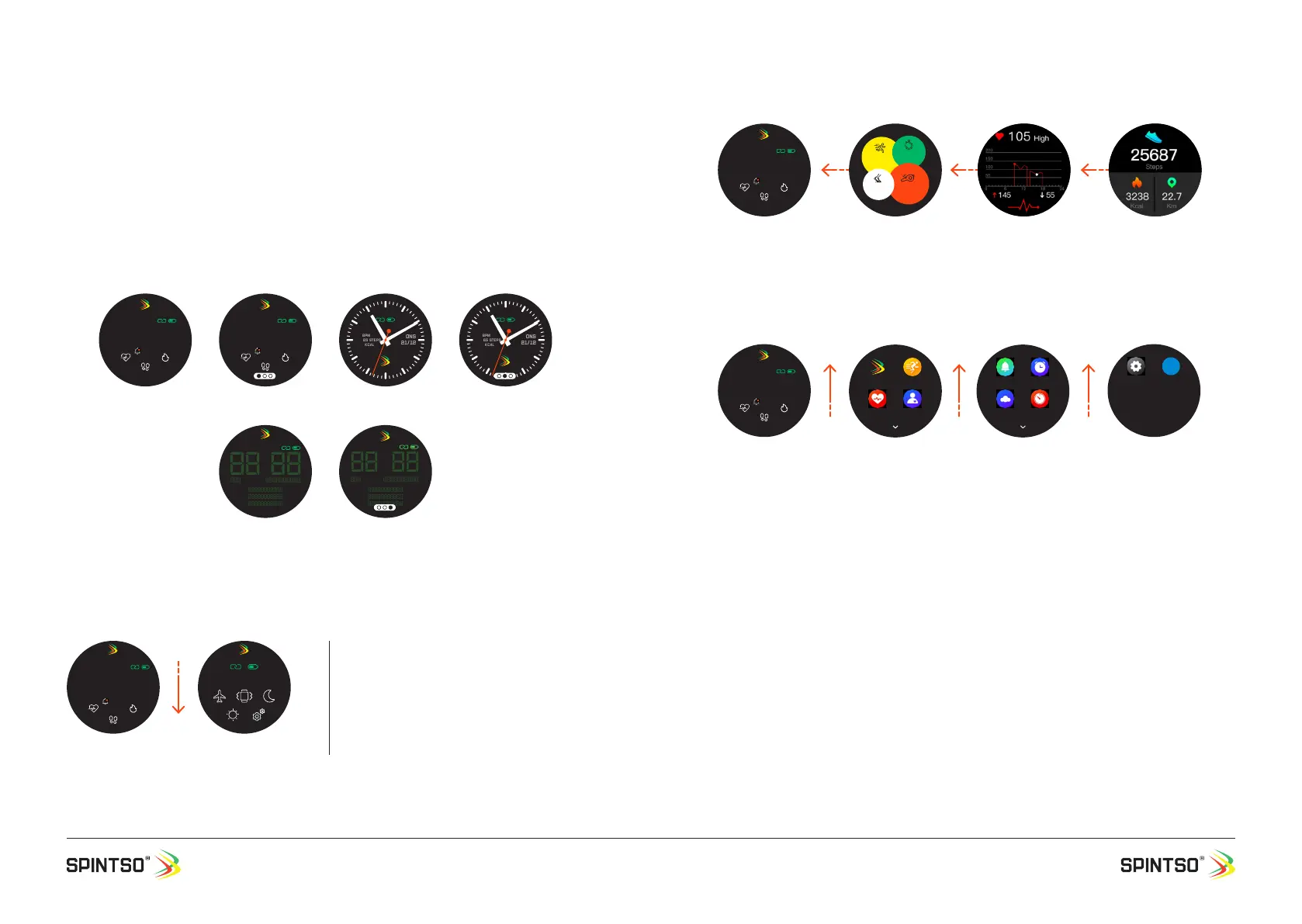
Changing clock-face is made when the watch show your current clock-face. Press on the touch-
screen until three small dots appear. Swipe to the right or to the left to change between the different
clock-faces. Select the clock-face you prefer by pressing the screen until the three dots disappear.
6.3. Navigation from home screen
6.3.1 Settings
20:08
ONS 21/12
79 BPM
16365
568 kcal
16:30
20:
47
ONS 2021-12-21
78 bpm
16365 steps
568 kcal
79 BPM
16365 steps
568 kcal
ONS
21/12
79 BPM
16365 steps
568 kcal
ONS
21/12
20:
47
ONS 2021-12-21
78 bpm
16365 steps
568 kcal
20:08
ONS 21/12
79 BPM
16365
568 kcal
16:30
Spintso Classic
Retro
20:08
ONS 21/12
79 BPM
16365
568 kcal
16:30
21/12, onsdag
Home Settings
Swipe down to go to settings.
Return to home screen by swiping up, or by
pressing button A
20:08
ONS 21/12
79 BPM
16365
568 kcal
16:30
Home Referee functions Heart Rate Daily health data
Stop
Watch
45
Interval
Training
Referee
Watch
Activity
Record
Return to home screen by swiping right/left, or by pressing button A
20:08
ONS 21/12
79 BPM
16365
568 kcal
16:30
Home
Spintso Sports
Heart Blood Pr.
Functions 1
Notice ALARM
Weather Timer
Functions 2
SETTINGS App
Functions 3
Return to home screen by swiping right, or by pressing button A


 To Next Page