IM-S27-12 CH Issue 1 9
5. SX100e Commissioning
instructions
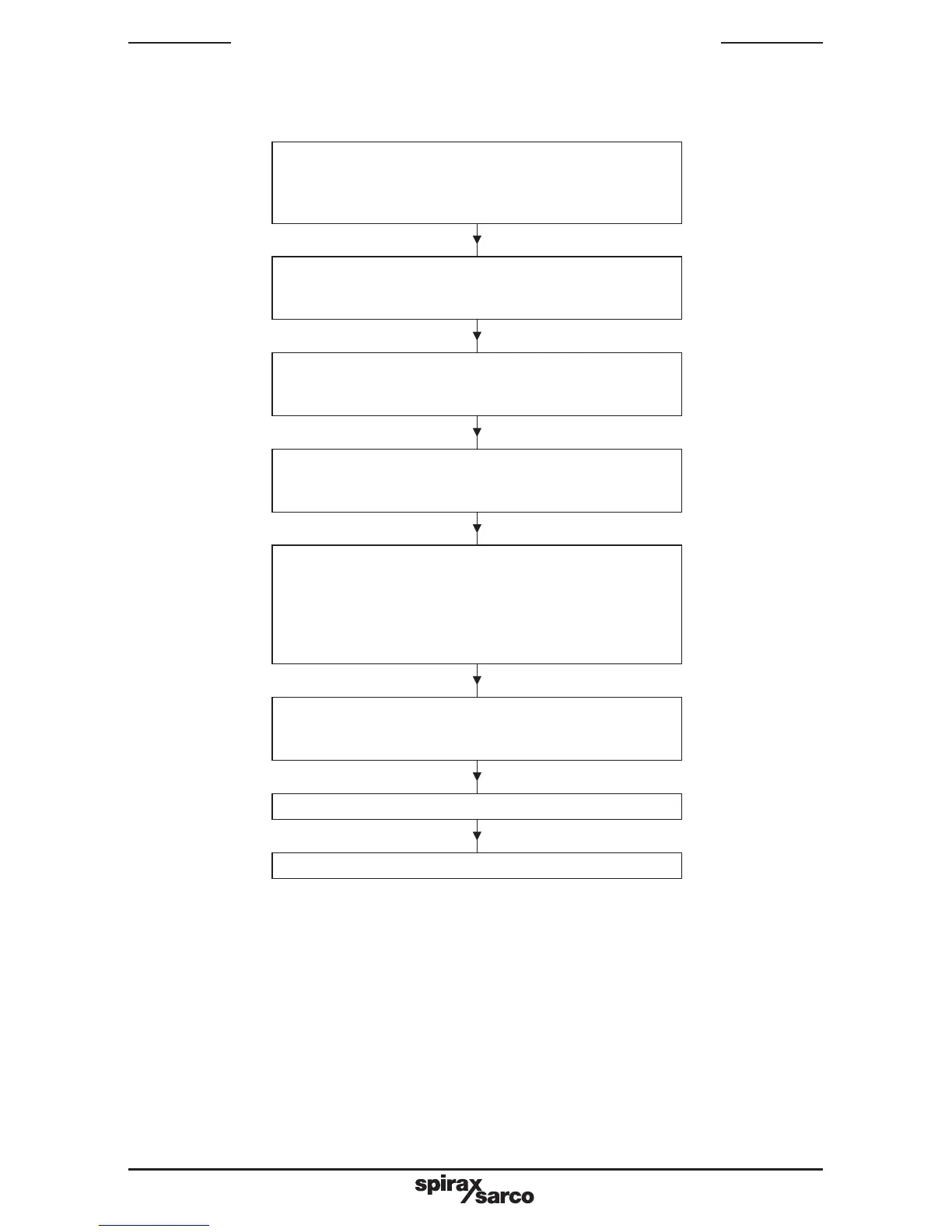
Go to 'normal' configuration mode
(ref. section 5.1)
then before making changes in this mode, go to
hardware configuration mode
Go to program define mode
(ref. section 5.5)
make changes to parameters as required
If 4 dots appear on the upper display -
this indicates that changes to configuration above
have invalidated any program define settings
previously made.
if so, check all program define parameters below
and adjust as necessary
Go to controller define mode
(ref. section 5.4)
make changes to parameters as required
Return to 'normal configuration mode
(ref. section 5.3)
make changes to parameters as required
Hardware configuration mode
(ref. section 5.2)
make changes to parameters as required
Go to base mode
Fig. 2 Initial commissioning sequence
Follow the steps below (5.1 to 5.5) to ensure that controller is configured correctly. (Each table
describes how to enter and exit from the appropriate mode)
5.1 Normal configuration
-
Table 4 - 'Normal' configuration mode parameters.
(N.B. - If changes are to be made to hardware configuration, do these first. otherwise the
expected options may not be displayed – ref. 5.2 below)







 To Next Page