8
Surround Monitor Controller 2489
Volume control
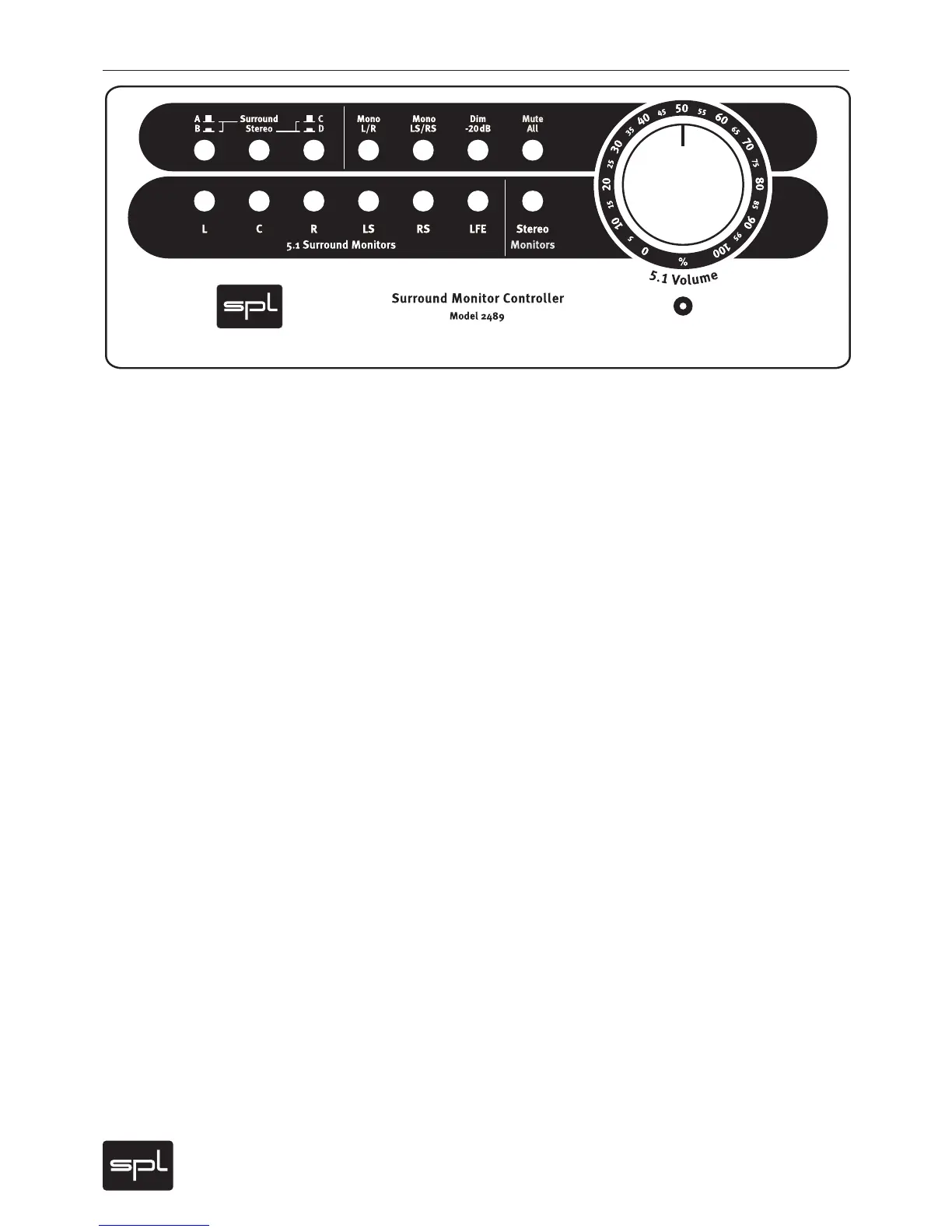
The volume is centrally controlled for all channels via a discrete six-level
potentiometer with an extremely linear curve. The potentiometer controls the
audio signals directly without any signal-degenerating circuitry such as VCA‘s
or DAC‘s, which tend to create excessive tolerances between channels as well
as distortion. The white circle with the potency scale can be easily marked
using a pencil.
Source
The SOURCE buttons allow easy switching between surround and stereo
sources (inputs). Two surround and two stereo sources are available.
The middle button selects between surround and stereo sources. When
depressed (in), the stereo sources are active; when not depressed (out) the
surround sources are selected.
The left button selects either surround source A (out) and B (in), while the
right button selects either stereo source C (out) or D (in).
Monitor Mode
The MONITOR MODE buttons provide various monitoring functions: MONO
L/R, MONO LS/RS, DIM -20 and MUTE ALL.
MONO L/R and MONO LS/RS switches the front L and R channels and the rear
LS and RS channels to mono, respectively, and can be used to check phase
correlation. The MONO LS/RS mode has no effect when a stereo speaker pair
is selected.
DIM lowers the monitor volume by -20 dB without changing the volume
pot setting, for example to control a mix at low volume (or to answer the
phone…).
MUTE ALL does exactly what it says: it mutes all speaker outputs.
Operation


 To Next Page