6 7
First Name
Last Name
Email Addres s
Password
Confirm Password
CREATE ACCOUNT
or
Login with Facebook
SIGN IN
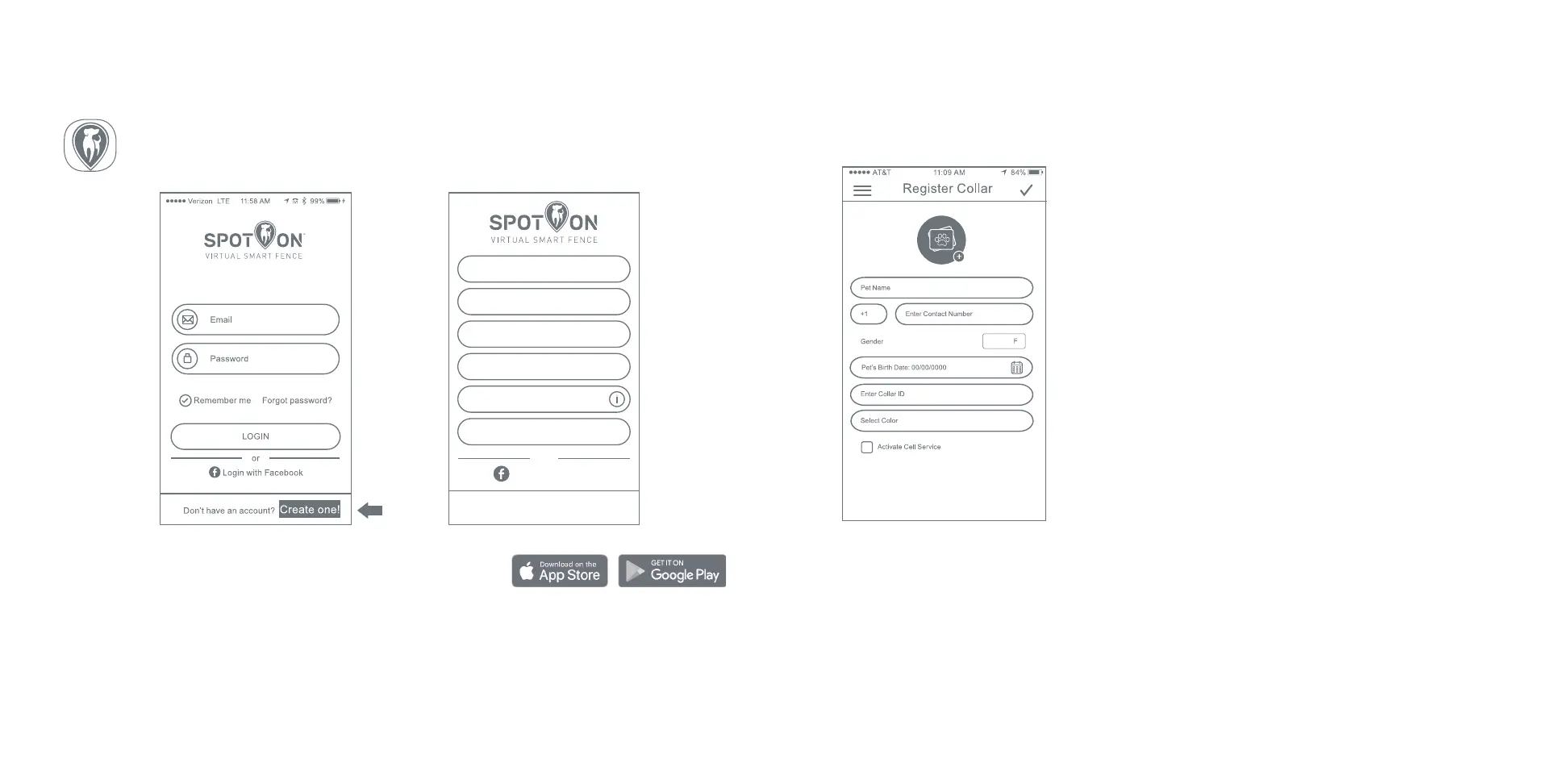
1. Download and install the free mobile app for your
smartphone at either the Apple or Google Play stores.
2. Open the app and tap CREATE ONE! to create an account.
3. Enter your information and tap CREATE ACCOUNT.
4. Visit your email inbox and activate your account. If you do not receive an email,
be sure to check your spam/junk folder.
STEP 2: CREATE A SpotOn ACCOUNT
SpotOn smartphone apps are available for both iOS and Android devices. The app
allows you to register your collar, receive notifications, view maps, and access training
features. Follow these steps to get started:
STEP 3: REGISTER YOUR SMART COLLAR
The first time you log into the SpotOn app, you’ll be prompted to register your collar.
Follow these steps:
1. Enter your dog’s name, gender, and birth date.
2. Enter your contact phone number, 8-digit Collar ID
located on the back of your Smart Collar, and
select a color to represent your dog’s icon on the
app’s map screens.
3. Add a photograph of your dog.
4. Click the check mark in the upper right corner of
the screen.
Your SpotOn Smart Collar is now registered!
Note: if the collar is registered before tracking is activated,
a generic home screen will appear on the collar until tracking
activation is complete.
Helpful Hints:
• While cell connectivity isn’t required to set up and use your Virtual Smart Fence, for a small
monthly fee, it’s a lifesaver. The SpotOn Smart Collar uses a subscription-based cellular con-
nection to give you instant access to your dog’s location at any time.
• Invite other family members to create maps, track your pup, and receive notifications. In
Account Settings, select FAMILY MEMBER ACCESS and enter email addresses for the family
members you would like to invite their accounts will automatically be linked to your dog’s
collar.


 To Next Page