EasyManua.ls Logo

Spring Well CSS1 - Softener Configuration: SS1 Model; Adjusting SS1 Regeneration and Capacity

Spring Well CSS1
23 pages
Print Icon
To Next Page IconTo Next Page
To Previous Page IconTo Previous Page
Loading...
Questions? Call (800)-589-5592 21
Whole House Filter and Water Softener
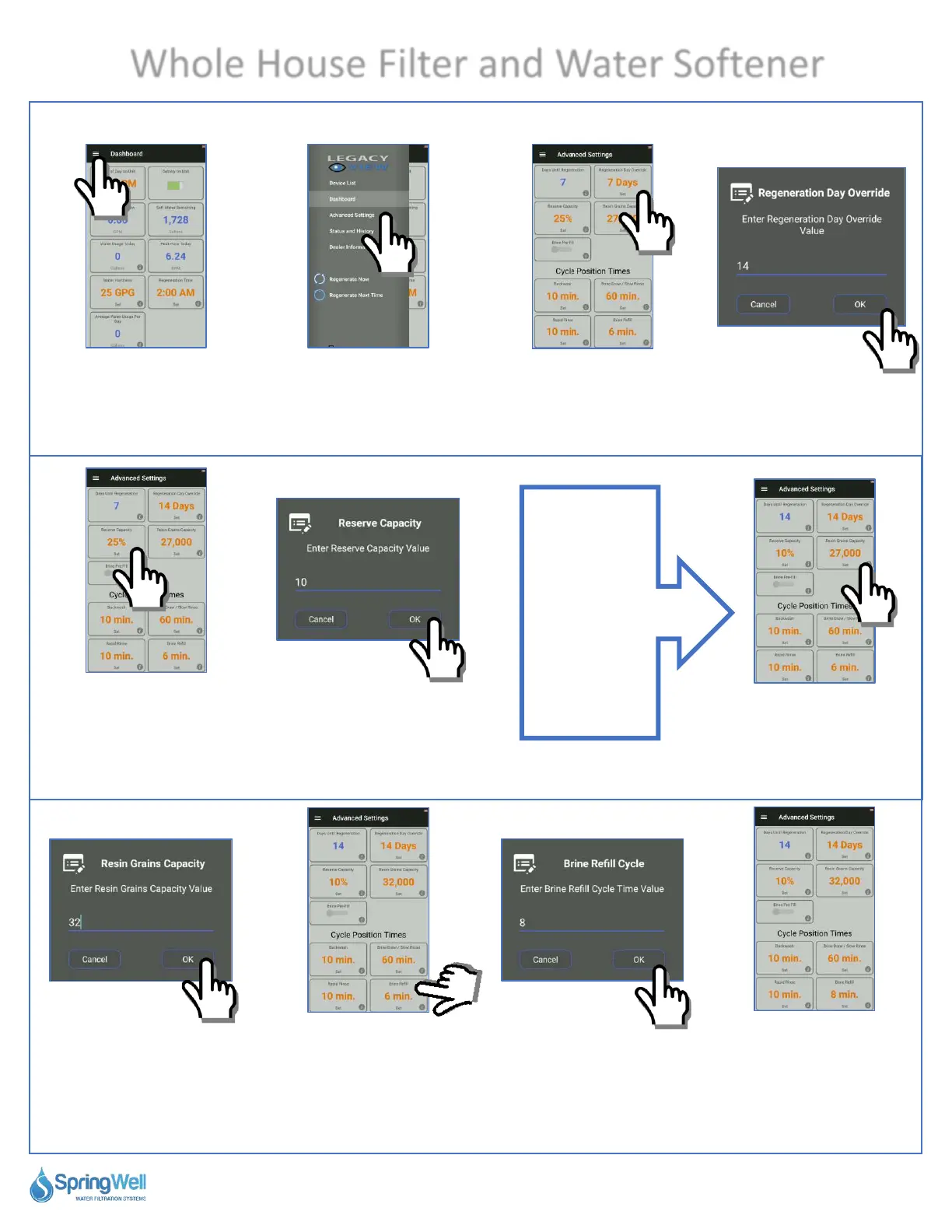
Setting Softener Values
108) Select the
menu icon in the
upper left-hand
corner.
109) Select “Advanced
Settings.”
110) Tap
“Regeneration Day
Override.”
111) Change the
value to 14 days.
112) Tap “Reserve
Capacity.”
113) Change the value
to 10%.
114) Tap “Resin
Grains Capacity.”
115) Change the
value to 32 for
32,000.
116) Select “Brine
Refill.”
117) Change the
value to 8 min.
118) Recap of
settings for SS1
system.
Next Steps
114 to 118
are for SS1
Systems.
Skip to step 119
for SS4 systems.

Related product manuals