EasyManua.ls Logo

Spring Well CSS1 - Softener Configuration: SS4 Model; Finalizing SS4 System Parameters

Spring Well CSS1
23 pages
Print Icon
To Next Page IconTo Next Page
To Previous Page IconTo Previous Page
Loading...
Next Steps
119 to 123
are for SS4
Systems.
Refer to step 114
for SS1 systems.
Questions? Call (800)-589-5592 22
Whole House Filter and Water Softener
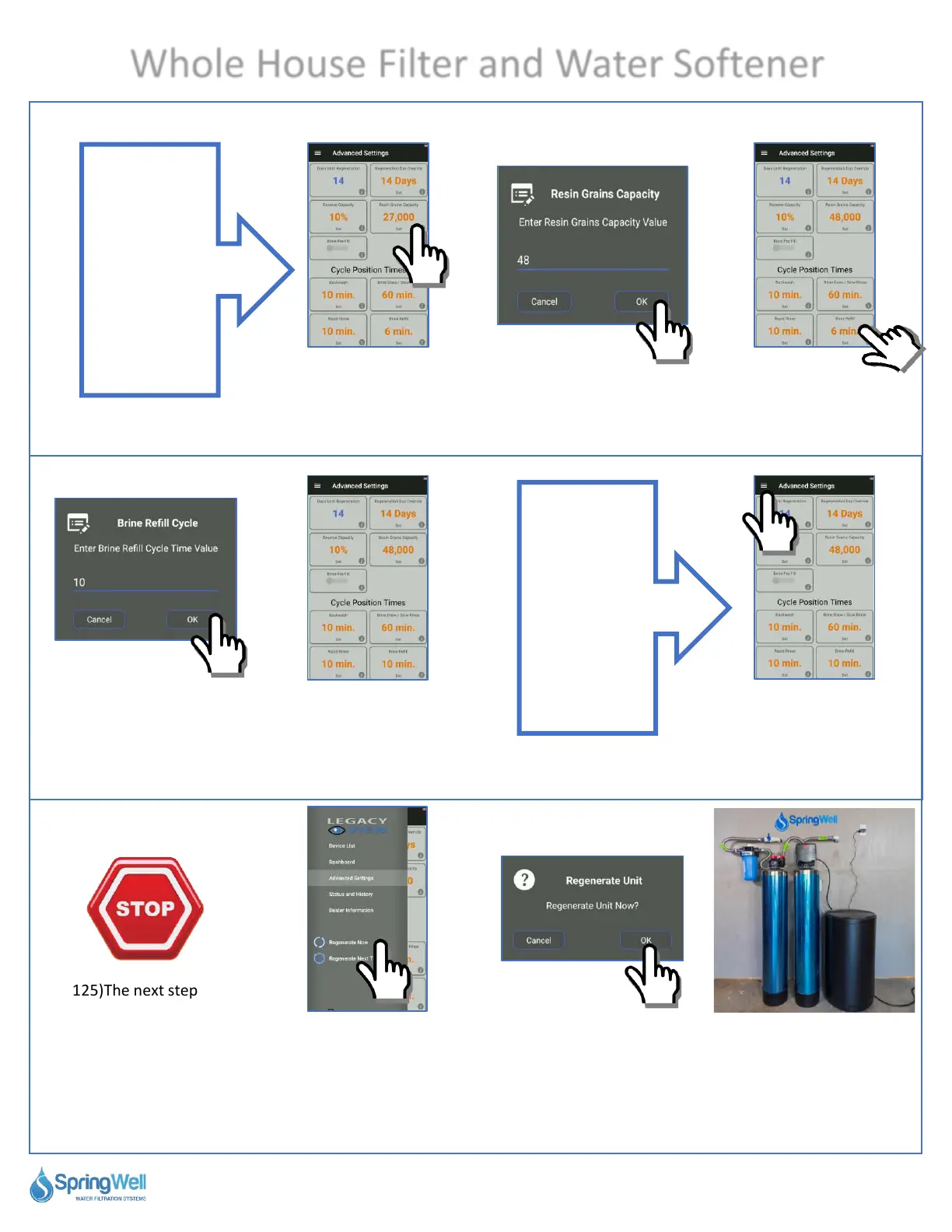
Setting Softener Values
120) Enter 48 for
48,000.
121) Select “Brine
Refill.”
122) Set the value to
10 minutes.
123) Correct values for
SS4 system.
124) Tap the menu
icon in the upper
left-hand corner.
125)The next step
will force you to
regen your system.
During this time you
will not be able to
use your water for
90 minutes.
126) Select “Regenerate
Now.”
127) Select “OK”
from the pop up and
the system will
regen for 90
minutes.
128) Once the regen
is done, your system
is ready to use.
119) Tap “Resin
Grains Capacity.”
Steps
from here
apply to
both
versions

Related product manuals