Removing Power From The PC Card
When the PCS Connection Card is connected to the computer it has power
and is trying to communicate with the network. To remove power, the
card must be ejected from the PC Card slot.
Removing the PCS Connection Card
To remove the card:
1. Close the PCS Connection Manager if it is open.
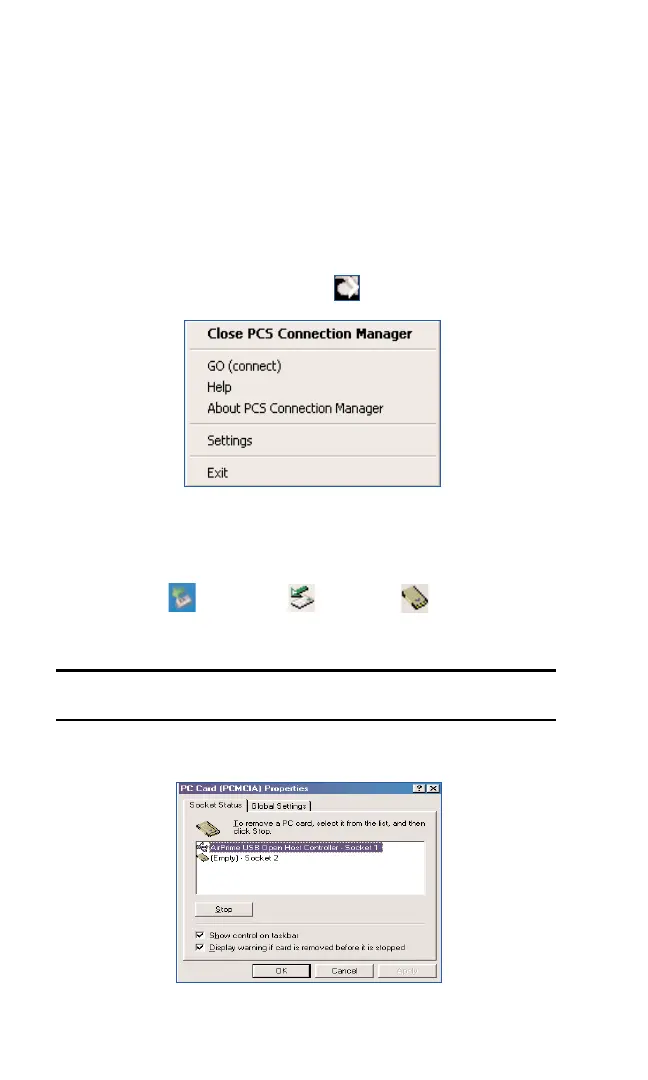
2. Right Click on the System Tray icon
3. SelectExit
4.
After the PCS Connection Manager has exited, go to the task bar and
double click on the
Unplug and Eject Hardware icon.
Note: The window display in steps 5and 6may differ across Operating
Systems.
5. Select AirPrime USB OpenHost Controller. Click Stop.
Section 2: Installing the PCS Connection Card
32 2C: Inserting and Removing the PCS Connection Card
XP
98SE
2000 & Me



 To Next Page