Software Updates
SprintRay will periodically publishes software updates for
the Pro S 3D printer. Ensure your printer is connected to
internet to receive software updates.
Backup Resin Tank
Resin tanks are consumable products that have an
expected lifetime. Keep a backup resin tank on hand
to avoid downtime due to tank life.
Maintenance
Finishing a Print Job
Cleaning the Printer Chassis
Clean the printer chassis with a soft,
damp cloth. If resin is spilled on the
printer, clean up immediately and wipe
clean with a paper towel and IPA.
Resin Care
Cured resin can be discarded as regular trash. Never dispose of
liquid resin in your sink or other plumbing.
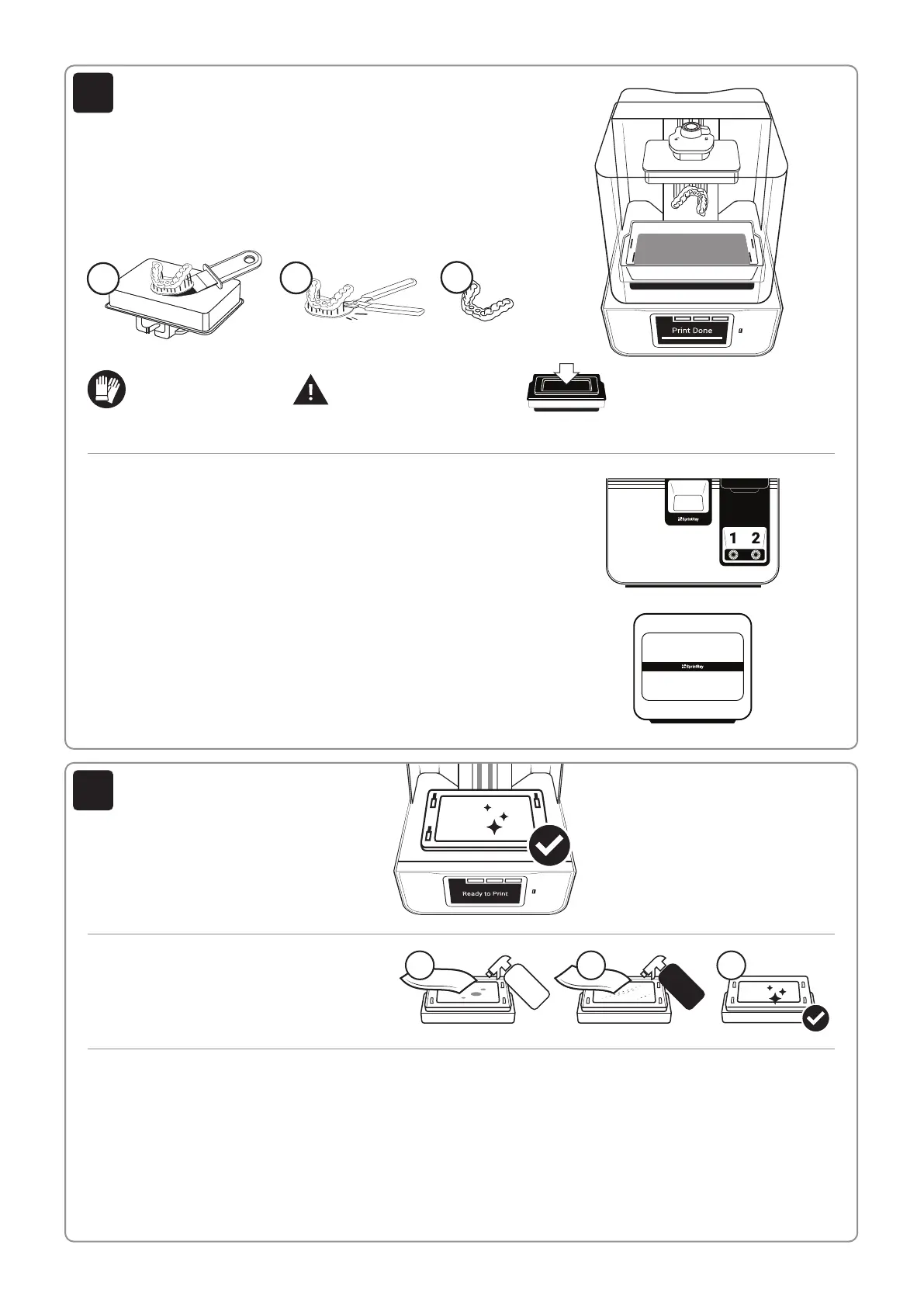
Removing Prints from Print Platform
When the print job is complete and the build arm has fully raised, remove
the platform and place it on a flat surface.
Using the provided print removal tool, detach the part from print platform.
Using the support snipper, remove the supports from your part.
A
B
C
Washing Models with SprintRay Pro Wash/Dry™
Use IPA 99% to wash the 3D printed models prior to post curing. To ensure
complete cleanliness, the washing process can be repeated. We recommend using
SprintRay Pro Wash/Dry to perform a fully-automated, two-stage wash and dry.
Start washing models by simply placing the print platform in the Pro Wash/Dry to
wash models and the platform simultaneously.
Post Curing Models with SprintRay ProCure 2™
Depending on the material specifications and regional regulatory requirements,
you may need to post-cure the printed part after wash. You can use presets on
SprintRay ProCure 2 to complete the post-curing in a few minutes.
SprintRay Pro Wash/Dry and ProCure 2 are sold separately.
Minimize Clean Up
To minimize cleanup, always
remove the platform before
removing your resin tank.
Wear Gloves
We strongly recommend
wearing gloves while
handling printer and resin.
Clean 3D Printer Optical Glass Regularly
If resin cures onto the optical window, spray the
glass with IPA and wipe with a soft cloth. Repeat if
needed. Spray with glass cleaner and use a soft
cloth to clean away fingerprints or other smudges.
2 3
IPA
99 %
Glass
Cleaner
1
Cover Resin Tank After Print
If you’re done printing for the day,
secure the tank cover to help extend
the life of resin in tank.
Clean Underside Tank Glass Regularly
Avoid touching the glass on the underside of the
resin tank. To clean, spray with IPA to remove
resin and then use glass cleaner to finish.
Reorder Consumables
To reorder consumables, including materials and resin tanks,
contact your equipment dealer representative.
9
10


 To Previous Page
 Loading...