3. QUICK START GUIDE 3. QUICK START GUIDE
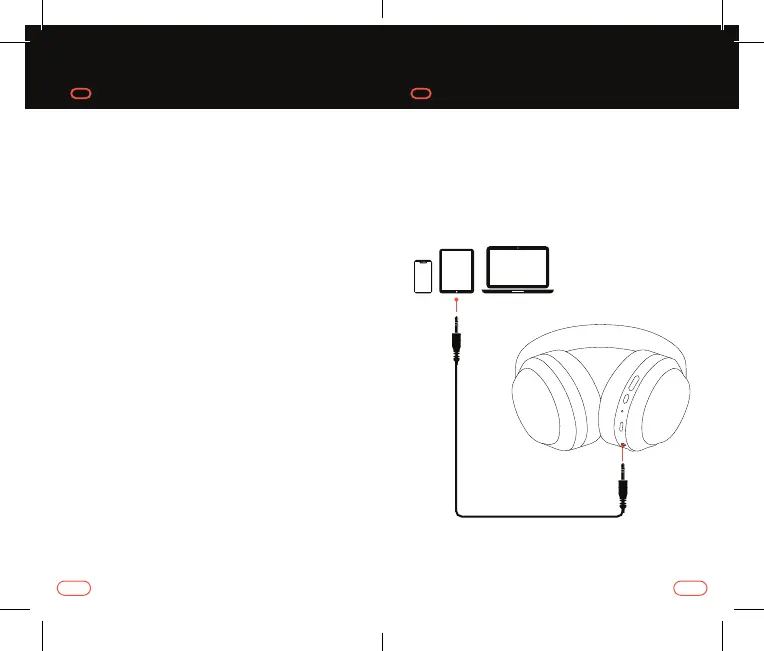
CONNECTING VIA 3.5MM AUX CABLE
Connect your Invoke Headphones to a
smarphone, tablet or other audio device
using the aux-in audio cable provided.
CONNECTING VIA BLUETOOTH
1. To enter into pairing mode from power of, press
and hold the power buton until you hear “power
on”. The LED indicator will flash blue and red when
your Invoke Headphones are in pairing mode
2. Turn on Bluetooth on your mobile phone/music
device*
3. ‘Invoke BT Headphones’ will appear on your mobile
phone/music device. Select ‘Invoke BT Headphones’
to pair. The LED indicator will flash blue every 5
seconds when pairing is successfully complete
4. Enjoy your music
5. Afer the initial pairing, the headphones will
always automatically pair with the previously
paired device
*If you are not familiar with Bluetooth pairing for your mobile
phone or music device, refer to the user guide for your mobile
phone/music device for instructions to pair a new device using
Bluetooth.
76



 To Next Page