Quick Start Guide Quick Start Guide
03. 03.
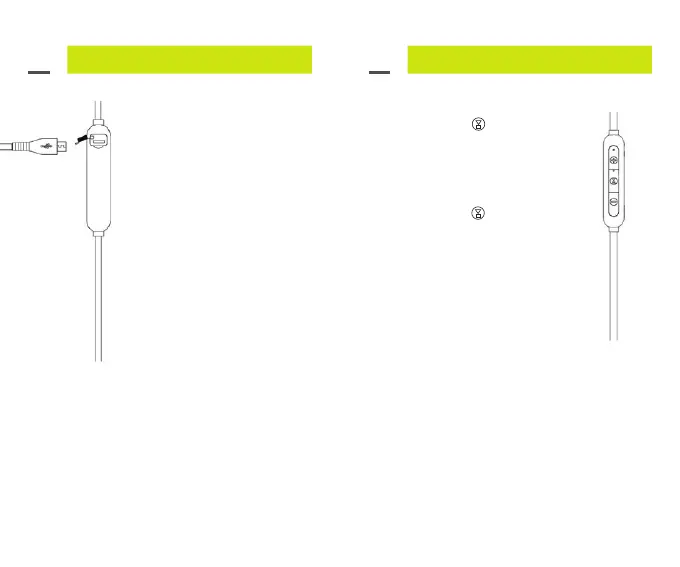
Charging your Stride BT5
Earphones:
Step 1: Carefully lift the rubber
cover for the Micro USB
charging port and rotate the
cover to the rear.
Step 2: Insert the Micro USB
Cable into the Micro USB charging
port as shown.
Step 3: Insert the USB end into
a power source* to charge. The
LED indicator light will flash red
while charging and solid red when
charged.
To turn on:
• Press and hold
button for
3 Seconds.
• A tone will sound and the LED
Indicator light will turn on.
To turn off:
• Press and hold
button for
3 Seconds.
• A tone will sound and the LED
Indicator light will remain off.
Automatic Turn Off
Stride BT5 will automatically turn off
2 minutes after being disconnected
from your mobile device.
Connecting to Stride BT5 via Bluetooth:
• Your mobile device needs to be within 10 meters
of the Stride BT5.
• Make sure your Stride BT5 battery has a
sufficient charge.
• The Stride BT5 can only be connected to one
mobile device at any time.
• If the blue light flashes every 5 seconds it has
automatically reconnected to the last mobile
device it was connected with and is ready to play.
0706
*Power source options include USB connection to
a Sprout AC power adapter, a Sprout car charger or
computer/notebook USB connection.



 To Next Page