EasyManua.ls Logo

SPRT SP-TL54 - Chapter1 Outer Appearance and Model no; Notice of Storing; Outer Appearance

SPRT SP-TL54
15 pages
Print Icon
To Next Page IconTo Next Page
To Previous Page IconTo Previous Page
Loading...
4
Notice of Storing
The printer should be placed in such an environment that the temperature is between-20 and
60, and the relative humidity is between 10% and 90%.
Chapter1 Outer appearance and model No.
1.1Outer Appearance
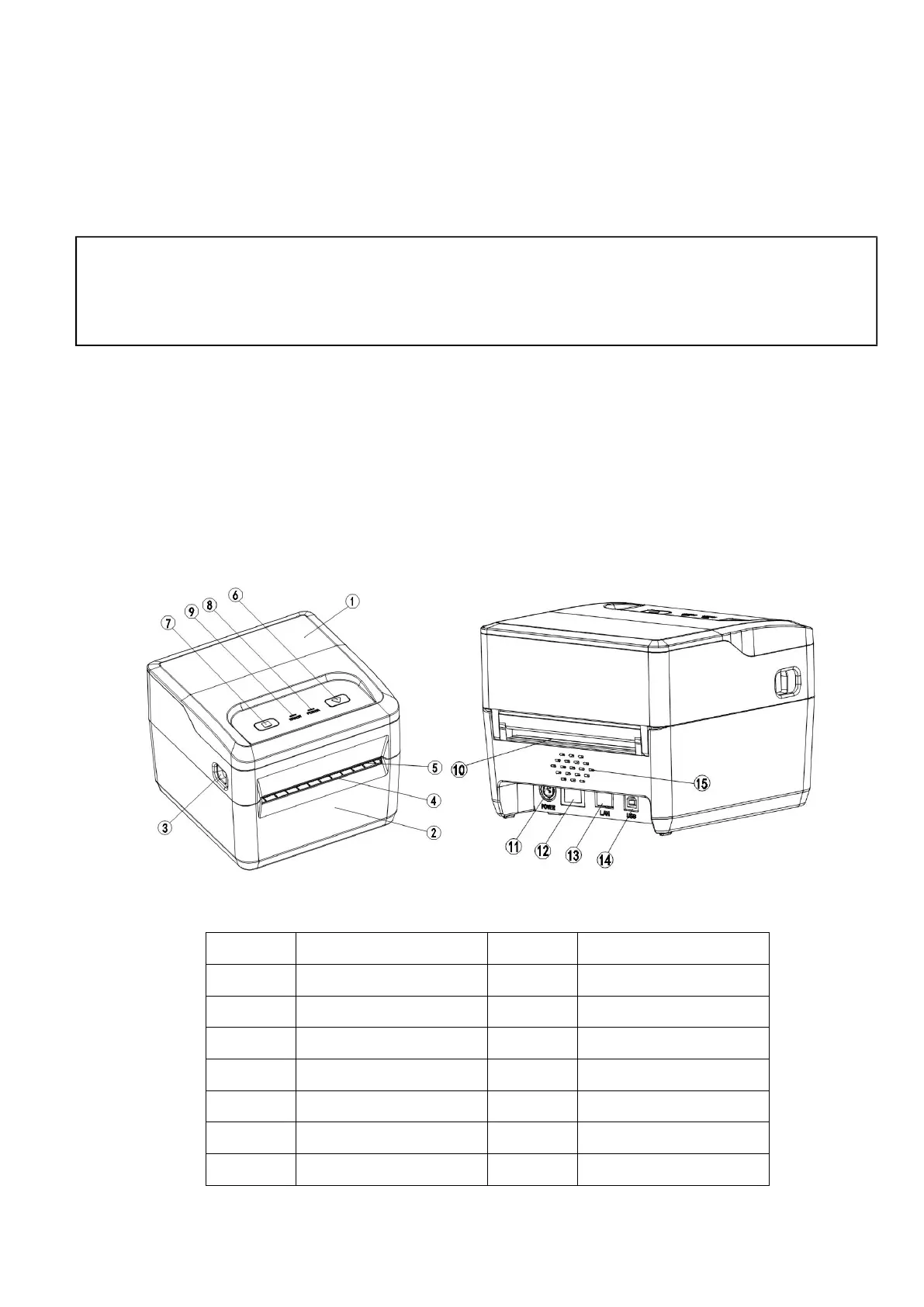
Fig 1-1 Printer parts name
1
Upper cover
9
Error indicator
2
Bottom cover
10
External paper exit
3
Open button
11
Power socket
4
Paper exit
12
Power button
5
Tear bar
13
Ethernet (reserved)
6
Feed button
14
USB
7
Pause button
15
Buzzer (reserved)
8
Power indicator
Statement
This is a Class A product, which may cause radio interference in a living environment. In this case,
the user may be required to take practical measures for their interference.


Related product manuals