EasyManua.ls Logo

SPX FLOW Deltech ZP Series - User Manual

SPX FLOW Deltech ZP Series
52 pages
Print Icon
To Next Page IconTo Next Page
Loading...
ZP Series
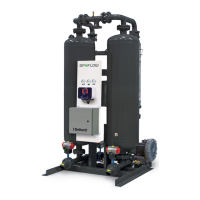
Blower Purge Desiccant Compressed Air Dryer
FORM NO.: 3158148 REVISION: 12/2017 READ AND UNDERSTAND THIS MANUAL PRIOR TO OPERATING OR SERVICING THIS PRODUCT.
INSTRUCTION MANUAL
MODELS
RATED
FLOW
MODEL
REFERENCE
ZP500
ZP600
ZP750
ZP900
ZP1050
500 SCFM
600 SCFM
750 SCFM
900 SCFM
1050 SCFM
500
600
750
900
1050
ZP1300
ZP1500
ZP1800
ZP2200
ZP2600
1300 SCFM
1500 SCFM
1800 SCFM
2200 SCFM
2600 SCFM
1300
1500
1800
2200
2600
ZP3200
ZP3600
ZP4300
3200 SCFM
3600 SCFM
4300 SCFM
3200
3600
4300

Questions and Answers

  • R
    rosalesbonnieAug 21, 2025
    Why is the SPX FLOW Dehumidifier showing a high humidity alarm?
    • R
      robertsonjenniferAug 21, 2025
      A high humidity alarm on your SPX FLOW Dehumidifier can stem from a few reasons. The desiccant bed might be overloaded due to higher than design airflow and temperature, or lower than design pressure. Check these parameters. The dew point sensor or monitor could be damaged or defective, so examine the sensor for physical damage and check the monitor/sensor operation, replacing them if necessary. Also, the desiccant drying capacity might be lost, so examine filter elements and drains, repairing or replacing them as necessary. The useful life of the desiccant might have been exceeded.
  • C
    Clayton BarajasAug 28, 2025
    Why are the indicator lights off on my SPX FLOW Dehumidifier?
    • A
      Alexis RowlandAug 28, 2025
      If the indicator lights on your SPX FLOW Dehumidifier aren't lit, it could be due to several reasons. First, check if there's power to the unit by checking the voltage at the terminal board. A loss of power supply to the dryer's electrical disconnect switch or breaker (customer supplied) could also be the problem, so ensure the disconnect switch or breaker is closed, and investigate and remedy the cause if a tripped breaker or blown fuse is found. A blown fuse could also be the reason, so replace the fuse. Finally, a board malfunction might be the cause, so replace the board.
  • T
    Travis HurleyAug 30, 2025
    What causes a heater over-temperature alarm in SPX FLOW Dehumidifier?
    • T
      Tracey GuzmanAug 30, 2025
      A heater over-temperature alarm in your SPX FLOW Dehumidifier can be triggered by insufficient purge gas flow. Check for any purge blockage or temperature sensor failure. Repair and replace components as required. A temperature sensor failure can also directly cause this alarm. Repair and replace the sensor as needed.
  • A
    Amanda MccoySep 1, 2025
    What to do if the SPX FLOW Dehumidifier displays a low pressure alarm during regeneration?
    • M
      mbowmanSep 1, 2025
      If your SPX FLOW Dehumidifier shows a low pressure alarm during regeneration, check the left tower pressure switch operation using a tower pressure gauge and replace it if defective. Also, check for airflow out of the regenerating tower purge valve or exhaust piping, which would indicate that the regenerating tower purge exhaust valve isn't completely closed. Similarly, check for airflow out of the regenerating tower depressurization muffler, indicating that the regenerating tower depressurization valve isn't completely closed. Examine the repressurization valve (V11) for damage and repair or replace as necessary. Lastly, inspect the repressurization orifices for any blockage and clean them as needed.
  • R
    Renee HodgesSep 3, 2025
    How to reduce excessive pressure drop in SPX FLOW Dehumidifier?
    • J
      Jeff GreenSep 3, 2025
      To reduce excessive pressure drop in your SPX FLOW Dehumidifier, start by cleaning the inlet/outlet screens on the desiccant towers, following the desiccant removal instructions in the Maintenance section. If the flow rate is too high, check the inlet air flow rate and reduce it to the design flow rate.
  • S
    steven23Sep 6, 2025
    Why is my SPX FLOW Dehumidifier showing a heater low-temperature alarm?
    • K
      Kelly RangelSep 6, 2025
      A heater low-temperature alarm on your SPX FLOW Dehumidifier may be due to a heating malfunction caused by heater failure or heater contactor failure, so replace the heater or heater contactor. It could also be caused by temperature sensor failure, so repair and replace as required.
  • T
    Thomas WhiteSep 8, 2025
    What causes a blower motor overload alarm on the SPX FLOW Dehumidifier?
    • T
      Tonya WrightSep 8, 2025
      A blower motor overload alarm on your SPX FLOW Dehumidifier can be caused by restricted or blocked purge airflow. Examine the intake filter on the blower and clean or replace the filter element if it's dirty. Check the voltages and currents in the motor circuit for a line failure.
  • T
    Travis ZimmermanSep 12, 2025
    What should I do if my SPX FLOW Dehumidifier displays a temperature under-range or over-range alarm?
    • P
      Phillip AdamsSep 12, 2025
      If your SPX FLOW Dehumidifier displays a temperature under-range or over-range alarm, it could be due to a tower temperature sensor failure. Check the temperature circuit for continuity and repair or replace components as necessary.
  • L
    larrygreeneSep 13, 2025
    What does an energy management under-range or over-range alarm mean on my SPX FLOW Dehumidifier?
    • R
      robert29Sep 13, 2025
      An energy management under-range or over-range alarm on your SPX FLOW Dehumidifier indicates a possible energy management sensor failure. Check the circuit for continuity and repair or replace as necessary.
  • C
    Cody BakerSep 15, 2025
    What to check if the SPX FLOW Dehumidifier shows a dew point alarm during regeneration?
    • S
      Sara SchmidtSep 15, 2025
      If your SPX FLOW Dehumidifier shows a dew point under-range or over-range alarm during regeneration, it could be due to an energy management temperature sensor (RTD4) failure. Check the temperature circuit for continuity and repair or replace as necessary.

Summary

General Safety Information

Receiving, Storing, and Moving

Instructions for receiving, storing, and handling the dryer safely.

Description

Function

Explanation of how the blower purge type regenerative dryer operates.

Installation

System Arrangement

Guidelines for installing the dryer within the compressed air system.

Ambient Air Temperature

Specifies the recommended ambient temperature range for dryer operation.

Location and Clearance

Requirements for dryer placement and necessary service space.

Piping and Connections

Details on external piping, connections, and support requirements.

Electrical Connections

Procedures and safety precautions for electrical hookups.

RS-232 Connections

Information on connecting the dryer to a host computer via RS-232.

Initial Desiccant Charge

To Add Desiccant

Step-by-step instructions for filling the dryer towers with desiccant.

Instrumentation

Controls

Overview of the solid-state controller, LEDs, and display.

Chamber Pressure Gauges

Explanation of the chamber pressure gauges and their readings.

Purge Flow Pressure Gauge

Description of the gauge indicating purge air pressure.

Energy Management System

Details on the optional EMS for adjusting operation based on conditions.

Dew Point Transmitter

Information on the dew point monitoring and alarming option.

Operation

Controls

How the controller manages dryer operations and displays status.

Operating Modes

Description of available operating modes like Fixed, EM, and Dew Point Control.

Operating Sequence Description

Detailed sequence for tower drying and regeneration cycles.

Control Board Jumpers

Jumper Functions

Explains the purpose of jumpers JP1 through JP8 for dryer configuration.

Operator Interface

Front Panel LEDs

Description of the indicator lights on the front panel.

Front Panel Switches

Overview of the switches on the operator interface.

Front Panel Operation

How to navigate and operate the dryer via the front panel.

Program Mode Screens

Detailed explanation of screens within the Program Mode.

Setup Mode Screens

Explanation of screens available in Setup Mode.

Alarm & Service Mode

Heater and Temperature Alarms

Covers alarms for heater inlet temp, RTD readings, and heat low temp.

Optional Device Alarms

Details alarms for Energy Management and Dew Point Sensors.

Test Mode

Test Mode Screens

Descriptions of the screens used in the Test Mode.

Start-up

Controller Settings

Procedures for setting or verifying controller parameters.

Initial Pressurization

Steps for slowly pressurizing the dryer system.

Energizing the Dryer

Instructions for powering up the dryer controls.

Bringing the Dryer On-line

Procedure to establish normal airflow through the dryer.

Operational Check Points

Key checks during dryer operation for safety and performance.

Loss of Power

Power Recovery

How the dryer behaves during and after a power interruption.

Using the RS-232 Port

Operation

Details on data format and communication for monitoring via RS-232.

Maintenance

Desiccant Replacement

Procedures and frequency for replacing desiccant material.

Purge Mufflers

Maintenance and replacement recommendations for purge mufflers.

Pilot Air Filter Element Replacement

Instructions for replacing the pilot air filter element.

Dew Point Analyzer Filter (optional)

Procedures for replacing the dew point analyzer filter element.

Troubleshooting

Power and Pressure Issues

Diagnosing no power, excessive pressure drop, and low/high pressure alarms.

Temperature and Dew Point Alarms

Troubleshooting temperature and dew point sensor under/over-range alarms.

Operational Alarms

Diagnosing outlet dew point, humidity, heater, blower, and EM alarms.

P&ID Schematic - Models 500 through 600

Sequence of Operation (Models 500 through 600)

Visual representation of the dryer's operational sequence.

P&ID Schematic - Models 750 through 4300

Sequence of Operation (Model 750 through 4300)

Visual representation of the dryer's operational sequence.

Replacement Parts

Models 500 through 600

List of replacement parts for models 500-600.

Models 750 through 1800

List of replacement parts for models 750-1800.

Models 2200 through 2600

List of replacement parts for models 2200-2600.

Models 3200 through 4300

List of replacement parts for models 3200-4300.

Warranty

SPX FLOW Deltech ZP Series Specifications

General IconGeneral
BrandSPX FLOW
ModelDeltech ZP Series
CategoryDehumidifier
LanguageEnglish

Related product manuals