FAQ1-4
FAQ1-5
FAQ2: MicroSD card record and playback setting
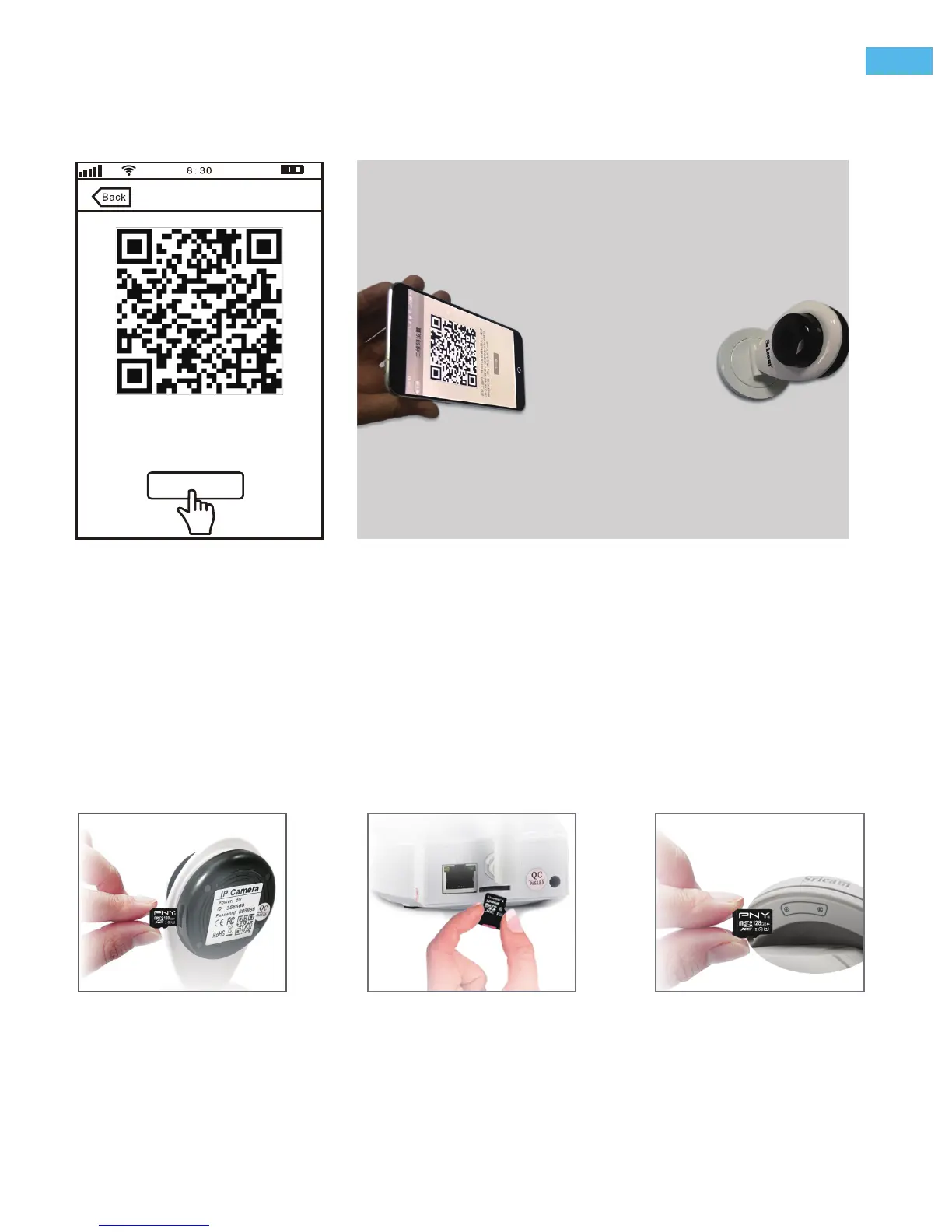
1) Insert the microSD card to the camera
2) MicroSD card format and record setting
(Note: The App can't format 64GB and 128GB MicroSD card directly, so you need format 64, 128GB MicroSD
card via SD card reader on PC.)
2) Click “QR Code Setting”, and input Wi-Fi password, Click “Next”.
You will get a Wi-Fi QR Code on your smartphone, please direct put the lens of the camera to the QR code
within20-30cm and move forward slowly. when you hear a clash sound from the camera, click “Next” the
camera successfully connected to Wi-Fi.
Note:
Please direct put the lens of the
camera to the QR code at the distance
of about 20-30cm and move forward
slowly. After hearing the sound of “di...
Next
QR Code Setting
Mini IP Camera PT Indoor IP Camera Outdoor IP Camera
Log in “Sricam” App and follow the steps: Setting -> Record Setting -> SD card Farmatting-> Record Switch
When scan the QR code, maybe you need try some different position and angle for scan succeed.
-6-
EN


 To Next Page