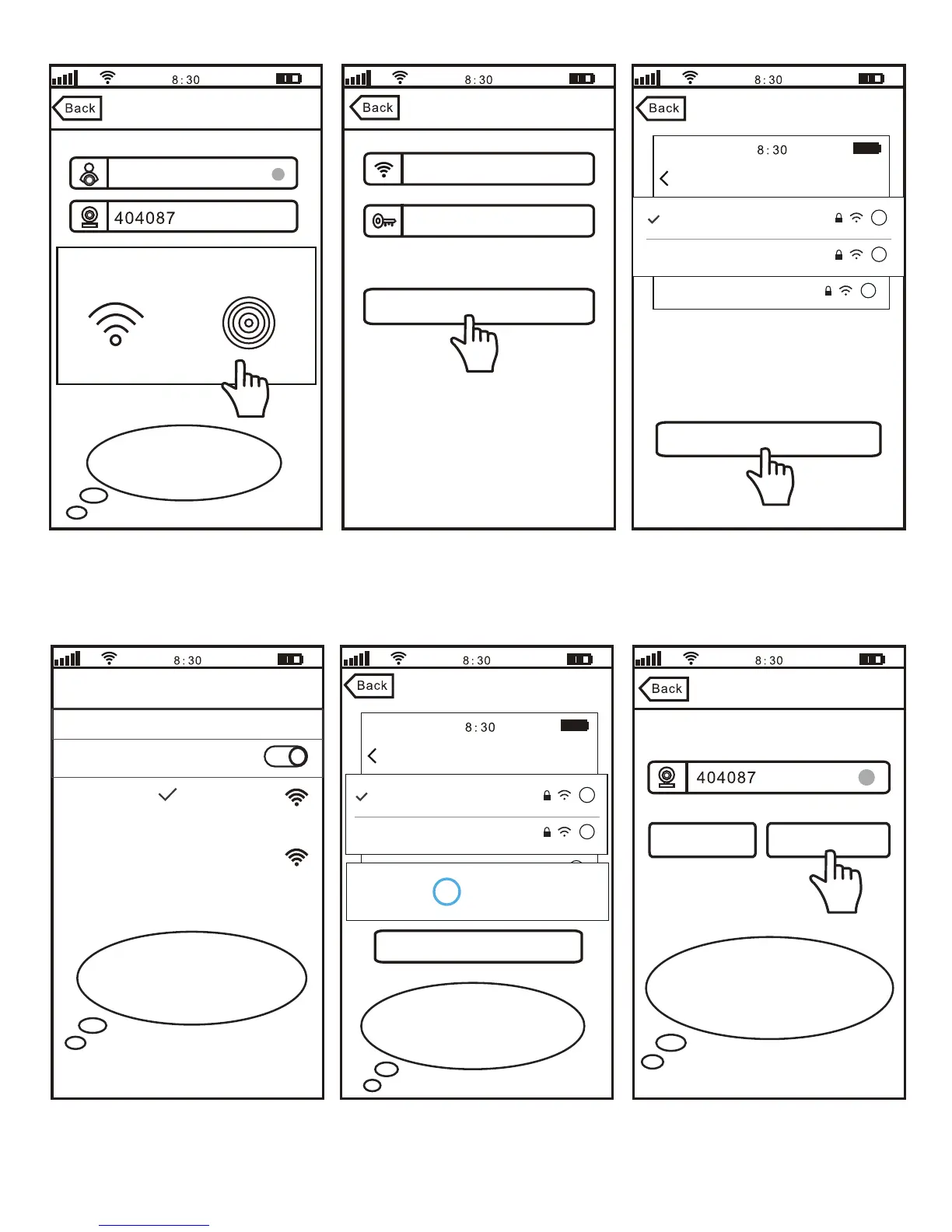
4-4 4-5 4-6
4-7 4-8 4-9
Next
WLAN
WLAN
MEYE_404087
Turn on or turn off
Wi-Fi Setting
Setting Wi-Fi
NO SIM
100%
MEYE_898888
MEYE_1022222
TP-LINK
i
i
i
Connect
Sricamsales
Secured
Loading
Wi-Fi Setting
Wi-Fi setting succeed
Skip
Change Password
Note: Password should be
3-9 characters long (A-Z,0-9)
without special characters.
Configuring Wi-Fi ..., please
wait for couple of minutes
Note: After your smart
phone is connected to the AP
Hotspot,back to App.
56
Add device
Wi-Fi Setting
salestest
Next
Next
Input Wi-Fi Password
Wi-Fi Setting
Setting Wi-Fi
Smart Wi-Fi AP Hotspot
NO SIM
100%
MEYE_898888
MEYE_1022222
TP-LINK
i
i
i
Note: Touch “Next” go to setup Wi-Fi. Please
connect your smart phone to Wi-Fi: MYEY_
404087. Then back to App
Note: Touch
AP Hotspot.
IPCam
Device offline ,please choose camera
network connection mode
4



 To Next Page