Setting and Checking the Device
The following procedure should be performed by the supervisor of the device.
Device Operation Settings
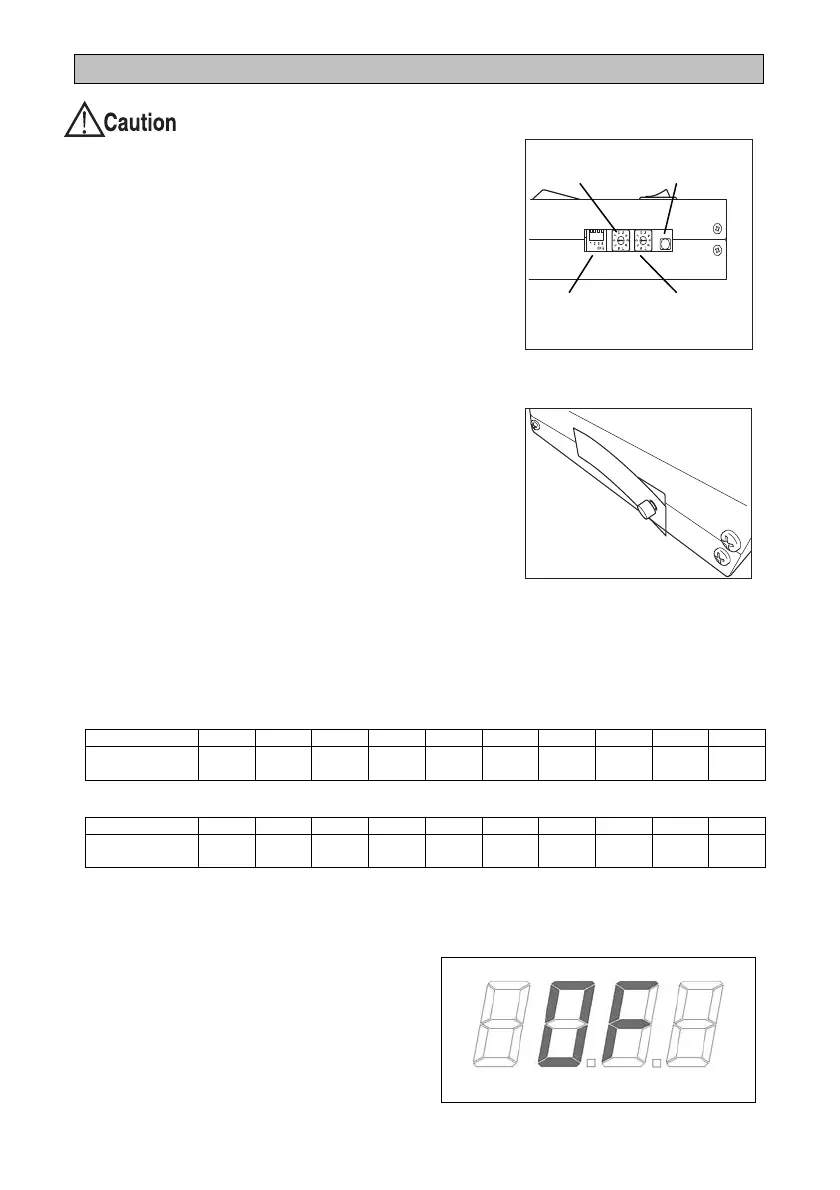
Set the operation setting switches 1 to 4 down for ON
and up for OFF.
The default factory setting is "OFF" for all switches.
1: Buzzer ON (sound) or OFF (silent) for measurement
results that are not OK.
2:Buzzer ON (sound) or OFF (silent) when
measurement is complete.
3: Measure while the touch button is pressed (ON)
10 second measurement mode or 3 second
measurement mode (OFF)
4: 10 second measurement mode (ON)
After changing the settings, attach the included dust
protection sticker.
Setting the Maximum and Minimum Values for Alerts
Set the maximum value and minimum value as the standard for determining the
measurement result.
The factory default setting is "0" (not set) for both switches.
Minimum setting switch
Switch number 0 1 2 3 4 5 6 7 8 9
Setting value
(MΩ)
Not set 0.1 0.5 1 5 10 Not set Not set Not set Not set
Maximum setting switch
Switch number 0 1 2 3 4 5 6 7 8 9
Setting value
(MΩ)
Not set 1 5 10 20 35 50 100 Not set Not set
All settings are reflected when the device power is turned on. Turn the power off and on
when you have changed a setting.
If the measured value exceeds 200 MΩ,
the following is displayed (overflow).
Operation
setting switches
Minimum setting
Self-check
Maximum setting
switch


 To Next Page