4.When measurement is complete, turn the power switch off.
Adjustment and Maintenance
Clean the measurement stand periodically.
Troubleshooting
If the device does not operate correctly, it may be the result of one of the following.
■ The screen is not displayed after switching the power on.
Cause: The AC adapter is broken.
Remedy: Check whether the AC adapter is outputting DC 12 V.
■ An overflow is displayed when the touch button is pressed.
Cause: The connector is disconnected.
Remedy: Check whether the connector is disconnected from the measurement stand or touch
button.
Directly connect the measurement stand and touch button and check whether a value
between 0.00 and 0.02 is displayed.
Specifications
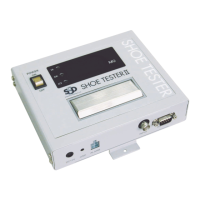
Weight: main device 0.9 kg
: with supports and
angle adjustment
1.2 kg
: measurement stand 4.5 kg
Measurement voltage DC 10 V
Function check 1 MΩ
Measurement range 0.00 to 200 MΩ
Power supply DC 12 V AC adapter (AC 100 to 240 V)
Measurement precision ±10% + 2 digits
Maximum setting 1, 5, 10, 20, 35, 50, 100 (MΩ)
Minimum setting 0.1, 0.5, 1, 5, 10 (MΩ)


 To Next Page