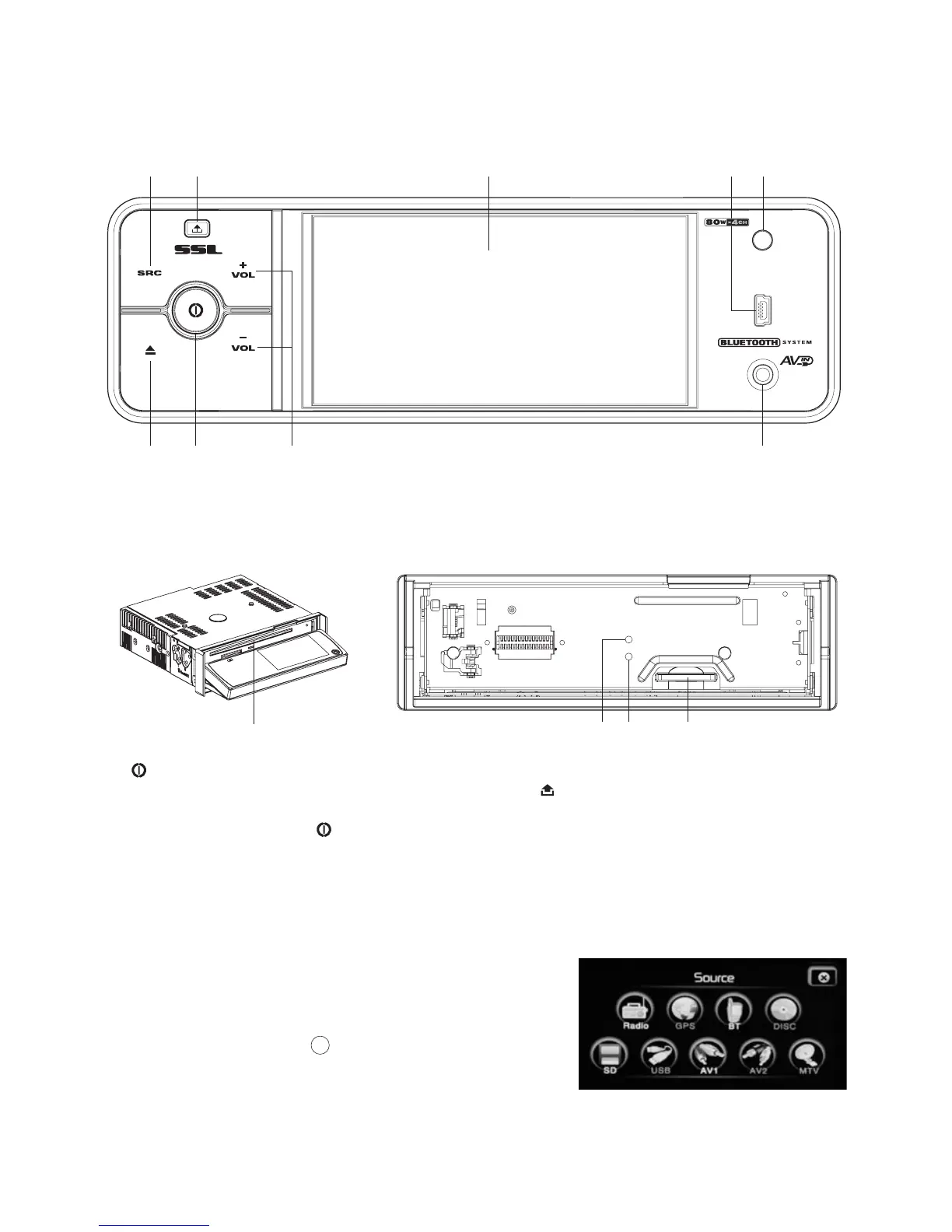
Turning the unit on/off
Mute on/off: MUTE
ANTI-THEFT LED indicator
Select source
SRC
Note
Sound adjustment
VOL + /VOL -
1.
- Turn the unit on by pressing any button except the (Release) button.
When the unit is switched on, press and hold down the button to go to standby mode.
- Press the ( ) button to shut off the sound output.
Press it again to resume previous sound level.
2
Flashes when the front panel is removed.
3.
Press the button to display the main menu (or root
menu). Then you can access all the features (Such as
RADIO, BT, DISC, SD, USB, AV IN.) by tapping on
the touch screen icons. Touch an icon to select a
source. Touch the icon “ ” icon to exit the menu and
return to the previous mode. : The GPS, AV2, and
TV(MTV)function are not available for this unit.
4.
Adjust the volume by pressing the button.
.
X
User’s Manual page 9-
Car radio
after sliding down the front panel after removing the front panel
12
10213
6
8
3
5
11
1
79
4
Operations
Features and controls
Front panel
SD435B



 To Next Page