5. IR window: To receive the infrared signal from the remote control.
6.
7. LCD display
11. AV IN
Connect the AV cable (supplied) to your external AV device by the audio/video input
3.5mm jack on the front panel, then press the SRC button to switch to AV mode.
Remove the front panel and use a pointed object to press the RESET button to restore
the factory settings when the unit or display is not working properly.
Press this button to slide down the front panel and eject a disc when it is loaded into the
unit.
8. [ ] RELEASE
Press this button to open the front panel.
9. USB port
10. SD Slot (For MP3/WMA/MPEG4/JPEG file playing)
12. Disc Loading Slot
13. Reset the unit
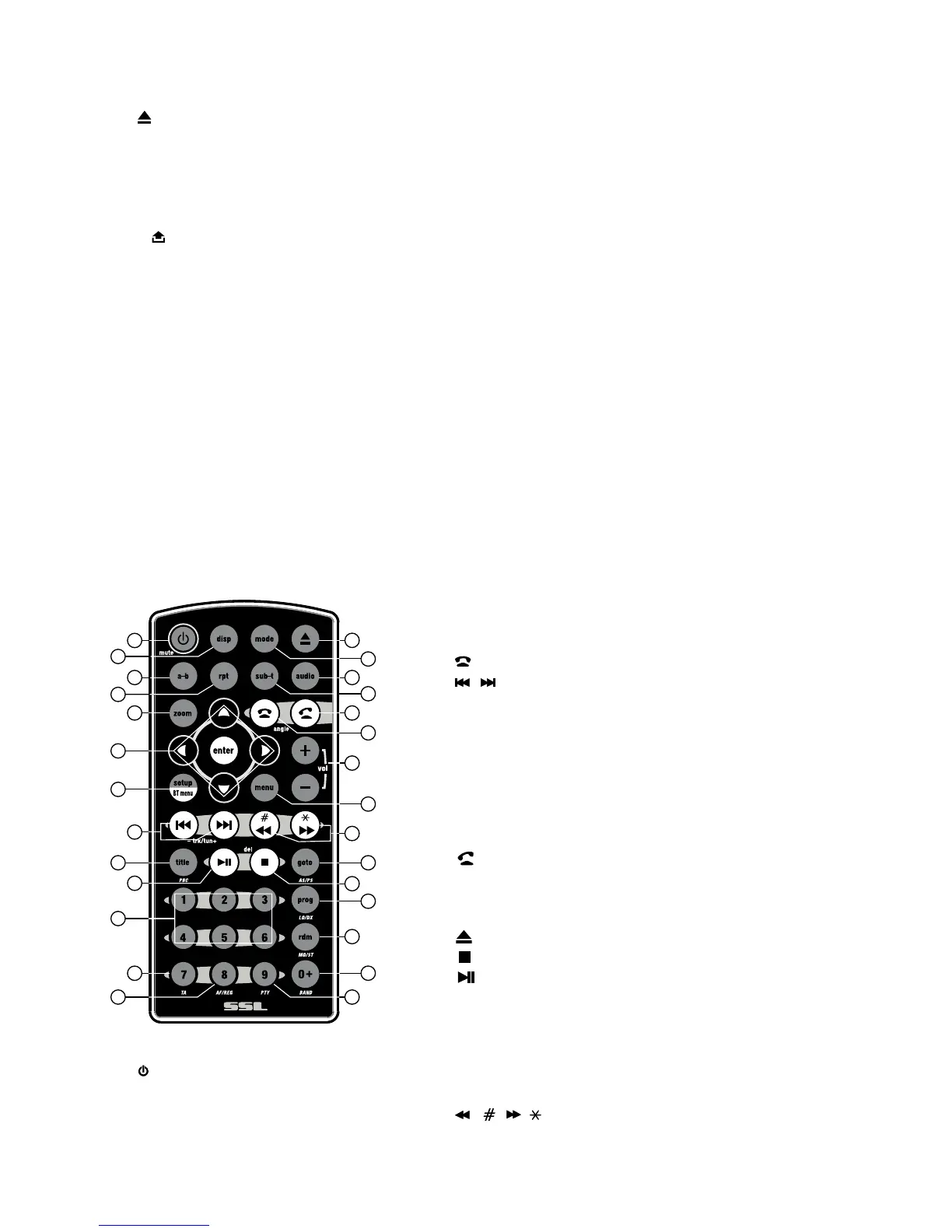
Using the remote control
1. POWER, MUTE
2. MODE
3. DISP
4. A-B
5. SETUP, BT MENU
6.▲/▼/◄/►/ENTER
7. TITLE/PBC
8. , ANGLE
9. / (-TUNING+)
10. VOL-/VOL+
11. PTY (program type)
12. RPT (repeat)
13. Preset stations buttons (1-6),
Number buttons (0-9)
14. GOTO/AS/PS (go to/scan stations to memory/
automatic station store)
15. TA (traffic announcement)
16.
17. AF/REG (alternative frequencies/
regional mode)
18. DVD MENU
19.
20. , DEL (Delete)
21.
22. PROG/LO/DX
23. SUB-T(subtitles)
24. RDM/MO/ST (random/mono or stereo select)
25. BAND/0/+
26. AUDIO (audio language)
27. ZOOM
28. / , /
User’s Manual - page 10
18
17
27
16
19
20
21
22
23
24
25
26
28
12
14
1
2
3
15
5
4
6
7
8
9
10
11
13



 To Next Page