P a g e | 12P a g e |
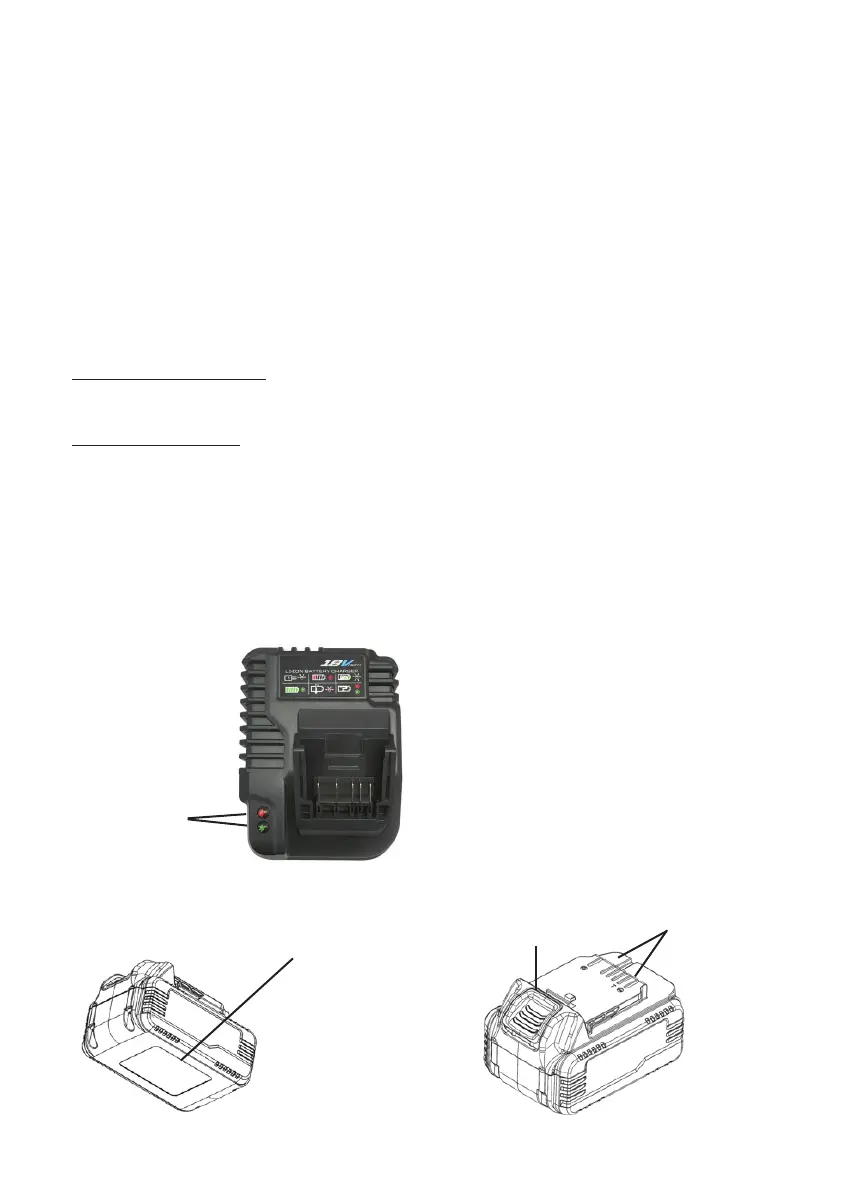
Charger Status
Lights
◀
◀
◀
Baery Informaon
Label
◀
◀
◀
Baery Terminal
Locaon
Baery Release
Buon/Latch
CHARGING THE BATTERY:
Remove the baery from the cycle. Plug the charger into an outlet and slide the
baery into place on charger.
New baeries can take longer to charge. Allow the baery to charge unl the green
LED is solid before removing the baery from the charger. A ashing green status
LED indicates the baery is in the nal stage of charging which includes cell balanc-
ing, which is very important to the life of the baery. If both the red and green LEDs
are ashing there is a problem with the baery or charger. Remove the baery and
unplug the charger, and repeat the charging process. Remove the baery from the
charger when charging is complete.
BATTERY CHARGER:
Without Baery Installed:
• Flashing green LED = power from outlet present
With Baery Installed:
• Solid green LED = charging complete
• Flashing green LED = charging in process;
more than 80% charged
• Solid red LED = charging in process; less than 80% charged
• Flashing red LED = baery too hot to charge
• Flashing red and green LED = error detected;
remove and reinstall baery



 To Next Page