- POWER SWITCH This power switch turns on the system. Remember to
adjust the volume level to the lowest setting before turn on the power
switch.
- BATTERY MANAGEMENT: This section show you the battery level and
the battery charging status
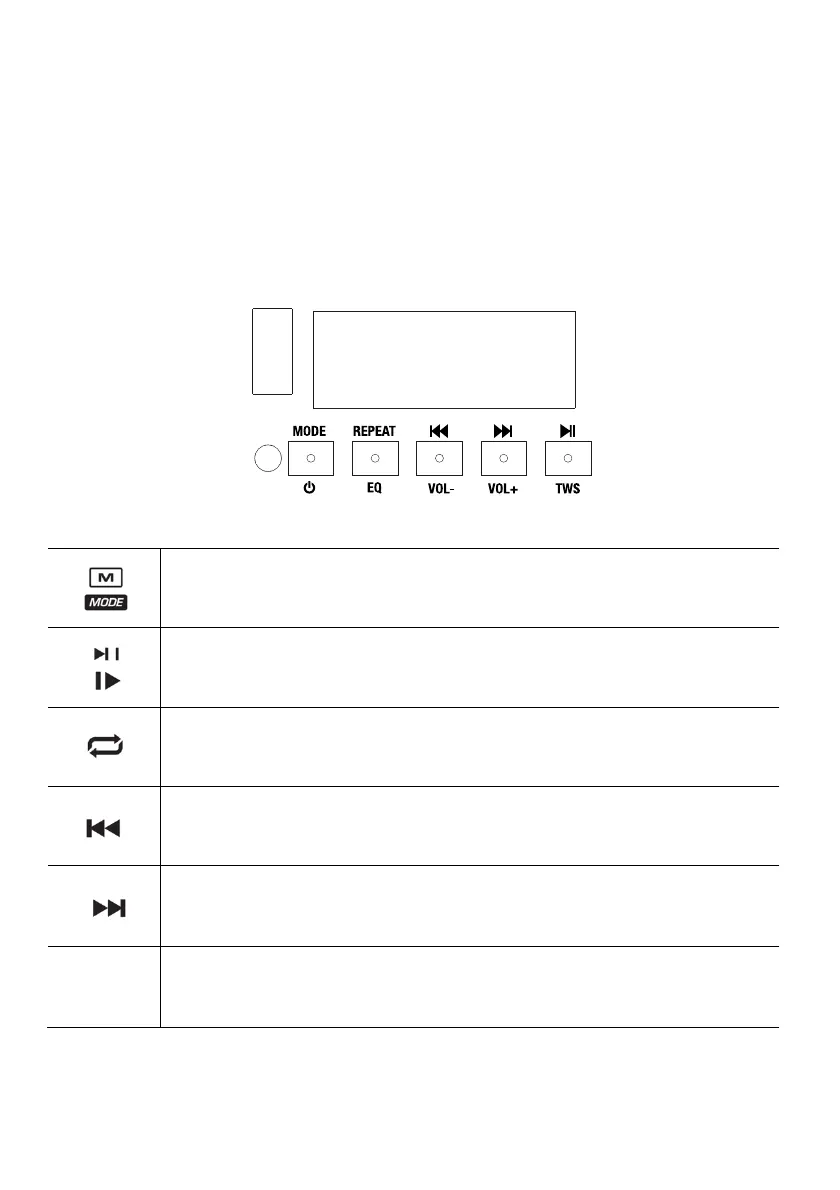
Media player functions
Switches modes from Bluetooth™, FM radio and USB.
Play / Pause the USB or Bluetooth™ source. Press and hold Play / Pause for 2 seconds to start the preset
auto-store function. This jumps to the lowest station (87.5) and then travels through the bandwidth to auto-
store the strongest stations as presets.
Repeat the current playing USB track (ONE), repeat all tracks (ALL).
Navigates through USB tracks. Plays the previous USB or Bluetooth™ track. It also switch to the previous
radio preset when pressed once. Hold the button down to seek back through radio stations.
Plays the next USB or Bluetooth™ track, or switch to the next radio preset when pressed once. Hold the
button down to seek forward through radio stations.
Link two compatible speakers without cables. Please refer to specific section of this manual for more
information.
*Note: In some apps, pressing the Previous or Next buttons may go to another playlist or music
genre.



 To Next Page