USAGE INFORMATION
9
SEAT ADJUSTMENT
Proper seat adjustment is important.
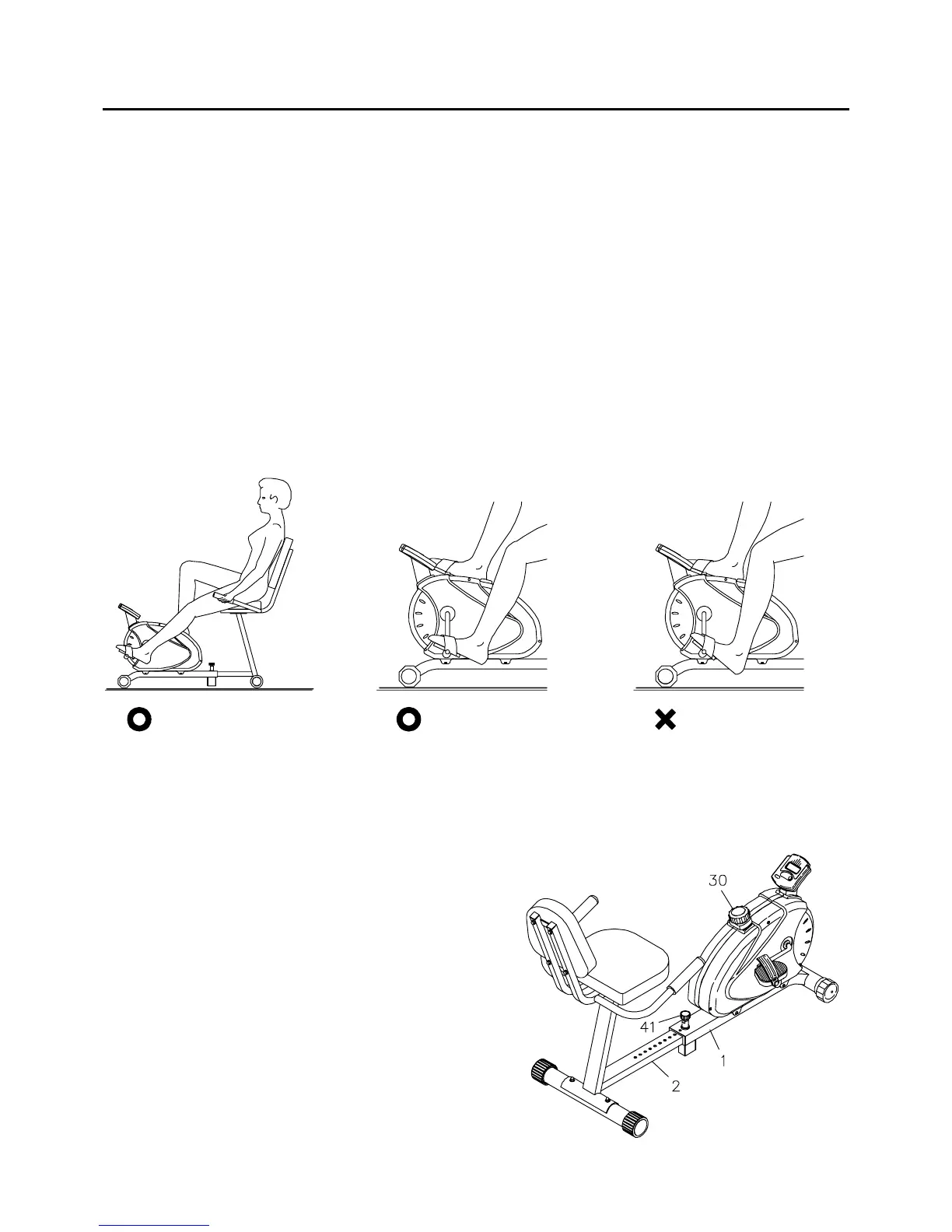
Loosen and pull out the
ADJUSTMENT KNOB(41), then slide the REAR FRAME(2) to adjust the
seat. Tighten the
ADJUSTMENT KNOB(41) after adjusting the seat to a new position.
Sit on the seat and place your feet on the pedals. You should be able to move through a complete pedal
stroke without locking your knees or shifting your hips on the seat. The seat is too close to the pedals if
you have more than a slight bend in your knees at the bottom of the pedal stroke. The seat is too far
from the pedals if you have to completely straighten your knees at the bottom of the pedal stroke. Refer
to the illustrations below.
1.
2.
WARNING:
1. Do not attempt to adjust the seat while you are on the 4600 Recumbent Bike.
2. Always tighten the ADJUSTMENT KNOB(41) after adjusting the seat to a new position.
Proper Seat Adjustment Proper Foot Position Improper Foot Position
FOOT POSITION
Your feet must be properly positioned on the pedals as shown above. Your feet are not properly positioned
on the pedals if your heels hit the floor. See the illustrations above.
LOAD ADJUSTMENT
To increase the load, turn the TENSION KNOB(30)
clockwise. To decrease the load, turn the TENSION
KNOB(30) counterclockwise.





 To Next Page