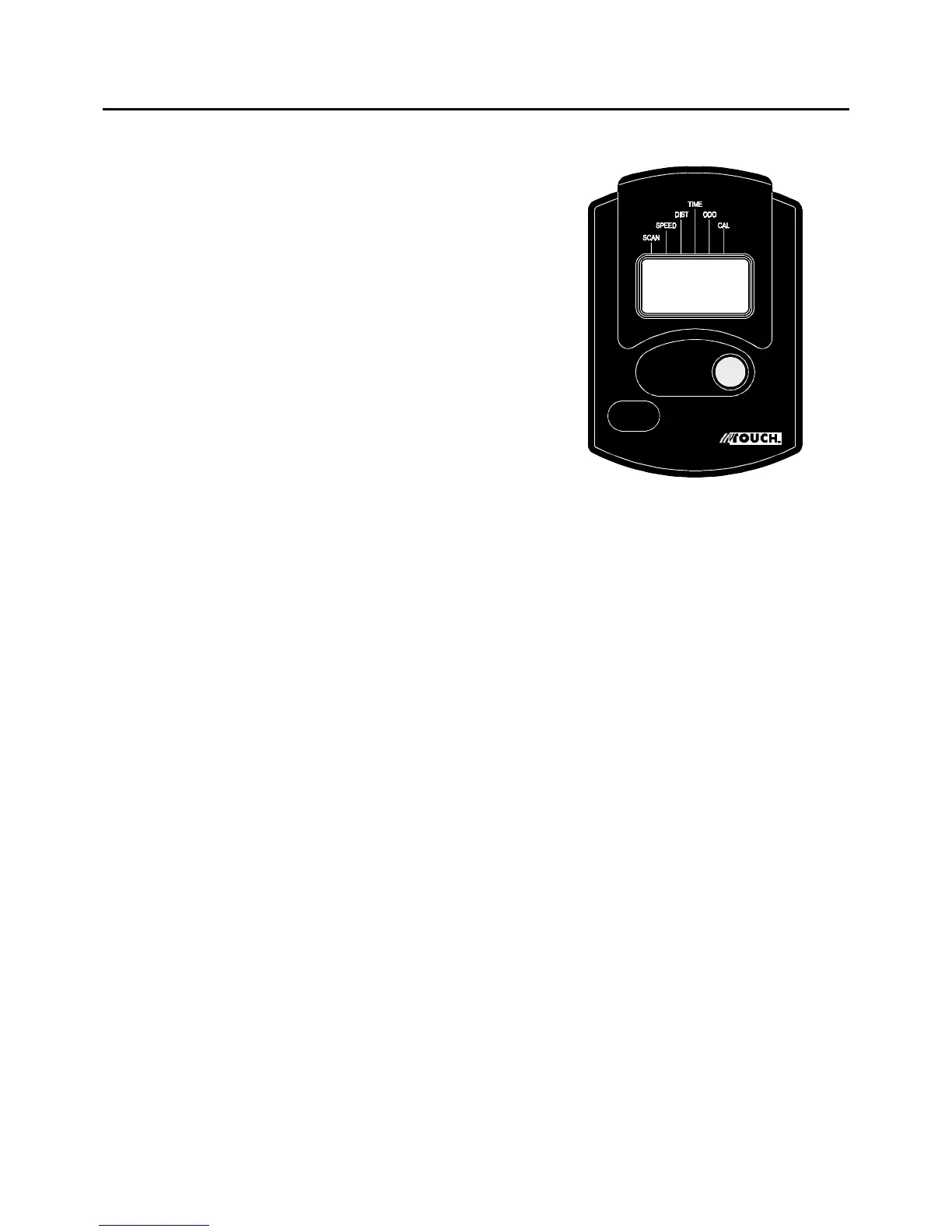
USING THE ELECTRONIC METER
FUNCTIONS:
SPEED:
TIME:
Pedal movement or push the BUTTON.
Automatic shut off after 4 minutes of
inactivity.
POWER ON :
FUNCTION BUTTON:
Push for selecting functions.
CALORIE:
8
Automatically scans each function of TIME, ODOMETER, CALORIE, SPEED, DISTANCE
in sequence every 6 seconds.
Displays the current speed, from zero to 999.9 Mile/Hr.
Displays the distance, from zero to 999.9 miles.
Displays the time, from 1 sec up to 99:59 minutes.
Displays the total accumulated distance you have traveled, from zero to 999.9 miles.
The total accumulated distance is retained when the meter is turned off.
Displays the calorie consumption, from zero to 999.9 K cal.
The calorie readout is an estimate for an average user. It should be used only as a
comparison between workouts on this unit.
POWER OFF :
SCAN:
DISTANCE:
ODOMETER:
NOTE:
1.
2.
3.
To reset all the functions except ODOMETER to zero, push the BUTTON and hold it
down for two seconds.
The electronic meter uses two "AA" or "UM-3" batteries.
The ODOMETER will be reset to zero after batteries are removed for battery replacement
or storage of the unit.





 To Next Page